MCP, plugins and skills, explained: how AI agents use ProvaLab
ProvaLab team · · 7 min read
Three words keep coming up when people talk about AI coding agents: MCP, plugins and skills. They are related, but they do different jobs. This post explains each one in plain language, shows what changed in the newest version of MCP, and walks through how your agent uses them to work with ProvaLab.
What is MCP?
The Model Context Protocol (MCP) is an open standard, introduced by Anthropic in November 2024, for connecting AI apps to the tools and data they need.
Before MCP, every AI app needed its own custom integration for every tool. MCP replaces that with one standard plug. A tool is wrapped once as an MCP server, and any app that speaks MCP, an MCP client, can use it. People often compare it to USB-C: one shape of connector for many devices.
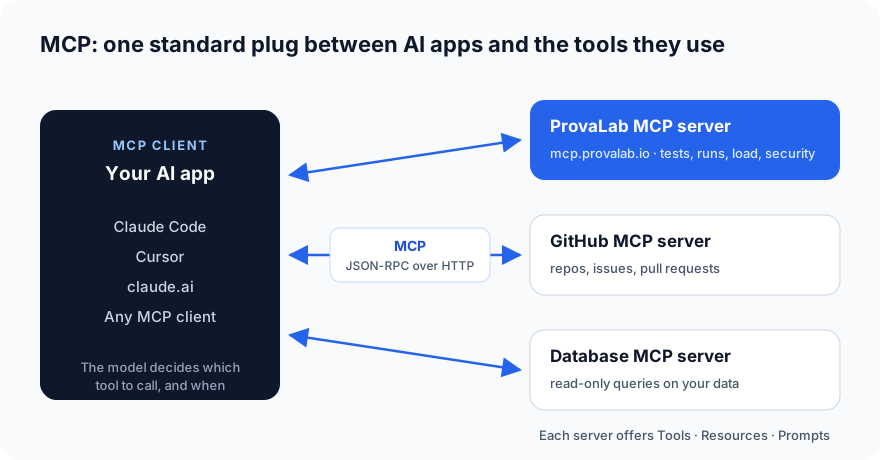
An MCP server can offer three kinds of things:
- Tools: actions the model can take, such as "run this test suite" or "create an issue".
- Resources: data the model can read, such as a file or a test report.
- Prompts: ready-made instructions a user can pick, such as "summarise last night's run".
The important part: the model decides which tool to call and when, based on what you asked. You don't click buttons in another dashboard; you ask in plain language, and the agent does the work through MCP.
What is a skill?
MCP gives an agent access to a tool. It does not teach the agent how to use it well. That is what a skill is for.
A skill is a folder with a SKILL.md file: a short name, a one-line description of when to use it, and step-by-step instructions. The agent only sees the name and description until your request matches. Then it loads the full instructions. So you can have many skills installed without filling up the agent's memory.
For example, ProvaLab's triage-failures skill tells the agent: read the actual error text before describing a failure, group failures by cause rather than by test, and flag skipped tests. Without it, an agent with the same MCP access might just list twenty red tests that all come from one broken selector.
What is a plugin?
A plugin is the package that ships it all in one install. A Claude Code plugin can bundle:
- Skills: the know-how.
- Slash commands: shortcuts like
/provalab-test. - MCP servers: the connection, configured in a
.mcp.jsonfile. - Optionally, sub-agents and hooks.
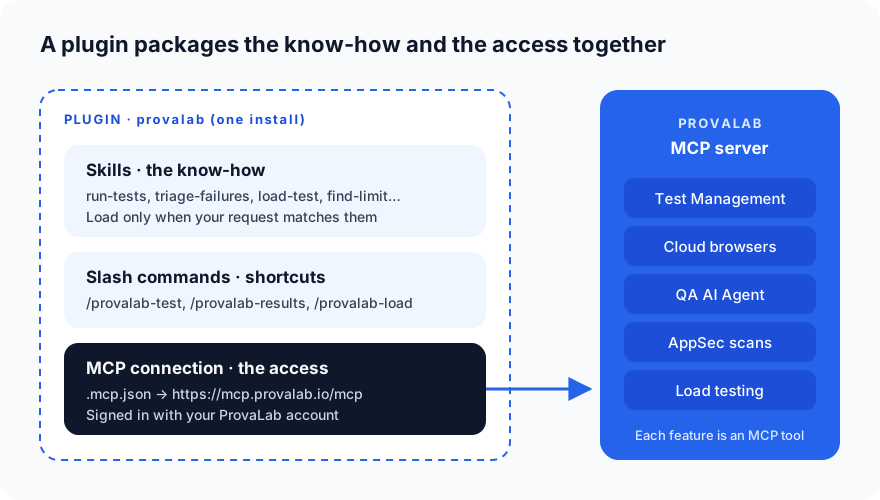
In one line: MCP is the access, skills are the know-how, and the plugin is the box they come in.
| What it is | What it does | ProvaLab example | |
|---|---|---|---|
| MCP server | A service that speaks the MCP standard | Gives the agent tools and data | mcp.provalab.io |
| MCP tool | One action on that server | Does one job when the agent calls it | execute_pytest, tms_get_test_run_failures |
| Skill | A SKILL.md instruction file |
Teaches the agent when and how to use the tools | run-tests, load-test, triage-failures |
| Slash command | A saved prompt | A shortcut you type | /provalab-test checkout |
| Plugin | A package | Installs all of the above at once | provalab |
"MCP 1.0" vs "MCP 2.0": what changed?
Officially, MCP versions are named by date, not by number. The original specification is 2024-11-05, and it was revised in 2025-03-26, 2025-06-18 and 2025-11-25. The 2026-07-28 revision changed the protocol's core design so much that many people call it the next generation of MCP, or "MCP 2.0". Here, "MCP 1.0" means the original design that ran through 2025-11-25.
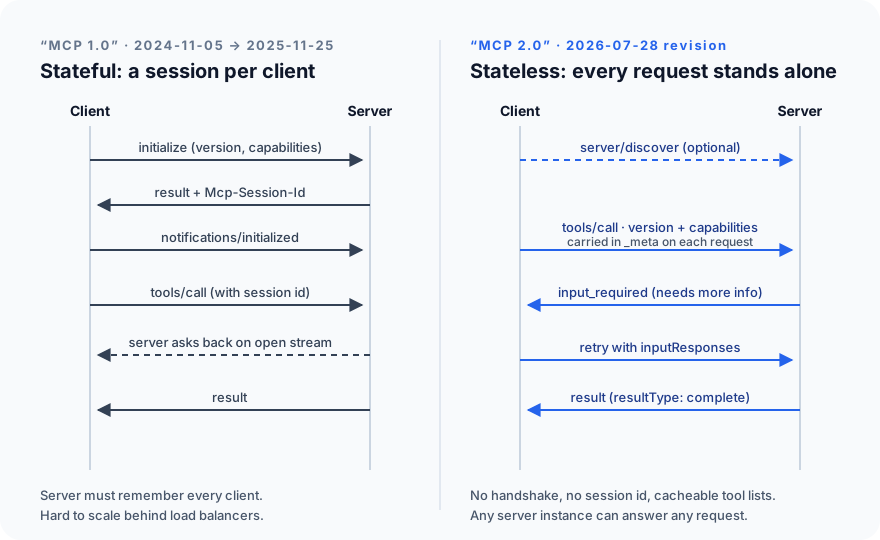
The headline change: MCP became stateless. In the original design, a client opened a session with an initialize handshake, got a session id, and the server had to remember every connected client. In the 2026-07-28 revision there is no handshake and no session id. Every request carries its own protocol version and capabilities, so any server instance can answer any request. That makes MCP servers much easier to run at scale, behind load balancers and gateways.
| "MCP 1.0" (original design) | "MCP 2.0" (2026-07-28 revision) | |
|---|---|---|
| Connection | initialize handshake, then a session |
No handshake; each request is self-contained |
| Session id | Mcp-Session-Id header ties calls together |
Removed; tools pass their own handles if they need state |
| Learning what a server can do | During the handshake | Optional server/discover call |
| Server needs more input | Server sends a request back on an open stream | Server returns input_required; client retries with the answer (Multi Round-Trip Requests) |
| Routing | Gateways must read the request body | Mcp-Method and Mcp-Name headers on each HTTP request |
| Tool lists | Fetched again and again | Cacheable, with ttlMs and cacheScope hints |
| Long-running jobs | Experimental tasks inside the core | Tasks moved to an official extension |
| Deprecated | — | Roots, Sampling and Logging, the old HTTP+SSE transport, and Dynamic Client Registration (in favour of Client ID Metadata Documents) |
Deprecated features keep working for at least twelve months under MCP's new deprecation policy, so existing servers don't break overnight. Teams that relied on session ids will have some migration work. The details are in the official changelog and the release announcement.
What this means for you as a user: very little changes day to day. You still install a server or plugin and ask in plain language. The difference shows up as faster, more reliable connections, because the servers behind them are simpler to run.
How to use ProvaLab through MCP
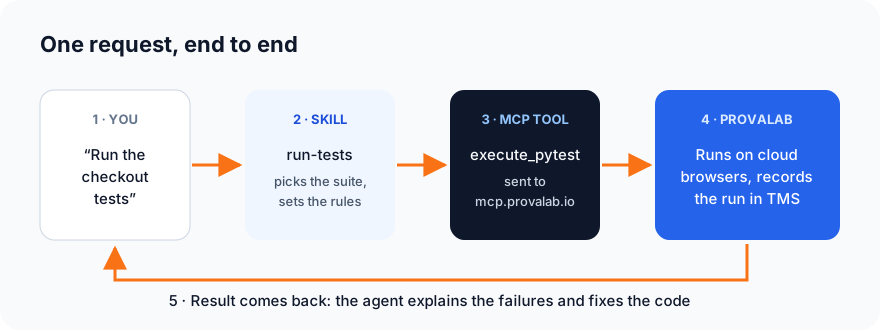
ProvaLab's features are exposed as tools on one MCP server at https://mcp.provalab.io/mcp. Running tests, reading results, triaging failures, load tests and security scans can all be driven by your coding agent.
Option 1: the Claude Code plugin (recommended)
The plugin gives you the MCP connection plus the skills and slash commands.
/plugin marketplace add provalab-dev/claude-code-plugin
/plugin install provalab@provalab-marketplace
Then sign in once. The sign-in works on any machine, including SSH sessions and CI, because you approve it in a browser on any device:
curl -fsSL https://plugins.provalab.io/install.sh | sh
provalab-auth login
Restart Claude Code, then check the connection with claude mcp list. You should see the ProvaLab server marked as connected.
Option 2: the claude.ai connector
If you work in claude.ai rather than Claude Code, add the ProvaLab connector instead. It points at the same server and gives you the same tools. Use either the connector or the plugin, not both.
What you can ask
Once connected, just ask. The skills pick up your intent:
- "Run the login tests for the checkout project": runs the suite on ProvaLab's cloud browsers and records the run in Test Management.
- "Generate tests for https://staging.example.com/signup and run them": writes the tests from the live page, then runs them.
- "Why did last night's run fail?": reads the failures, groups them by cause and explains them.
- "Load test our API up to 200 users": writes the load test from your repo, shows the cost, and runs it when you say go.
Or use the slash commands: /provalab-test, /provalab-status, /provalab-results and /provalab-load.
A few tips
- Set your project. If your organization has more than one project, set
PROVALAB_PROJECT_ID(andPROVALAB_ORG_IDif you belong to several organizations) so results land in the right place. - Let the agent fix, but you approve. The real gain comes when failures go straight back to the agent that wrote the code. Keep a person on the final approval.
- Allow the tools by name. Plugin tools are named
mcp__plugin_provalab_api__<tool>. Use that pattern in your permission rules if you want to skip repeated approval prompts.
The short version
- MCP is the standard plug that lets AI agents use tools.
- Skills teach the agent how to use those tools well.
- Plugins package both into one install.
- The 2026-07-28 revision ("MCP 2.0") made MCP stateless and easier to scale, without changing how you use it.
- With the ProvaLab plugin, your coding agent can run tests, read results, triage failures and run load tests, all from a plain-language request.
Want to see it working? Watch the two-minute product tour or book a 30-minute demo.
See ProvaLab working on a real app
Your coding agent runs the tests, reads the failures and fixes them.