Testing in Practice · Part 9
User acceptance testing (hands-on): plan, dry run and sign-off, and the bug only the UAT server had
ProvaLab team · · 14 min read
Your team has tested the new feature. The unit tests pass, the system tests pass, the bugs are fixed. One question is left, and your team can't answer it: will this work for the people who'll use it, for the job they need to do? Answering that is user acceptance testing (UAT).
UAT is the last test level before release. The people who'll use the software, or the people who represent them, try it on realistic tasks and decide whether to accept it. It's often done badly: users are handed a build on a Friday afternoon, click through a script, and sign. That's a rubber stamp, not a test.
This post shows how to plan and run UAT for a new FoodNow feature, order for later. It includes two things that really ran:
- A dry run on a UAT-like server, which found a bug that every system test had passed.
- A script that checks the UAT results against the exit criteria, which caught a gap in how a retest was recorded.
The UAT sessions themselves need real people, so the session results in Step 6 are an example, and we say so where they appear.
What UAT is, and what it isn't
| System testing | User acceptance testing | |
|---|---|---|
| Question | Does it meet the specification? | Can users do their job with it? |
| Who | Testers and developers | Users, customers, or the business people who represent them |
| Checked against | Requirements and acceptance criteria | Real tasks and real expectations |
| Finds | Bugs in the code | Misunderstood needs, workflow gaps, confusing wording, and bugs the team's setup hid |
| Ends with | A test report | A decision: accept or not, signed by a named person |
UAT is not a second round of system testing by people who aren't testers. If users are finding crashes and wrong totals, the build wasn't ready for UAT. Fix the process before that, not the users.
The ISTQB names several kinds of acceptance testing. You'll hear these:
- User acceptance testing: the users check it fits their work. This post.
- Operational acceptance testing: the people who'll run it check backups, monitoring, restarts and the release steps.
- Contract and regulatory acceptance testing: checks against what a contract or a law requires.
- Alpha and beta testing: for products sold to many customers. Alpha is with users at your site, beta is with users in their own environment.
The feature: order for later
Office managers asked for a way to order lunch for a meeting in advance. The story:
As an office manager, I want to choose a delivery slot when I order, so that lunch arrives when the meeting starts, not when I happened to order it.
The acceptance criteria the team built to:
- Slots are 30 minutes long, on the hour and half hour.
- The first slot is at least 45 minutes from now (cooking and riding time).
- Slots go up to 3 hours ahead.
- Every slot is within kitchen hours, 11:00 to 23:00.
Here's the code that picks the slots, in foodnow/app.py. The page that shows them is a small FastAPI app with an HTML form:
from datetime import datetime, timedelta

OPENS, CLOSES = 11, 23          # kitchen hours
LEAD = timedelta(minutes=45)    # cooking + riding time
AHEAD = timedelta(hours=3)


def now() -> datetime:
    return datetime.now()


def slots(at: datetime) -> list[datetime]:
    first = (at + LEAD).replace(second=0, microsecond=0)
    first += timedelta(minutes=(30 - first.minute % 30) % 30)
    out, t = [], first
    while t <= at + AHEAD:
        day = t.replace(hour=0, minute=0)
        if day + timedelta(hours=OPENS) <= t <= day + timedelta(hours=CLOSES, minutes=-30):
            out.append(t)
        t += timedelta(minutes=30)
    return out
And the team's system tests, which pass:
def test_slots_start_after_the_lead_time_and_are_half_hours():
    at = datetime(2026, 11, 11, 19, 10)
    s = fn.slots(at)
    assert s[0] == datetime(2026, 11, 11, 20, 0)
    assert all(b - a == timedelta(minutes=30) for a, b in zip(s, s[1:]))
    assert s[-1] <= at + fn.AHEAD


def test_no_slots_after_closing():
    assert fn.slots(datetime(2026, 11, 11, 22, 30)) == []


def test_page_offers_slots_from_now():
    html = client.get("/").text
    first = fn.slots(fn.now())[0]
    assert f"{first:%H:%M} –" in html


def test_scheduling_confirms_the_slot():
    r = client.post("/schedule", data={"slot": "20:00"})
    assert "between 20:00 and 20:30" in r.text
$ pytest -q
....                                                                     [100%]
4 passed, 1 deselected, 1 warning in 0.46s

$ TZ=UTC pytest -q
....                                                                     [100%]
4 passed, 1 deselected, 1 warning in 0.40s
They pass with the machine's clock in India time and in UTC. (The deselected test is the one we add in Step 4. The warning is a deprecation notice from Starlette's test client.) Keep datetime.now() in mind.
A correction, found later: test_page_offers_slots_from_now also depends on the real clock in a second way. Between 21:46 and 07:59 there are no slots left, and the test fails with IndexError. We ran these tests in the evening, so we missed it. Part 14 shows how it turned up in a nightly-style run, and the fix: give the test a fixed time.
Step 1: Plan, and agree the exit criteria first
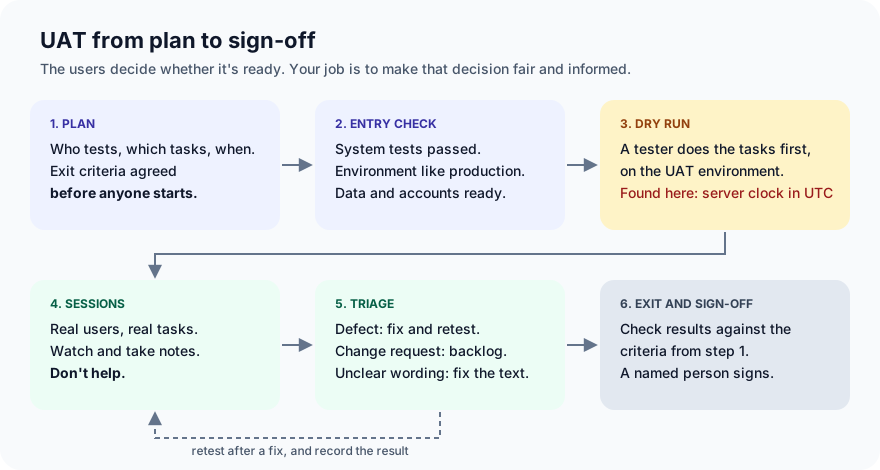
A UAT plan is short. It answers:
- Who tests? People who'll really use it. For order for later: two office managers or team assistants who order for meetings, and one night-shift lead, because they order late. Not developers, and not the product owner alone.
- What do they do? Three to six realistic tasks (Step 3).
- Where and when? The UAT environment, on their own phones, in a 45-minute session each, in the week before release.
- Who decides? One named person who signs the acceptance. Here, the head of FoodNow for Business.
- What counts as accepted? The exit criteria.
Agree the exit criteria before UAT starts. Afterwards, there's pressure to call whatever happened "good enough". Ours:
- Every must-have task is completed by at least two testers.
- No open critical or major defects.
- Minor defects are either fixed or accepted in writing by the product owner.
- Change requests are logged, and don't block acceptance.
Step 2: Check the entry criteria
UAT wastes everyone's time if the build isn't ready. Before inviting anyone, check:
- The build has passed system testing, and the known defects are listed.
- The UAT environment is set up like production: same configuration, same kind of data, same integrations.
- Testers have accounts, and there's realistic data (menus, addresses, payment test cards).
- Testers know how to report a problem, and who to ask when they're stuck.
"Like production" is the one teams skip, and the next step shows why it matters.
Step 3: Write the scenarios as tasks, not steps
A system test script says exactly what to click. A UAT scenario gives the user a goal, and you watch how they reach it:
| Step-by-step script (avoid in UAT) | Task (use in UAT) |
|---|---|
| 1. Open the app. 2. Tap "Order for later". 3. Select the first slot. 4. Tap "Schedule delivery". 5. Check the confirmation shows the slot. | S1. Your team has a meeting in about two hours. Order lunch so it arrives when the meeting starts. |
The script tells you whether the buttons work, which system testing already did. The task tells you whether a real user can find the feature, choose the right slot and trust the confirmation. If they hesitate, go back, or ask "is this the right time?", that's a finding.
Our scenarios:
- S1 (must have) Order lunch for a meeting that starts in about two hours.
- S2 (must have) Choose a slot, then change your mind before paying.
- S3 (must have) It's late evening. Order dinner for the night shift.
- S4 (nice to have) Order tomorrow's lunch today.
- S5 (nice to have) Read the confirmation aloud to a colleague: when does the food arrive?
S4 is there on purpose. The story only promised the next three hours. If users expect tomorrow, it's a change request, and that's worth knowing too.
Step 4: Dry run on the UAT environment
Before users arrive, a tester does the scenarios on the UAT environment, as a user would: on a phone, in the users' time zone. This catches the problems that would waste a session, and the ones the team's own setup hides.
Our UAT server runs in a container, and like most containers, its clock is set to UTC. The users are in India, 5 hours 30 minutes ahead. We started the server that way:
TZ=UTC uvicorn foodnow.app:app --port 8077
Then ran scenario S1 in a browser set up like the users' phones: a phone-sized screen, India's time zone and Indian English. This short Playwright script records what the tester saw:
from playwright.sync_api import sync_playwright

with sync_playwright() as p:
    browser = p.chromium.launch()
    phone = browser.new_context(
        viewport={"width": 412, "height": 915}, device_scale_factor=2,
        is_mobile=True, has_touch=True,
        timezone_id="Asia/Kolkata", locale="en-IN",
    )
    page = phone.new_page()
    page.goto("http://localhost:8077/")
    print("time on the phone:", page.evaluate(
        "new Date().toLocaleTimeString('en-IN', {hour: '2-digit', minute: '2-digit', hour12: false})"))
    print("slots offered:   ", page.locator("label").all_inner_texts())
    page.locator("input[name=slot]").first.check()
    page.get_by_role("button", name="Schedule delivery").click()
    print("confirmation:    ", page.locator("#confirm").inner_text())
    browser.close()
time on the phone: 19:55
slots offered:     ['15:30 – 16:00', '16:00 – 16:30', '16:30 – 17:00', '17:00 – 17:30']
confirmation:      Your order will arrive between 15:30 and 16:00 today.
At 19:55, the app offered a delivery at 15:30, four and a half hours ago, and confirmed it.
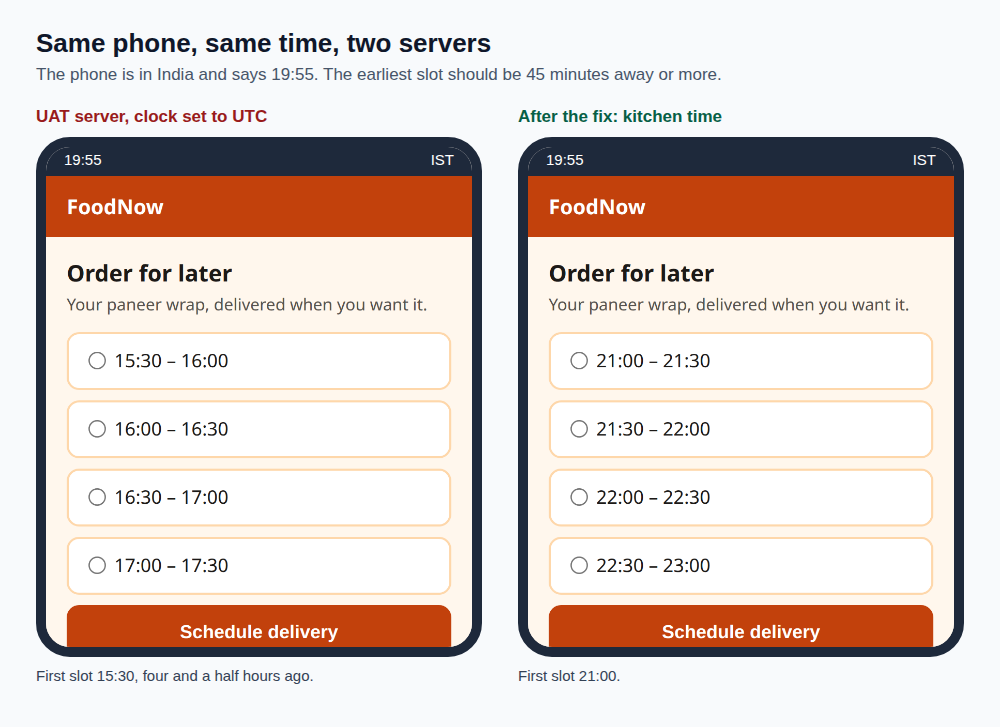
(We drew the phone frame and its clock around the real screenshots. The time is the one the browser reported in the run.)
Why did every system test pass? datetime.now() returns the server's local time. On the developers' laptops, that's India time, so everything looked right. The test that checks the page, test_page_offers_slots_from_now, compares the page with slots(fn.now()), the same wrong clock, so it passed on the UTC machine too. A test that computes the expected value the same way as the code shares its mistakes. The other tests used fixed times, so they never asked "what time is it for the customer?"
The fix: slots are in the kitchen's local time, whatever the server's clock says:
 from datetime import datetime, timedelta
+from zoneinfo import ZoneInfo
...
+KITCHEN_TZ = ZoneInfo("Asia/Kolkata")  # slots are in the kitchen's local time
...
 def now() -> datetime:
-    return datetime.now()
+    return datetime.now(KITCHEN_TZ).replace(tzinfo=None)
And a system test that would have caught it, so it can't come back:
def test_now_is_kitchen_time_whatever_the_server_clock(monkeypatch):
    monkeypatch.setenv("TZ", "UTC")  # like the UAT server
    time.tzset()
    try:
        kitchen = datetime.now(ZoneInfo("Asia/Kolkata")).replace(tzinfo=None)
        assert abs(fn.now() - kitchen) < timedelta(seconds=5)
    finally:
        monkeypatch.undo()
        time.tzset()
On the old code, it fails by 5 hours 30 minutes:
E       assert datetime.timedelta(seconds=19799, microseconds=999987) < datetime.timedelta(seconds=5)
1 failed, 4 passed, 1 warning in 0.48s
With the fix, 5 passed. The dry run again, on the same UTC server:
time on the phone: 19:55
slots offered:     ['21:00 – 21:30', '21:30 – 22:00', '22:00 – 22:30', '22:30 – 23:00']
confirmation:      Your order will arrive between 21:00 and 21:30 today.
19:55 plus 45 minutes is 20:40, so 21:00 is the first slot, and the last ends when the kitchen closes at 23:00. Had we skipped the dry run, the first tester would have hit this in the first minute, and the session would have been spent on a bug instead of on whether the feature fits their work.
Step 5: Run the sessions
What makes a UAT session useful:
- Give the task, then be quiet. Read the task out, and let the user work. Don't point. If you help, you're testing yourself.
- Ask them to think aloud. "I'm looking for... I expected this to say..." is where the findings are.
- Write down what they do, not just what they say. Hesitations, wrong taps, going back. Users often blame themselves for the software's problems: "Sorry, I'm not good with apps."
- Use their devices, at their pace. Not a fast office laptop with the developer's account.
- Record each result: the scenario, the tester, pass or fail, and what they found.
Step 6: Triage, then check the exit criteria
The results below are an example, written for this post to show the process. They are not from real users. Picture this at the end of the sessions:
scenario,must_have,tester,result,finding,type,severity,status
S1 Schedule lunch for a meeting,yes,Office manager,pass,,,,
S1 Schedule lunch for a meeting,yes,Team assistant,pass,,,,
S2 Change your mind before paying,yes,Office manager,pass,,,,
S2 Change your mind before paying,yes,Team assistant,fail,Back button loses the chosen slot,defect,major,fixed and retested
S3 Late evening order,yes,Night-shift lead,pass,,,,
S3 Late evening order,yes,Team assistant,pass,,,,
S4 Order for tomorrow,no,Office manager,fail,Wants to book tomorrow's lunch today,change request,,backlog
S5 Read the confirmation aloud,no,Team assistant,pass,"""Today"" was unclear just after midnight",defect,minor,accepted by product owner
Every finding is triaged into one of three kinds:
- Defect: the software doesn't do what was agreed. The back button losing the slot breaks S2. Major, fixed, retested.
- Change request: it does what was agreed, but users want something else. Booking for tomorrow was never in the story. It goes to the backlog, and it doesn't block acceptance. It's still valuable: the next story is written.
- Wording, training or documentation: the software is right, but users misread it. "Today" just after midnight is confusing. Minor, and the product owner accepted it for now.
Arguing about which kind a finding is happens in every UAT. Decide with the acceptance criteria from the story, not with how strongly someone feels.
This script checks the results against the exit criteria from Step 1. It's go_no_go.py:
"""Check UAT results against the exit criteria agreed before UAT started."""
import csv
import sys
from collections import defaultdict

MIN_TESTERS = 2  # each must-have scenario passed by at least two people
BLOCKING = {"critical", "major"}
CLOSED = {"fixed and retested", "accepted by product owner"}

rows = list(csv.DictReader(open(sys.argv[1], encoding="utf-8")))
problems = []

passes = defaultdict(set)
for r in rows:
    if r["must_have"] == "yes" and r["result"] == "pass":
        passes[r["scenario"]].add(r["tester"])
for s in sorted({r["scenario"] for r in rows if r["must_have"] == "yes"}):
    if len(passes[s]) < MIN_TESTERS:
        problems.append(f"{s}: passed by {len(passes[s])} tester(s), need {MIN_TESTERS}")

for r in rows:
    if r["type"] == "defect" and r["status"] not in CLOSED:
        if r["severity"] in BLOCKING:
            problems.append(f"open {r['severity']} defect: {r['finding']}")
    if r["type"] == "defect" and r["severity"] in BLOCKING and r["status"] == "accepted by product owner":
        problems.append(f"{r['severity']} defect accepted instead of fixed: {r['finding']}")

defects = [r for r in rows if r["type"] == "defect"]
changes = [r for r in rows if r["type"] == "change request"]
print(f"{len(rows)} results, {len(defects)} defects, {len(changes)} change requests")
for r in changes:
    print(f"  change request (not a blocker): {r['finding']} -> {r['status']}")
if problems:
    print("NO GO")
    for p in problems:
        print("  -", p)
    sys.exit(1)
print("GO: exit criteria met, ready for sign-off")
$ python go_no_go.py uat-results.csv
8 results, 2 defects, 1 change requests
  change request (not a blocker): Wants to book tomorrow's lunch today -> backlog
NO GO
  - S2 Change your mind before paying: passed by 1 tester(s), need 2
We expected a GO: the defect's status says "fixed and retested". But the retest was never recorded as a result. The sheet only shows the failure. As far as the evidence goes, only one person has completed S2. That's a real gap that happens all the time: the fix is mentioned in a chat, and the record still says it failed. Recording the retest:
S2 Change your mind before paying,yes,Team assistant,pass,Retest after the back-button fix,,,
$ python go_no_go.py uat-results.csv
9 results, 2 defects, 1 change requests
  change request (not a blocker): Wants to book tomorrow's lunch today -> backlog
GO: exit criteria met, ready for sign-off
And for comparison, the results as they stood on the first day, with the back-button defect still open:
NO GO
  - S2 Change your mind before paying: passed by 1 tester(s), need 2
  - open major defect: Back button loses the chosen slot
A script doesn't make the decision. It makes sure the decision is made against the criteria everyone agreed, with the evidence in front of them, and not from memory at the end of a long week.
Step 7: Sign-off
The sign-off is a short record, signed by the named person from Step 1:
- What was tested: the build version and the environment.
- Results: the scenarios, testers and outcomes, and the exit criteria result.
- Known issues accepted: the minor "today" wording, with who accepted it.
- Change requests raised: booking for tomorrow, now in the backlog.
- Decision: accepted, accepted with conditions, or not accepted.
If the decision is "not accepted", that's UAT working, not failing. It's much cheaper than finding out from customers.
Common mistakes
- Treating UAT as system testing by other people. If users find crashes and wrong totals, the build wasn't ready. Use entry criteria.
- Step-by-step scripts. They tell you the buttons work. Tasks tell you whether people can do their job.
- A UAT environment that isn't like production. Ours had a UTC clock, and the bug only existed there. Do a dry run on it, as a user, before inviting anyone.
- Helping the user. The moment you point at the right button, you've lost the finding.
- Deciding the exit criteria afterwards. Agree them in the plan, then check the results against them.
- Treating every finding as a bug. Change requests are useful, but they're not defects. Log them, and don't let them block a release that does what was agreed.
- Fixes that are never retested on the record. Step 6 shows how a "fixed and retested" status can hide a missing result.
What's next
In Part 10 of Testing in Practice we look at usability testing: how to watch five people use your app and find most of the problems that make users give up, and how it differs from UAT.
ProvaLab's test management system keeps UAT in the same place as the rest of your testing. Write the UAT scenarios as test cases, run them as a test run in the UAT build's version, and record the results, with defects linked to the case that found them. When it's time to decide, the run shows what passed, what failed and what was retested, next to the system tests for the same release. See it in the two-minute product tour.
See ProvaLab working on a real app
Your coding agent runs the tests, reads the failures and fixes them.