Testing Basics · Part 7
Test design techniques: black-box, white-box and grey-box testing
ProvaLab team · · 6 min read
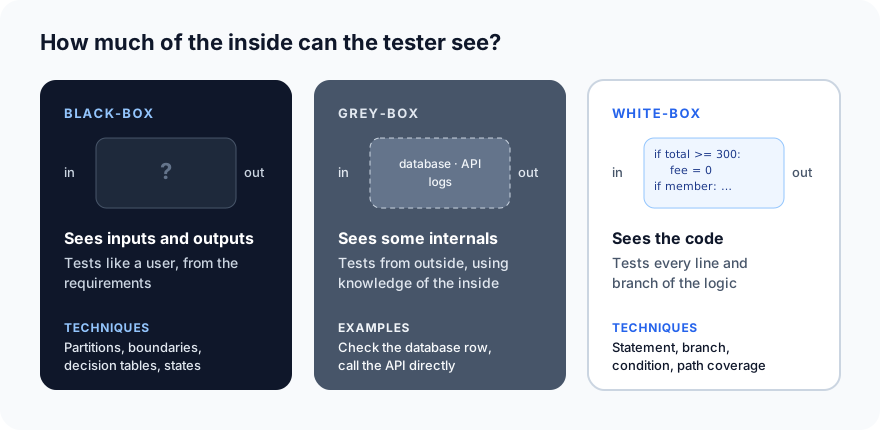
In Part 6 we learned how to write a test case. This part is about how to find the right ones. Testers group their techniques by one simple question: how much of the inside of the software can you see?
That gives three approaches: black-box, white-box and grey-box testing.
Black-box testing
In black-box testing you test without looking at the code. You know what goes in, what should come out, and what the requirements say. The inside is a closed box.
This is how users experience software, and it is how most QA testing is done. You need no programming knowledge, and the tests stay valid even when developers rewrite the code inside.
The main black-box techniques:
1. Equivalence partitioning
Split the inputs into groups the software should treat the same, and test one value from each group. A discount field that accepts 0–100% has three groups: below 0, 0 to 100, above 100. (More detail, with a diagram, in Part 6.)
2. Boundary value analysis
Test at and around every edge: -1, 0, 1, 99, 100 and 101 for that discount field. Mistakes like < instead of <= only show up at the exact boundary.
3. Decision table testing
When the result depends on combinations of conditions, list every combination in a table, and turn each row into a test. For example: new customer yes/no × order over 300 yes/no → free delivery yes/no.
4. State transition testing
Some features behave differently depending on what state they are in. A food order moves through clear states:
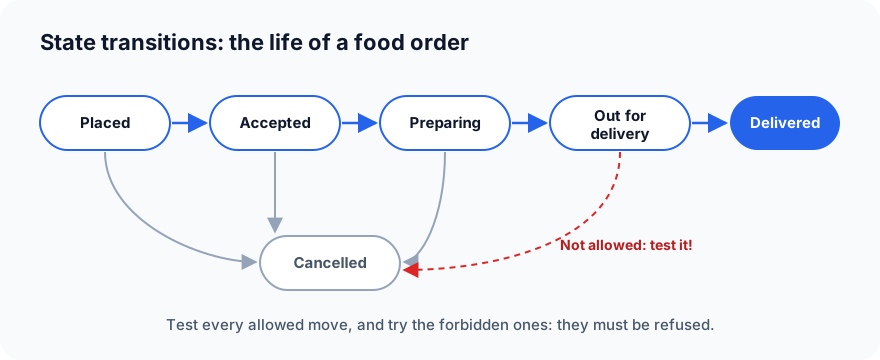
Draw the states and the allowed moves, then test:
- Every allowed move: placed → accepted, preparing → cancelled, and so on.
- The forbidden moves: can a customer cancel an order that is already out for delivery? They mustn't, and the app must say so clearly.
State transition testing is ideal for orders, payments, sign-in (locked after 3 wrong passwords?), subscriptions and any kind of workflow.
5. Use case testing
Test complete journeys the way a real user would: "A customer searches for pizza, adds two, applies a code, pays by card and tracks the delivery." Each use case has a main flow and alternative flows (the card is declined, the restaurant closes mid-order).
6. Pairwise testing
When many settings combine, testing every combination explodes. Three devices × three payment methods × two languages makes 18 combinations. Most bugs are triggered by one setting, or a pair of settings, so pairwise testing picks a smaller set where every pair appears at least once. Here, 9 tests cover every pair instead of all 18. Free tools such as PICT generate these sets for you.
White-box testing
In white-box testing you design tests by looking at the code itself. You read the logic and make sure every part of it is exercised. It is mostly done by developers, usually as unit tests (see Part 5).
The key white-box idea is code coverage: how much of the code your tests actually ran. Here is a small function from our delivery app:
def delivery_fee(order_total, is_member):
    fee = 40
    if order_total >= 300:
        fee = 0
    if is_member:
        fee = fee / 2
    return fee
Statement coverage
Has every line run at least once? One test is enough here:
def test_big_order_member():
    assert delivery_fee(400, is_member=True) == 0
Both if conditions are true, so every line runs. We measured it with pytest-cov:
Name          Stmts   Miss  Cover
delivery.py       7      0   100%
100% statement coverage, from one test. Sounds complete, but it isn't.
Branch coverage
Has every decision gone both ways? Each if can be true or false, and our single test only ever took the "true" side. Turn on branch coverage and the gap appears:
Name          Stmts   Miss Branch BrPart  Cover   Missing
delivery.py       7      0      4      2    82%   3->5, 5->7
3->5 means "the if on line 3 never skipped straight to line 5": we never tested a small order. Add one test where both conditions are false:
def test_small_order_non_member():
    assert delivery_fee(100, is_member=False) == 40
Name          Stmts   Miss Branch BrPart  Cover   Missing
delivery.py       7      0      4      0   100%
Now every decision has gone both ways. This is why branch coverage is a stronger measure than statement coverage.
Condition and path coverage
- Condition coverage checks each part of a combined condition separately, such as
if is_member and order_total >= 300: has each half been both true and false? - Path coverage checks every route through the code. Our function has two
ifs, so four paths: big+member, big+non-member, small+member, small+non-member. Our two tests cover only two of them. The small-order member case (fee 20) has never been tested.
Path coverage grows very fast with real code, so teams usually aim for good branch coverage and add path tests only for critical logic.
One warning: coverage tells you what code ran, not whether the tests checked the right things. A test with no assert still counts as coverage. Treat coverage as a map of what you haven't tested, not as proof of quality.
Grey-box testing
Grey-box testing sits in between. You test from the outside, like a user, but you use some knowledge of the inside (the database design, the APIs, the logs or the architecture) to design sharper tests and check results more deeply.
Examples from our app:
- Check behind the screen: place an order in the app, then check the database. Is the order saved with the right total and status, or did the screen just show success?
- Go around the UI: the app only lets customers choose quantities 1–10, but what does the API accept if you send 1,000 or -5 directly? Knowing there is an API makes this test possible.
- Use the logs: trigger a failed payment and check the server logs for a clear error, with no card details written in plain text.
- Integration points: knowing that orders are passed to the restaurant through a message queue, test what happens when that queue is slow or down.
Grey-box testing is common in integration, API and security testing, where knowing a little about the inside finds bugs a pure black-box tester would never reach.
Experience-based techniques
Alongside the three boxes, testers rely on experience:
- Error guessing: "what usually breaks?" Empty fields, very long text, special characters, double clicks, the back button, a lost network.
- Exploratory testing: learning, designing and testing at the same time, guided by curiosity and a time limit.
- Checklists: a team's growing list of things that have gone wrong before.
Comparing the three
| Black-box | Grey-box | White-box | |
|---|---|---|---|
| Sees | Inputs and outputs | Some internals | The code |
| Based on | Requirements | Requirements + architecture | Code structure |
| Usually done by | QA testers | QA, automation, security | Developers |
| Typical levels | System, acceptance | Integration, API, security | Unit |
| Finds | Missing or wrong behaviour | Hidden data and integration problems | Untested logic, dead code |
| Misses | Untested code paths | Very deep logic | Missing features (you can't test code that was never written) |
The last row matters most: each approach misses what the others catch. White-box testing can't find a feature nobody built, and black-box testing can't see a branch nobody reached. Good teams use all three.
What's next
In Part 8 we put it together in a test plan: what to test, how, by whom and when.
ProvaLab helps on every side of the box: Test Management keeps your black-box test cases, the coding agent writes and runs unit tests from the code, and API and security testing reach behind the UI. See it in the two-minute product tour.
Prefer to read offline? The whole Testing Basics series is one free PDF: get the PDF.
See ProvaLab working on a real app
Your coding agent runs the tests, reads the failures and fixes them.