Testing Basics · Part 6
How to write good test cases: template, examples and techniques
ProvaLab team · · 5 min read
Test cases are the building blocks of all testing. Whether a person follows them by hand or code runs them automatically, as in Part 5, every test starts as a test case. In this part you will learn what goes into one, how to write it well, and how to choose which test cases to write.
What is a test case?
A test case is a set of steps, with specific data, that checks one thing about the software and says exactly what result to expect.
Anyone on the team should be able to pick it up, follow it and get the same answer: pass or fail. If two testers can read the same test case and do different things, it isn't finished.
Test scenario vs test case
These two get mixed up a lot:
- A test scenario is what to test, in one line: "Check that discount codes work at checkout."
- A test case is exactly how to test one part of it: which code, which cart, which clicks, which result.
One scenario usually becomes several test cases: a valid code, an expired code, two codes at once, a code on an empty cart, and so on.
The anatomy of a test case
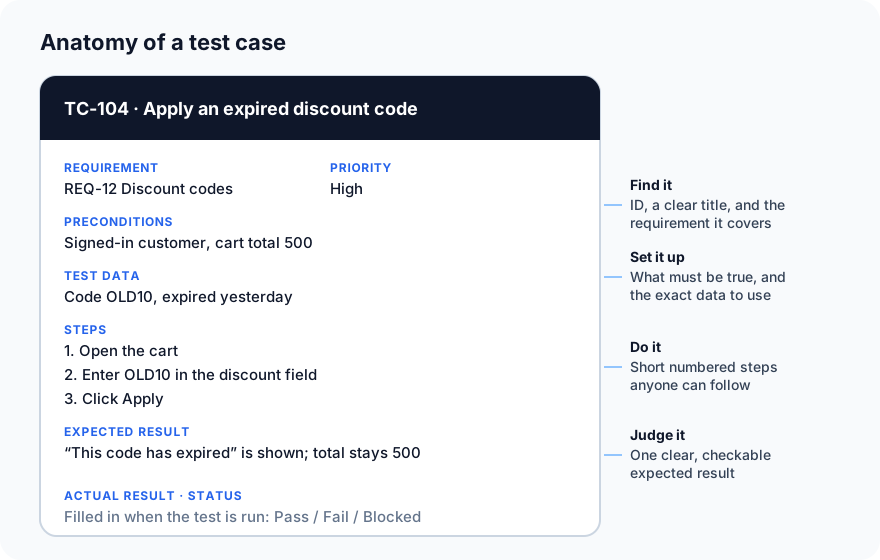
| Field | What to write |
|---|---|
| ID | A unique reference, such as TC-104 |
| Title | What it checks, in plain words: "Apply an expired discount code" |
| Requirement | The requirement or user story it covers (we come back to this in Part 10) |
| Priority | How important it is: High, Medium or Low |
| Preconditions | What must be true before you start |
| Test data | The exact values to use |
| Steps | Short, numbered actions |
| Expected result | What should happen, precise enough to judge pass or fail |
| Actual result | What really happened, filled in during the run |
| Status | Pass, Fail, Blocked or Not run |
Example: discount codes in the food delivery app
| ID | Title | Test data | Expected result |
|---|---|---|---|
| TC-101 | Apply a valid 10% code | SAVE10, cart 500 | Total becomes 450 |
| TC-102 | Code is not case-sensitive | save10, cart 500 | Total becomes 450 |
| TC-103 | Apply an unknown code | NOPE99 | "Code not recognised"; total stays 500 |
| TC-104 | Apply an expired code | OLD10 | "This code has expired"; total stays 500 |
| TC-105 | Apply two codes | SAVE10, then FREEDEL | Second code refused with a clear message |
| TC-106 | Remove all items after applying a code | SAVE10, then empty the cart | Discount removed; total 0 |
Notice the mix: one positive case (it works when used correctly) and several negative cases (it fails safely when used wrongly). Most real bugs live in the negative cases, so don't skip them.
Techniques for choosing test cases
You can't test every possible input. These techniques help you pick the few cases that catch the most bugs.
Equivalence partitioning
Group inputs that the software should treat the same way, then test one value from each group. If a discount field accepts 0 to 100, there are three groups: below 0, 0 to 100, and above 100. Testing 50 tells you about the whole valid group; you don't need to test 51, 52 and 53.
Boundary value analysis
Bugs love edges. A developer might write < where they meant <=, and only the exact edge value shows it. So test at and around each boundary:
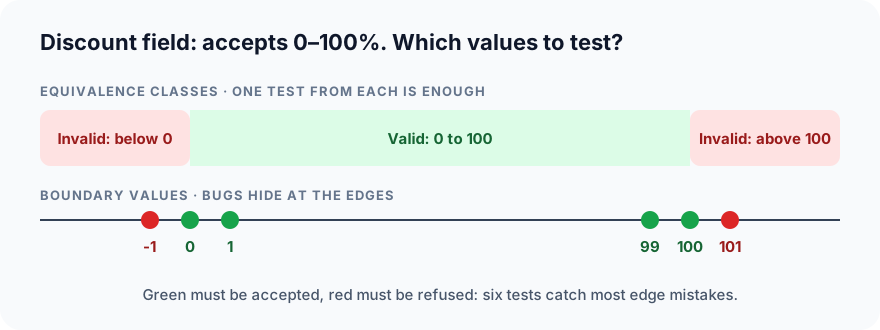
Six well-chosen values catch most of the mistakes a hundred random ones would.
Decision tables
When the result depends on combinations of conditions, list every combination in a table so none is missed. For free delivery:
| New customer? | Order over 300? | Free delivery? |
|---|---|---|
| Yes | Yes | Yes |
| Yes | No | Yes |
| No | Yes | Yes |
| No | No | No |
Each row becomes one test case.
Error guessing
Use experience to guess where things break: empty fields, very long text, special characters like ' or <, double-clicking a button, going back in the browser, or losing the network mid-payment. Experienced testers keep a personal list of these.
Seven habits of good test cases
- One test, one purpose. If the title needs "and", split it.
- A clear, specific title. "Apply an expired discount code", not "Discount test 3".
- Exact test data. "Code OLD10", not "an expired code".
- Short steps anyone can follow, without knowing the app.
- A checkable expected result. "Total stays 500", not "it works correctly".
- Independent. Each test sets up what it needs, so the order doesn't matter.
- Linked to a requirement, so you know why it exists and what it covers.
Common mistakes
- Vague expected results like "the page should work fine". Nobody can fail that test.
- Only happy paths. Users mistype, double-click and go back. Test that too.
- Giant test cases with 30 steps. When step 17 fails, the rest are useless.
- Copy-paste duplicates that drift apart over time. Reuse and update instead.
- Never reviewing them. A quick review by another tester catches missing cases early.
What's next
In Part 7 we go deeper into test design techniques: black-box, white-box and grey-box testing, and how each one finds different bugs.
In ProvaLab Test Management, every test case has these fields built in, is grouped into suites, links to its requirement, and keeps the history of every run, manual or automated. See it in the two-minute product tour.
Prefer to read offline? The whole Testing Basics series is one free PDF: get the PDF.
See ProvaLab working on a real app
Your coding agent runs the tests, reads the failures and fixes them.