Testing Basics · Part 9
How to write a good bug report (with template and examples)
ProvaLab team · · 5 min read
Finding a bug is only half the job. If the developer can't understand it or reproduce it, the bug doesn't get fixed. It gets bounced back as "works on my machine", and everyone loses a day.
A good bug report is one of the most valuable things a tester produces. This part shows you how to write one.
What is a bug report?
A bug report (also called a defect report or an issue) is a written record of a problem: what went wrong, how to make it happen again, and why it matters.
Its job is simple: let someone who has never seen the bug reproduce it, understand it and fix it, without asking you a single question.
Same bug, two reports
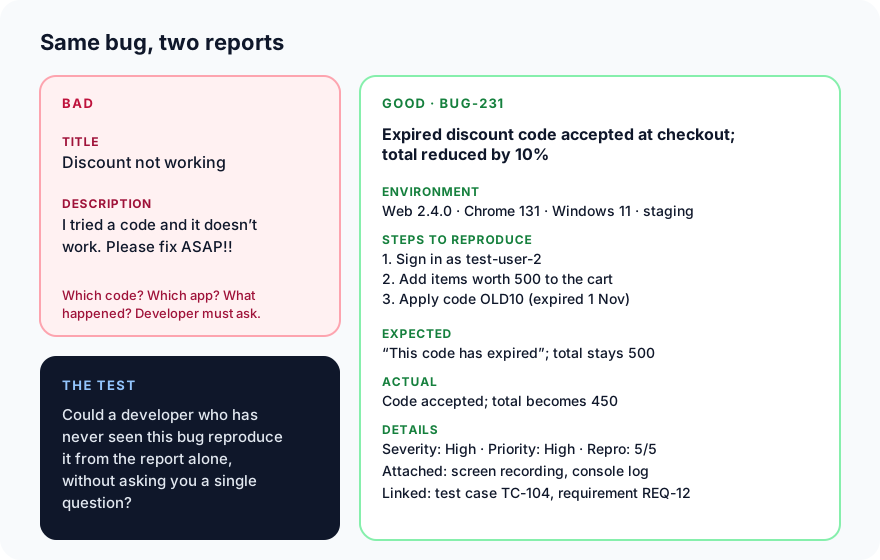
The bad report starts a conversation: which code, which app, what happened? The good one ends it.
The fields of a good bug report
| Field | What to write | Example |
|---|---|---|
| ID | Usually assigned by your tracker | BUG-231 |
| Title | Where, what goes wrong, and when | Expired discount code accepted at checkout; total reduced by 10% |
| Environment | App version, browser or device, OS, server | Web 2.4.0, Chrome 131, Windows 11, staging |
| Preconditions | What must be true first | Signed in as test-user-2; code OLD10 expired on 1 Nov |
| Steps to reproduce | Short, numbered, the fewest needed | 1. Add items worth 500 · 2. Open checkout · 3. Apply OLD10 |
| Expected result | What should happen | "This code has expired"; total stays 500 |
| Actual result | What really happens | Code accepted; total becomes 450 |
| Severity | How badly it breaks the software | High |
| Priority | How soon it should be fixed | High |
| Reproducibility | How often it happens | 5 out of 5 tries |
| Attachments | Proof and clues | Screenshot, screen recording, console log, network log |
| Links | Where it came from | Test case TC-104, requirement REQ-12 |
Writing a good title
Most people only ever read the title, in a list of fifty bugs. Use this pattern:
[Where] + [what goes wrong] + [under what condition]
- Bad: "Checkout bug"
- Bad: "Discount doesn't work properly"
- Good: "Expired discount code accepted at checkout; total reduced by 10%"
- Good: "Order history page blank on Android 14 after switching language"
Expected vs actual: the heart of the report
Keep these two side by side and specific. "It doesn't work" is not an actual result. "The total becomes 450 and no error appears" is. If the expected behaviour comes from a requirement or test case, link to it: that shows it's a bug and not a matter of opinion.
Severity vs priority
These two get confused constantly, and they are not the same thing:
- Severity is about the software: how badly does the bug break it? Usually set by the tester.
- Priority is about the business: how soon must it be fixed? Usually set by the product owner or team lead.
They often match, but not always:
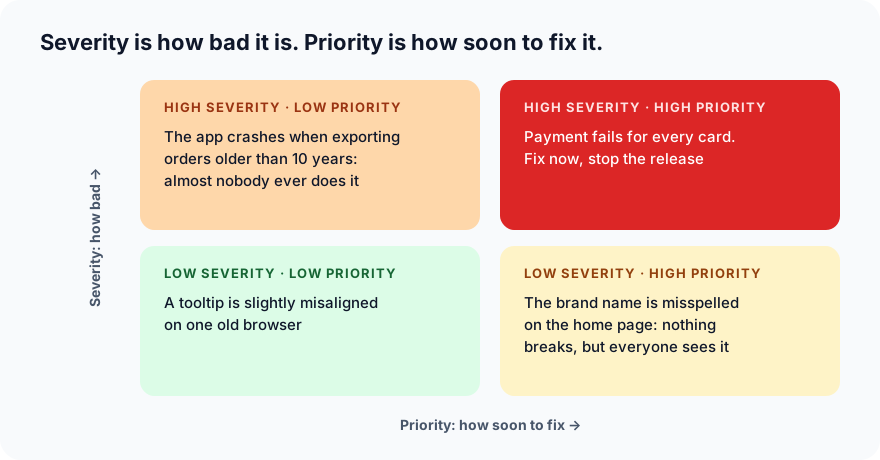
Common severity levels:
| Severity | Meaning | Example |
|---|---|---|
| Critical | System down, data lost, security hole, no workaround | Payment fails for everyone; other users' orders visible |
| High | A major feature is broken | Expired codes are accepted |
| Medium | A feature misbehaves, but there is a workaround | Discount only applies after refreshing the page |
| Low | Cosmetic or minor | Button text slightly misaligned |
Attachments that save hours
- Screenshot, with the problem area highlighted.
- Screen recording for anything involving several steps or timing. A short video often replaces a page of text.
- Console log from the browser's developer tools (F12 → Console) for web bugs.
- Network log or HAR file when a server request fails. It shows exactly what was sent and what came back.
- Server or app logs, with the time the bug happened.
- Test data: the account, order number or file you used.
Never attach real passwords, card numbers or customers' personal data. Use test accounts, and blur anything sensitive in screenshots.
Ten habits of great bug reporters
- Reproduce it first. Try at least twice before reporting.
- Search for duplicates. Someone may already have reported it.
- One bug per report. Two problems means two reports, because they may be fixed by different people at different times.
- Use the fewest steps that still trigger the bug.
- Find the boundaries. Does it happen in other browsers? With other codes? Only for new customers? Each answer narrows the cause.
- Report facts, not guesses. "The total becomes 450", not "the discount logic is broken".
- Keep the tone neutral. No blame, no capitals, no "!!!". Developers and testers are on the same side.
- Write for a stranger. Assume the reader has never seen this part of the app.
- Say if it's intermittent. "Happens about 2 in 5 tries" is useful; hiding it wastes time.
- Keep it updated. If you learn more, add it to the report, not to a chat message that will be lost.
A copy-ready template
Title: [Where] [what goes wrong] [under what condition]

Environment: app version, browser/device, OS, server (staging/production)
Preconditions: account, data or settings needed first

Steps to reproduce:
1.
2.
3.

Expected result:
Actual result:

Severity: Critical / High / Medium / Low
Priority: High / Medium / Low
Reproducibility: e.g. 5/5, or 2 in 5 tries

Attachments: screenshot, recording, console log, network log
Links: test case, requirement, related bugs
What's next
Once a bug is reported, its journey has only just begun. In Part 10 we follow it through the bug life cycle: new, assigned, fixed, retested and closed (or reopened).
In ProvaLab, a failed automated test can raise a bug report with the steps, the error, the screen recording and the logs already attached, linked to its test case and test run. Your coding agent can read it and fix the code. See it in the two-minute product tour.
Prefer to read offline? The whole Testing Basics series is one free PDF: get the PDF.
See ProvaLab working on a real app
Your coding agent runs the tests, reads the failures and fixes them.