Testing Basics · Part 10
The bug life cycle explained: from New to Closed (and Reopened)
ProvaLab team · · 5 min read
In Part 9 you wrote a great bug report. Now what? A bug doesn't get fixed just because it was reported. It travels through a series of statuses, passing between testers, leads and developers, until it is finally closed.
That journey is the bug life cycle, also called the defect life cycle. Knowing it well means fewer bugs get lost, and nobody wonders "wait, who has this one?"
The bug life cycle at a glance
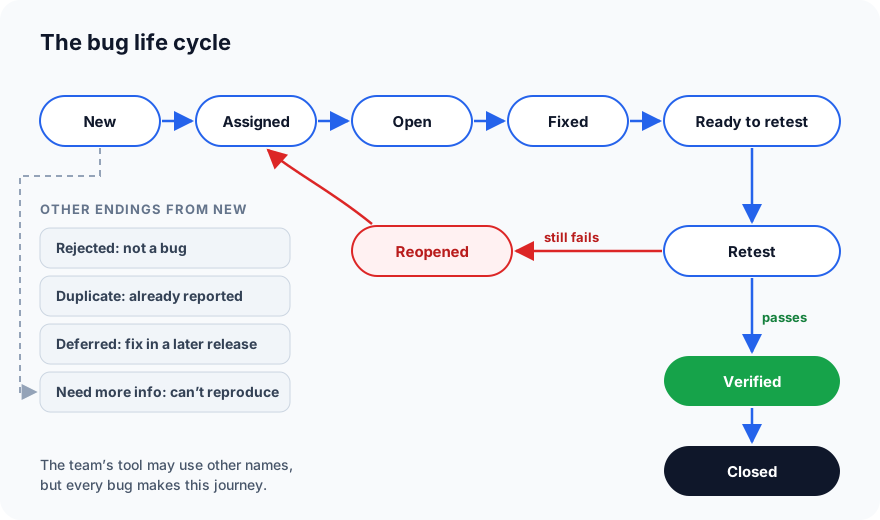
Every status, one by one
New
A tester (or a user, or an automated test) has reported the bug. Nobody has looked at it yet. This is where every bug starts.
Assigned
A test lead, product owner or developer lead has triaged it: confirmed it's a real bug, set its priority, and assigned it to a developer.
Open (or In Progress)
The developer has started working on it: reproducing it, finding the cause, writing the fix.
Fixed
The developer has changed the code and believes the bug is solved. Good practice is to also add an automated test that would have caught it, so it can't quietly come back.
Ready to retest
The fix has been deployed to the test environment, and the bug is waiting for a tester. A fix that only exists on the developer's laptop can't be retested yet. This status makes that clear.
Retest
The tester follows the original steps from the bug report again, on the new build.
Verified
The retest passed: the bug is gone. The tester also runs a few regression tests around it, to make sure the fix didn't break something nearby.
Closed
The bug is done. Usually the tester closes it after verifying, or it closes automatically when the fix is released.
Reopened
The retest failed: the bug is still there, or it only went away in some cases. The tester reopens it with a comment on what still happens, and it goes back to the developer.
The side exits
Not every bug follows the main path. During triage, a bug can also end up as:
| Status | Meaning | What the tester should do |
|---|---|---|
| Rejected / Not a bug | The software is working as intended | Check the requirement. If the behaviour is still wrong for users, raise it as a change request instead |
| Duplicate | The same bug is already reported | Link to the original; add any new details there |
| Deferred / Postponed | Real, but will be fixed in a later release | Make sure the risk is understood and the bug isn't forgotten |
| Need more info / Can't reproduce | The developer can't make it happen | Add more detail: exact data, environment, a screen recording |
"Can't reproduce" is usually a sign the report was missing something, which is why the habits in Part 9 matter so much.
Who moves the bug?
Each status change belongs to someone. If nobody owns a step, bugs get stuck there:
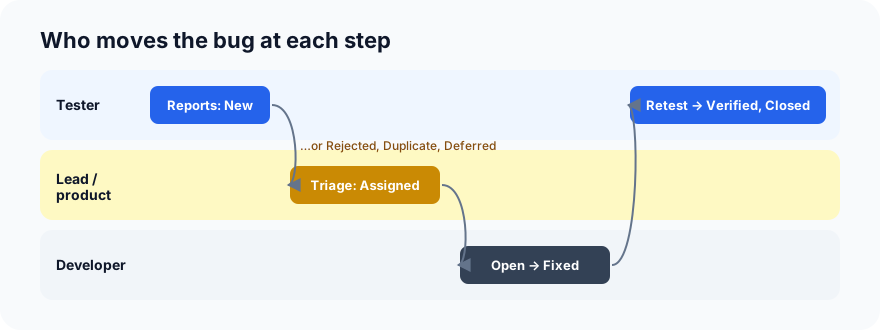
| Step | Usually done by |
|---|---|
| New → Assigned (or Rejected, Duplicate, Deferred) | Test lead, product owner or developer lead |
| Assigned → Open → Fixed | Developer |
| Fixed → Ready to retest | Developer or the release process |
| Retest → Verified → Closed, or Reopened | Tester |
The rule worth remembering: the person who found the bug should be the one who verifies the fix. They know exactly what was wrong.
One bug, start to finish
Let's follow BUG-231 from Part 9, "Expired discount code accepted at checkout":
- New (Mon 10:05): the tester reports it, with steps, a recording and a link to test case TC-104.
- Assigned (Mon 11:30): the team lead sets priority High, because it costs money, and assigns it to a developer.
- Open (Mon 14:00): the developer finds that the code checks the start date of a discount but never the end date.
- Fixed (Mon 16:20): the developer adds the missing check and an automated test for an expired code.
- Ready to retest (Tue 09:00): the fix is deployed to staging.
- Retest → Reopened (Tue 10:15): OLD10 is now refused on the web, but still accepted in the Android app, which has its own copy of the check. The tester reopens the bug with that detail.
- Fixed again (Tue 15:00): the check moves to the server, so every app uses the same rule.
- Retest → Verified (Wed 09:30): refused on web and Android; regression tests for valid codes still pass.
- Closed (Wed 09:35).
The reopen in step 6 is not a failure of the process. It is the process working. Without a proper retest, half the bug would have shipped.
Keeping the bug tracker healthy
- Triage regularly, ideally every day in busy periods, so no bug sits in "New" for a week.
- Watch for stuck bugs. A bug in "Fixed" for days probably never reached the test environment.
- Watch the reopen rate. If many bugs come back, fixes are being rushed or retests skipped.
- Don't let "Deferred" become a graveyard. Review deferred bugs before each release.
- Comment on every status change. "Reopened: still accepted in Android 2.4.0" is far more useful than a silent change.
Your tool's names may differ
Jira, Azure DevOps, GitHub Issues and other trackers each use their own names and allow teams to customise the flow. Some keep it as simple as To Do → In Progress → Done. The ideas stay the same: someone reports it, someone decides, someone fixes, someone checks, and only then is it closed.
What's next
In Part 11 we connect everything with the requirements traceability matrix: the table that proves every requirement has tests, and shows which ones are failing.
In ProvaLab, issues follow this life cycle with their status, priority and assignee, are linked to the test case and test run that found them, and can be raised straight from a failed automated test. See it in the two-minute product tour.
Prefer to read offline? The whole Testing Basics series is one free PDF: get the PDF.
See ProvaLab working on a real app
Your coding agent runs the tests, reads the failures and fixes them.