Testing Basics · Part 3
Manual vs automated testing: what to automate, and what not to
ProvaLab team · · 5 min read
In Part 2 we covered the four levels of testing. Every one of those tests can be done in two ways: by a person, or by code. Choosing well between the two is one of the most useful skills in testing, and one of the most common places teams go wrong.
What is manual testing?
In manual testing, a person uses the software and checks the result themselves. They click, type, look and decide whether what they see is right.
There are two main styles:
- Scripted manual testing: the tester follows written test cases step by step. "Open the cart. Apply code SAVE10. Check the total drops by 10%."
- Exploratory testing: the tester explores freely, using experience and curiosity. "What happens if I apply two discount codes? Or change the quantity to minus one?"
Manual testing is quick to start. You need no code, just the app and a sharp eye.
What is automated testing?
In automated testing, code performs the checks. A test script opens the app, does the steps, and compares the result with what was expected, without a person watching.
def test_discount_code_reduces_total(cart):
    cart.add("Margherita pizza", price=200)
    cart.apply_code("SAVE10")
    assert cart.total == 180
Once written, that check runs in a second, as often as you like: on every code change, every night, on every browser. That repeatability is the whole point.
Where each one shines
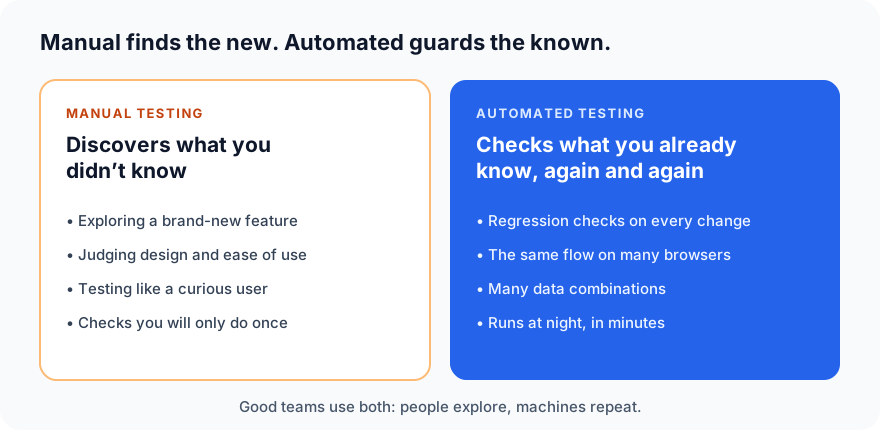
The key idea: automated tests mostly guard what you already know works. They are excellent at catching regressions, things that used to work and broke. Most new kinds of bugs are found by people, exploring in ways nobody wrote a script for.
Side by side
| Manual | Automated | |
|---|---|---|
| Cost to start | Low: just the app and a person | Higher: someone has to write the code |
| Cost to repeat | The same effort every time | Nearly free once written |
| Speed | Hours or days for a big suite | Minutes, even for thousands of checks |
| Consistency | People get tired and skip steps | Exactly the same steps every time |
| Finds new kinds of bugs | Yes, especially exploratory testing | Rarely; it checks what it was told |
| Judges design and ease of use | Yes | No |
| Needs upkeep | Test cases need updating | Test code needs updating when the app changes |
What should you automate?
Ask three questions about any test:
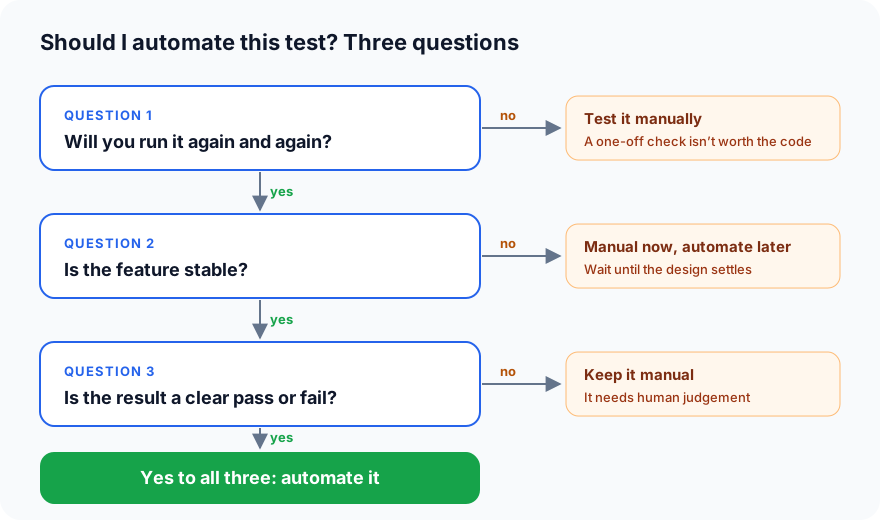
Good candidates for automation:
- Regression tests: everything that must keep working after each change.
- Smoke tests: "does the app start, can people sign in?" before every release.
- Critical journeys: sign-up, sign-in, checkout and payment.
- Cross-browser and device checks: the same flow on Chrome, Safari, Android and iPhone.
- Data-heavy tests: the same form with a hundred different inputs.
- API tests: fast, stable and easy to check.
Better kept manual:
- Brand-new features still changing every week.
- Usability and design: "is this confusing?" needs a person.
- Exploratory testing: looking for the bugs nobody imagined.
- One-off checks you will never repeat.
Automation isn't free
Two hidden costs catch many teams out:
- Maintenance. When the app changes, tests that depend on it must change too. A button renamed from "Buy" to "Checkout" can break dozens of tests at once.
- Flaky tests. A flaky test sometimes passes and sometimes fails without any code change, often because of timing or test data. Flaky tests are dangerous: once people stop trusting red results, they start ignoring real failures too.
Good automation is written like good code: readable, small and reliable. A few trusted tests beat hundreds that nobody believes.
Three myths about automation
- "Automation will replace manual testers." It replaces repetitive checking, not thinking. Exploring, questioning and judging still need people.
- "We should automate 100% of our tests." Some tests cost more to automate and maintain than they will ever save. Automate where it pays back.
- "Once written, automated tests run forever." They need the same care as the product code they test.
Common automation tools
| What you test | Popular tools |
|---|---|
| Unit tests | pytest (Python), JUnit (Java), Jest (JavaScript) |
| Web UI | Playwright, Selenium, Cypress |
| Mobile apps | Appium, Espresso (Android), XCUITest (iOS) |
| APIs | Postman, REST Assured, pytest with requests |
| Load and performance | k6, JMeter, Locust |
Automated tests usually run in a CI pipeline (continuous integration): every time someone changes the code, the tests run automatically and report the result before the change is merged.
Where AI fits in
AI coding agents can now write automated tests from a plain description, run them and read the failures. That makes automation much cheaper to start. It doesn't change the rules above: you still decide what is worth automating, and a person still explores and judges.
What's next
In Part 4 we put it all in order with the Software Testing Life Cycle (STLC): the six phases of testing, from the first requirement to the release.
ProvaLab runs your automated tests on real browsers and devices, keeps every result next to its test case, and sends failures back to your coding agent with a video and logs. See it in the two-minute product tour.
Prefer to read offline? The whole Testing Basics series is one free PDF: get the PDF.
See ProvaLab working on a real app
Your coding agent runs the tests, reads the failures and fixes them.