Testing Basics · Part 2
Types of software testing explained: unit, integration, system and acceptance
ProvaLab team · · 5 min read
In Part 1 we saw what software testing is and why every team needs it. Now the obvious next question: what exactly do you test, and in what order?
Testers answer that with four levels of testing. Each level looks at the software from a different distance, from one small piece of code up to the whole product in a customer's hands. We will walk through all four using one example: a food delivery app.
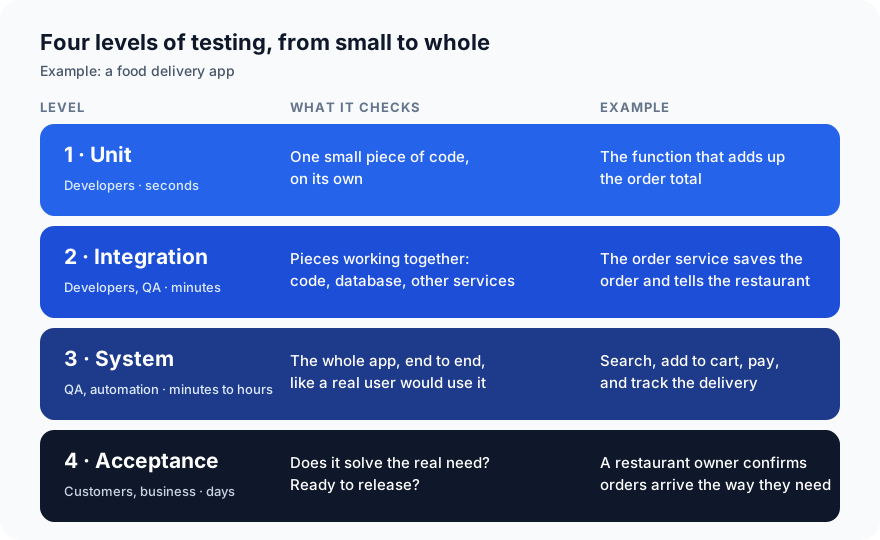
The four levels at a glance
1. Unit testing
A unit test checks one small piece of code on its own, usually a single function.
In our app, a unit test might check the function that adds up an order:
- Two pizzas at 200 and a drink at 50 should total 450.
- A 10% discount code should bring it to 405.
- An empty cart should total 0, not crash.
Developers write unit tests while they write the code. They run in milliseconds, so a project can have thousands of them and still check everything on every change.
What it can't tell you: whether the pieces work together. A perfect total function is no use if the checkout page never calls it.
2. Integration testing
An integration test checks that pieces work together: your code with the database, with another service, or with an outside system like a payment provider.
In our app: when a customer places an order, does the order service save it to the database and notify the restaurant? Each piece may pass its own unit tests and still fail here. A field could be named differently on each side, or a date could be sent in the wrong format.
Integration tests are slower than unit tests, because they need real databases or services (or realistic stand-ins). Teams usually have fewer of them.
3. System testing
A system test checks the whole app, end to end, the way a user would use it.
In our app: open the app, search for "pizza", add two to the cart, pay, and follow the delivery on the map. Every part of the system takes part: the screens, the servers, the database and the payment provider.
System testing also covers the non-functional questions from Part 1: is it fast enough, is it secure, is it easy to use? This is usually where QA engineers and automated UI tests do most of their work. You will often hear these called end-to-end (E2E) tests.
4. Acceptance testing
An acceptance test checks that the software actually solves the business need, and is ready to release.
The question changes from "does it work?" to "is this what we needed?" In our app, a restaurant owner might try the new order screen and confirm that orders arrive with everything their kitchen needs. If the app works perfectly but shows orders in a way the kitchen can't use, it fails acceptance.
Acceptance testing is often done by customers, product managers or a small group of real users. You will hear names like UAT (user acceptance testing) and beta testing (a release to a small group of real users first).
The testing pyramid: how many of each?
If end-to-end tests are closest to what users do, why not write only those? Because they are slow, costly to maintain, and when one fails it can take a while to find out why.
The testing pyramid, an idea popularised by Mike Cohn, gives a simple rule of thumb:
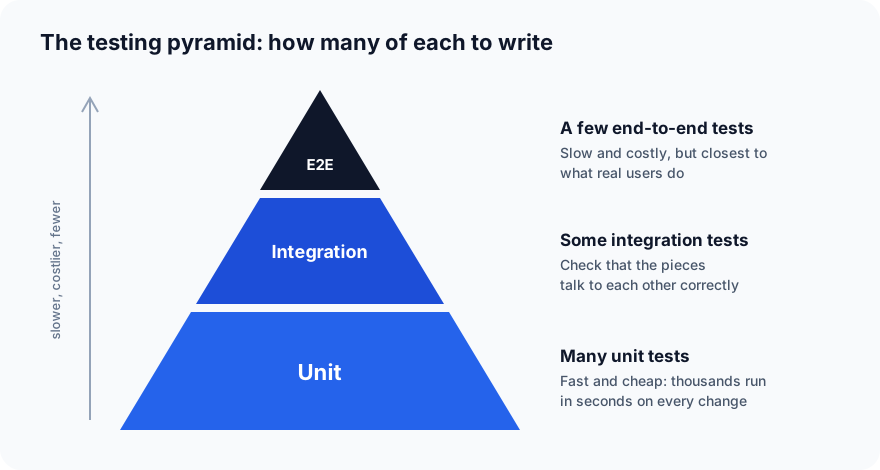
- Many unit tests at the base: fast, cheap, and they point straight at the broken line.
- Some integration tests in the middle.
- A few end-to-end tests at the top, for the journeys that matter most, such as sign-up and checkout.
The opposite shape, lots of slow end-to-end tests and few unit tests, is sometimes called the ice-cream cone. Its test runs are slow, flaky and hard to debug.
Other testing words you will hear
Not every testing word is a level. Some describe why or when you run tests, at any level:
| Term | What it means |
|---|---|
| Smoke test | A quick check that the most basic things work, such as "the app starts and the home page loads", before deeper testing |
| Sanity test | A quick, narrow check that one specific fix or change works |
| Regression test | Re-running existing tests to make sure a change didn't break something that used to work |
| End-to-end (E2E) test | A test of a full user journey through the whole system |
| Black-box testing | Testing without looking at the code, only at inputs and outputs |
| White-box testing | Testing with knowledge of the code, to cover its paths and branches |
Putting it together
| Level | Checks | Who usually | Speed | How many |
|---|---|---|---|---|
| Unit | One piece of code | Developers | Milliseconds | Many |
| Integration | Pieces working together | Developers, QA | Seconds | Some |
| System (E2E) | The whole app like a user | QA, automation | Minutes | Few |
| Acceptance | The real business need | Customers, product | Days | A handful |
A healthy project has all four. Each level catches problems the others miss.
What's next
In Part 3 we look at manual vs automated testing: what to automate, what not to, and why.
Running end-to-end tests is where ProvaLab helps most: your coding agent runs them on real browsers and devices, every result is kept in one place, and failures come back with a video and logs. See it in the two-minute product tour.
Prefer to read offline? The whole Testing Basics series is one free PDF: get the PDF.
See ProvaLab working on a real app
Your coding agent runs the tests, reads the failures and fixes them.