Testing Basics · Part 11
The requirements traceability matrix (RTM): prove everything is tested
ProvaLab team · · 6 min read
You have requirements, test cases, a test plan, test runs and bug reports. Each is useful on its own. But on release day, someone will ask the questions that need all of them at once:
- Is every requirement tested?
- Which requirements are failing right now?
- This requirement just changed: which tests do we re-run?
The tool that answers all three is the requirements traceability matrix, usually just called the RTM or traceability matrix. In the final part of this series, we build one.
What is a traceability matrix?
A traceability matrix is a table that links each requirement to the test cases that check it, and to their latest results and bugs.
"Traceability" means you can trace a line from any requirement to its tests, and from any test or bug back to its requirement. The matrix makes those lines visible.
An example
Here are the discount-code requirements from our food delivery app, matched against the test cases from Part 6:
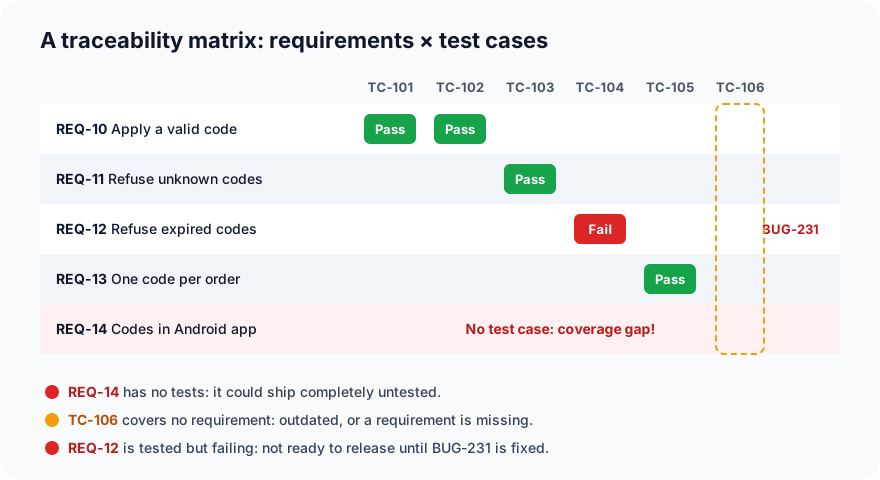
The same information as a table, the form most teams keep it in:
| Requirement | Description | Priority | Test cases | Latest result | Bugs |
|---|---|---|---|---|---|
| REQ-10 | Apply a valid discount code | High | TC-101, TC-102 | Passed | — |
| REQ-11 | Refuse unknown codes | Medium | TC-103 | Passed | — |
| REQ-12 | Refuse expired codes | High | TC-104 | Failed | BUG-231 |
| REQ-13 | Only one code per order | Medium | TC-105 | Passed | — |
| REQ-14 | Codes work in the Android app | High | None | Not tested | — |
At a glance, the matrix shows three problems that would otherwise stay hidden:
- A coverage gap: REQ-14 has no tests at all. Remember the Android bug from Part 10? Without the matrix, nobody would notice that Android was never tested.
- A failing requirement: REQ-12 is tested, but its test fails. The release isn't ready until BUG-231 is fixed.
- An orphan test: TC-106 ("removing all items removes the discount") isn't linked to any requirement. Either the behaviour matters and a requirement is missing, or the test is out of date.
Forward, backward and bidirectional traceability
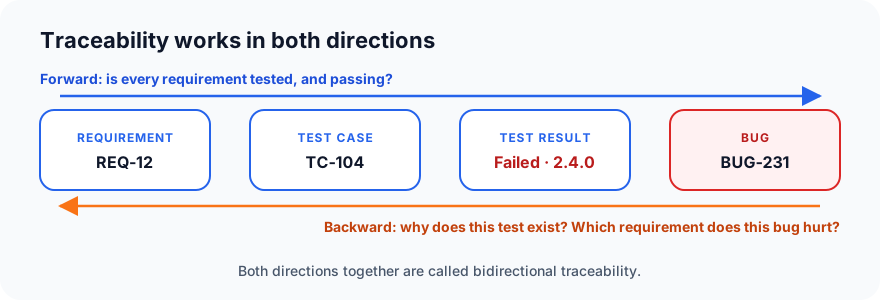
- Forward traceability goes from requirements to tests: is every requirement covered, and is it passing? This finds gaps.
- Backward traceability goes from tests and bugs back to requirements: why does this test exist, and which requirement does this bug affect? This finds orphans and shows the business impact of each bug.
- Bidirectional traceability is both at once, and it is what a good RTM gives you.
Measuring coverage
The matrix turns "are we done?" into numbers:
- Requirement coverage = requirements with at least one test ÷ all requirements. In our example: 4 of 5 = 80%. REQ-14 is the missing 20%.
- Passing requirements = requirements whose tests all pass ÷ all requirements. In our example: 3 of 5 = 60%. REQ-12 is failing and REQ-14 is untested.
Weight these by priority. Three of the five requirements are high priority, and two of those three have a problem: REQ-12 is failing and REQ-14 is untested. That tells you far more than the percentage does.
Requirement coverage is not the same as code coverage from Part 7. Code coverage asks "which lines of code ran?" Requirement coverage asks "which promises to the user did we check?" You need both.
Impact analysis: when a requirement changes
Requirements change all the time. Say the business decides expired codes should show a "renew your code" link instead of just an error. The RTM tells you instantly:
- Which tests to update: TC-104.
- Which bugs are affected: BUG-231 (the fix must include the new link).
- What to re-run before release: everything linked to REQ-12.
Without the matrix, someone has to search through hundreds of test cases and hope they found them all.
How to build an RTM, step by step
- List the requirements (or user stories), each with a unique ID such as REQ-12.
- Write test cases, each with its own ID (TC-104), as in Part 6.
- Link each test case to the requirements it covers. Do this when you write the test, not weeks later.
- Add the latest result of each test after every run.
- Link bugs to the failing test and the requirement.
- Review the gaps before each release: requirements with no tests, failing high-priority requirements, and orphan tests.
Where the RTM fits in the life cycle
The RTM isn't a one-time document. It grows through the whole testing life cycle:
| STLC phase | What happens to the RTM |
|---|---|
| Requirement analysis | Requirements are listed with IDs |
| Test case design | Test cases are linked to requirements; gaps found early |
| Test execution | Results and bugs are added after every run |
| Test closure | The final RTM shows exactly what was covered and what passed |
In agile teams, the "requirements" are usually user stories and their acceptance criteria, and the matrix links tests to stories.
Common mistakes
- A spreadsheet nobody updates. A stale RTM is worse than none, because it gives false confidence. Link tests and results where they live, so the matrix updates itself.
- Counting tests instead of requirements. Two hundred tests on one feature and none on another is not good coverage.
- Linking after the fact. Link each test to its requirement the moment you write it.
- Ignoring orphan tests. They often point to missing requirements, or to wasted effort on tests nobody needs.
- Only checking coverage, never results. "Tested" is not the same as "passing".
Testing Basics: the whole series
That completes our Testing Basics series. You now know:
- What software testing is, and why every team needs it
- The types and levels of testing, and the testing pyramid
- Manual vs automated testing, and what to automate
- The software testing life cycle (STLC)
- How to write your first automated test with pytest
- How to write good test cases
- Black-box, white-box and grey-box testing
- How to write a test plan
- How to write a good bug report
- The bug life cycle
- The requirements traceability matrix (this post)
Next we go deeper into specific kinds of testing, starting with Part 12: integration testing, then system testing, smoke and sanity testing, regression testing and performance testing.
ProvaLab Test Management keeps this matrix up to date for you: requirements and features link to test cases, every manual or automated run records its results, and issues link back to the test and requirement they affect, so coverage reports are always current. See it in the two-minute product tour.
Prefer to read offline? The whole Testing Basics series is one free PDF: get the PDF.
See ProvaLab working on a real app
Your coding agent runs the tests, reads the failures and fixes them.