Testing Basics · Part 12
Integration testing explained: approaches, stubs, drivers and examples
ProvaLab team · · 6 min read
In Part 2 we met the four levels of testing. In Part 5 we wrote unit tests that check one function on its own. But real software is many pieces talking to each other, and a surprising number of bugs live not inside the pieces, but in the gaps between them.
Finding those bugs is the job of integration testing.
What is integration testing?
Integration testing checks that separately built parts of the software work correctly together. The parts might be code modules, services, a database, or an outside system like a payment provider.
Each part may pass all its own unit tests and the whole thing can still fail, because the parts disagree about something: a field name, a date format, a unit of money, or what happens when one of them is slow.
Where integration bugs hide
Here is our food delivery app, broken into its main parts:
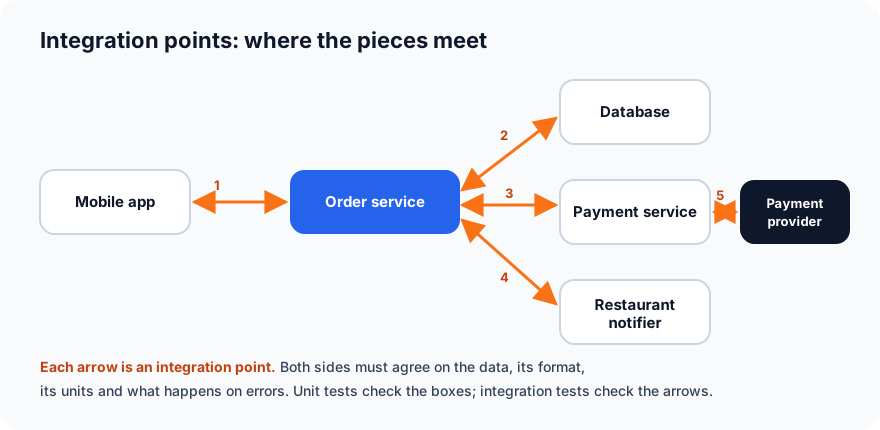
Unit tests check the boxes. Integration tests check the arrows.
A classic example: the order service sends the payment amount as 450 meaning rupees, but the payment service expects the amount in paise (hundredths of a rupee), so it charges 4.50 instead of 450. Both services pass their unit tests perfectly. Only a test that runs them together catches the bug.
Other typical integration bugs:
- Different field names or formats: one side sends
orderId, the other expectsorder_id; one sends dates as29/10/2026, the other expects2026-10-29. - Missing error handling: the payment service is down, and the order service crashes instead of showing "payment failed, please try again".
- Timeouts: the restaurant notifier takes 30 seconds and the app gives up after 10.
- Wrong assumptions: the order service assumes the database always returns orders newest first, but nobody told the database that.
- Changes on one side: a team renames a field in their API, and the services that depend on it break.
Approaches to integration testing
When there are many parts, in what order do you connect and test them?
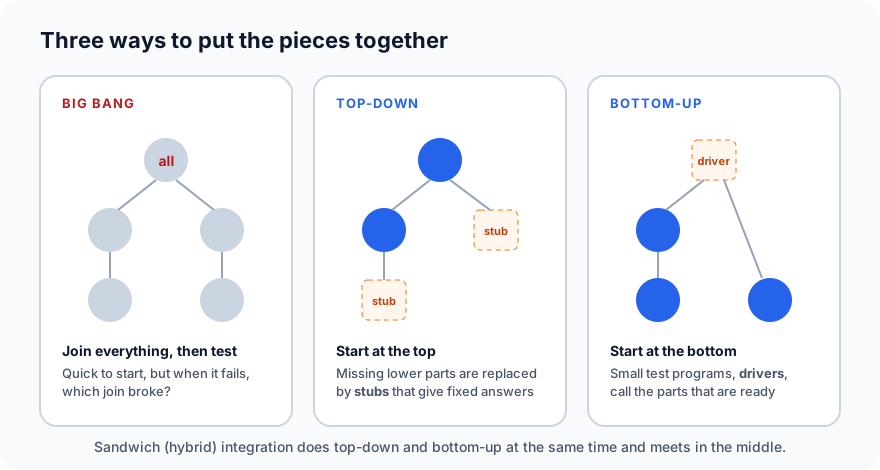
Big bang integration
Connect everything at once, then test the whole thing.
- Good: simple; nothing extra to build.
- Bad: when a test fails, the bug could be in any of the connections, so finding it is slow. And you can't start until every part is finished.
It is only reasonable for very small systems.
Incremental integration
Connect and test the parts a few at a time, so when something fails you know it is in the piece you just added. There are three ways to do this.
Top-down
Start with the top-level part (for example, the order service) and add the parts below it one by one. Parts that aren't ready yet are replaced by stubs.
- Good: the main flow of the application is tested early.
- Bad: many stubs to write; the lowest-level parts are tested last.
Bottom-up
Start with the lowest-level parts (for example, the database layer and the payment client) and work upwards. The parts above that don't exist yet are replaced by drivers.
- Good: the foundations are solid before anything is built on them.
- Bad: the full user flow can only be seen at the end.
Sandwich (hybrid)
Do top-down and bottom-up at the same time, meeting in the middle. It is the most common choice for large systems, because different teams can work in parallel.
Stubs and drivers (and other test doubles)
When you test part of a system, the parts it depends on may not be ready, or may be slow, costly or unreliable (no one wants a test that charges a real card). So we replace them with stand-ins, called test doubles:
| Test double | What it does | Example |
|---|---|---|
| Stub | Stands in for a part that is called; returns fixed answers | A fake payment service that always replies "payment approved" |
| Driver | Stands in for a part that calls; sends test requests | A small script that calls the order service with sample orders |
| Mock | A stub that also checks how it was called | Checks the order service called payment exactly once, with 450 |
| Fake | A simple working version of a real part | An in-memory database instead of the real one |
Test doubles make tests fast and repeatable. But remember: a test against a stub only proves your code works with the stub. At some point you also need tests against the real thing, or against a realistic copy in a test environment.
Two kinds of integration testing
- Component integration testing checks parts inside your system: the order service with your own database and payment service.
- System integration testing (SIT) checks your system with outside systems: the real payment provider's sandbox, an SMS gateway, a maps API.
System integration tests are usually slower and run less often, because outside systems can be slow, rate-limited or briefly unavailable.
What to check at every integration point
For each arrow in your diagram, check:
- The happy path: a normal request gets the right response, and data arrives correctly on the other side.
- Data format and units: names, types, dates, currencies, time zones and character encoding all match.
- Errors: what happens when the other side returns an error, is down, or sends something unexpected.
- Timeouts and slowness: the caller waits a sensible time and recovers cleanly.
- Retries and duplicates: if a request is retried, does the customer get charged twice?
- Security: the call is authenticated, and no secrets or personal data leak in the messages or logs.
Teams with many services also use contract testing (with tools such as Pact): each service writes down what it expects from the others, and both sides test against that agreement, so a change on one side can't silently break the other.
Integration testing in practice
- Integration tests usually run in the CI pipeline, after the unit tests pass.
- Tools like Testcontainers start a real database or message queue in a container just for the tests, then throw it away.
- API tests (with tools like Postman or pytest with requests) are a natural way to test integration points directly.
- Keep them fewer than unit tests and more than end-to-end tests, as the testing pyramid suggests.
What's next
In Part 13 we move up a level to system testing: testing the whole application, end to end, the way a real user would.
ProvaLab runs integration and API tests on every change, records each result next to its test case, and sends failures back to your coding agent with the request, the response and the logs. See it in the two-minute product tour.
Prefer to read offline? The whole Testing Basics series is one free PDF: get the PDF.
See ProvaLab working on a real app
Your coding agent runs the tests, reads the failures and fixes them.