Testing Basics · Part 13
System testing explained: testing the whole product, end to end
ProvaLab team · · 6 min read
In Part 12 we checked that the pieces of our food delivery app work together, one join at a time. Now every piece is in place. The next question is the one users actually care about: does the finished product work?
That's system testing, the third of the four levels of testing.
What is system testing?
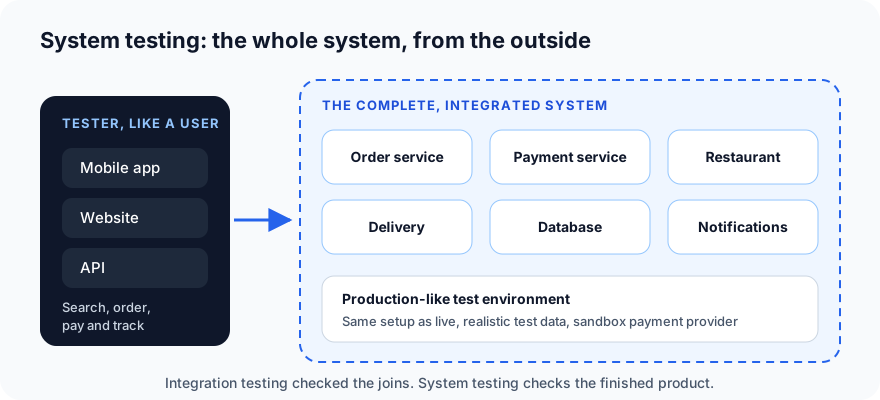
System testing checks the complete, integrated system against its requirements, from the outside, the way a real user would use it.
Three things make it different from the levels below it:
- The whole system is tested, not parts of it: apps, servers, database, notifications and outside services, all running together.
- From the outside, mostly as black-box testing: through the app, the website or the API, without looking at the code.
- In a production-like environment: set up like the live system, with realistic data.
System testing vs integration and acceptance testing
| Integration testing | System testing | Acceptance testing | |
|---|---|---|---|
| Question | Do the parts work together? | Does the whole system meet its requirements? | Is this what the business and users need? |
| Scope | Two or more parts | The complete system | The complete system, in real use |
| Done by | Developers, QA | QA team | Customers, product owners, real users |
| Based on | Interfaces and design | Requirements and specifications | Business needs and acceptance criteria |
| Environment | Test or CI | Production-like test environment | Staging or production-like, often with real users |
A system can pass system testing and still fail acceptance, if it does exactly what the requirements said but the requirements missed what users needed.
System testing vs end-to-end testing
The two terms are often used as if they meant the same thing, but there is a small difference:
- End-to-end (E2E) testing follows one complete user journey through every part of the system.
- System testing is broader: it covers those journeys plus non-functional checks like performance, security and compatibility of the whole system.
So E2E tests are one important part of system testing.
Types of system testing
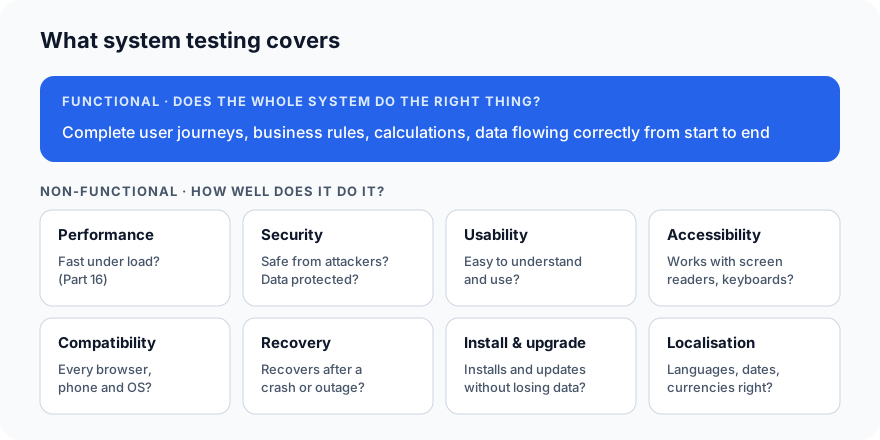
Functional system testing
Does the whole system do the right thing?
- Complete journeys: sign up, search, order, pay, track and rate.
- Business rules: free delivery over 300, one discount code per order, no orders when the restaurant is closed.
- Data end to end: the order shown to the customer, the restaurant and the delivery partner has the same items and the same total.
Non-functional system testing
How well does the whole system do it?
- Performance: does it stay fast with many users at once? (We cover this in Part 16.)
- Security: can users see only their own data? Can someone order without paying?
- Usability: can a first-time user order without help?
- Accessibility: does it work with a screen reader, with only a keyboard, with large text?
- Compatibility: does it work on the browsers, phones and operating systems your users have?
- Recovery: if a server restarts mid-payment, is the order lost, or charged twice?
- Installation and upgrade: does the new app version install cleanly and keep the user's saved addresses?
- Localisation: are languages, dates, currencies and phone numbers right in every country you serve?
Example system test cases
| ID | Test case | Expected result |
|---|---|---|
| ST-01 | New customer signs up, orders 2 pizzas, pays by card | Order confirmed; restaurant and delivery partner see it; confirmation SMS and email arrive |
| ST-02 | Order 350 worth of food | Delivery fee is 0 (free delivery over 300) |
| ST-03 | Restaurant closes while customer is at checkout | Customer is told clearly before paying; no charge |
| ST-04 | Payment provider is down | "Payment failed, please try again"; no order created; no charge |
| ST-05 | Place an order on Android, view it on the website | Same items, total and status on both |
| ST-06 | Order in Hindi with the app set to Hindi | All text, dates and prices shown correctly |
| ST-07 | Navigate the whole checkout with only a keyboard | Every step reachable and usable |
Notice how each one exercises many parts of the system at once, and how several test what happens when something goes wrong.
Entry and exit criteria for system testing
Start system testing when:
- Integration testing is complete, with no open critical integration bugs.
- The full system is deployed to a production-like environment.
- Test data and test accounts are ready.
- A smoke test of the build has passed (Part 14).
Finish system testing when:
- All planned system tests have been run.
- All high-priority tests pass.
- No critical or high-severity bugs are open (or the remaining ones are accepted risks).
- The test summary report is shared.
Doing system testing well
- Use a production-like environment. Bugs that only appear with the real configuration, a real-sized database or the real network setup won't show up on a developer's laptop.
- Use realistic test data. Long names, addresses with special characters, customers with a hundred past orders. Never use real customers' personal data; create test data that looks like it.
- Test the unhappy paths. Payment failures, closed restaurants, lost network, expired sessions. Users meet these every day.
- Think like different users: a first-time customer, a regular, a restaurant owner, a delivery partner, an admin.
- Automate the critical journeys. Sign-up, sign-in and checkout should run automatically on every release, with tools like Playwright or Selenium. Keep the rest manual or exploratory, as the testing pyramid suggests.
- Trace every test to a requirement, using the traceability matrix, so you know the whole specification is covered.
Common mistakes
- Testing on a developer environment that differs from production in small but important ways.
- Only testing happy paths because "the requirements didn't mention errors".
- Skipping non-functional testing until after release, then discovering the app is slow or inaccessible.
- Too many automated end-to-end tests, making the suite slow and flaky. Automate the journeys that matter most.
- Starting before integration is stable, so system testers spend their days reporting integration bugs.
What's next
Before deep testing like this begins, teams run a quick check to make sure the build is even worth testing. In Part 14 we cover smoke testing and sanity testing: what each one is, and when to use which.
ProvaLab runs your end-to-end and system tests on real browsers and devices, records a video of every run, and keeps each result linked to its test case and requirement, so system test reports are always up to date. See it in the two-minute product tour.
Prefer to read offline? The whole Testing Basics series is one free PDF: get the PDF.
See ProvaLab working on a real app
Your coding agent runs the tests, reads the failures and fixes them.