Testing Basics · Part 16
Performance testing and its types: load, stress, spike, soak, volume and scalability
ProvaLab team · · 7 min read
Your food delivery app passes every functional test. Then Friday evening arrives, thousands of hungry people open the app at once, pages take ten seconds to load, payments time out, and orders are lost.
The app worked. It just didn't work fast enough, for enough people at once. Finding that out before your customers do is the job of performance testing.
What is performance testing?
Performance testing checks how fast, stable and scalable a system is under different amounts of use. It is a non-functional type of testing: it doesn't ask "does checkout work?" but "does checkout still work, quickly, when 2,000 people use it at the same time?"
It answers questions like:
- How fast does the app respond with a normal number of users?
- How many users can it handle before it slows down or fails?
- What happens during a sudden rush?
- Does it stay healthy after running for hours or days?
- If we add servers, can we serve more users?
The six types of performance testing
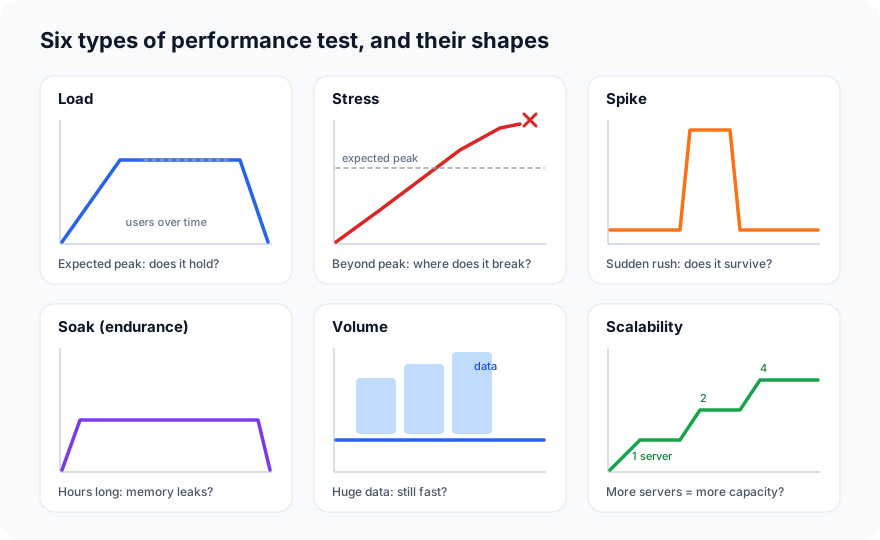
Each type answers a different question, and each has its own shape of load over time:
1. Load testing
Can the system handle the load we expect?
Ramp up to the expected number of users, for example the Friday dinner peak, hold it for a while, and check that response times and error rates stay within your targets. This is the most common performance test, and the one to run before every major release.
Example: 2,000 users browsing menus and placing orders for 15 minutes; 95% of pages must load in under 1 second, with less than 1% errors.
2. Stress testing
Where does the system break, and how does it break?
Keep increasing the load beyond the expected peak until something fails. The goal isn't to pass; it's to learn the breaking point and the failure mode. Does the app slow down gracefully and show a friendly "busy, please wait" message, or does it crash and lose orders? Does it recover by itself when the load drops?
3. Spike testing
Can the system survive a sudden rush?
Jump from a small load to a very large one in seconds, then back down. Real spikes happen: a push notification about a 50% discount, a TV advert, a cricket match ending. Auto-scaling systems in particular need this test, because adding servers takes time and the spike arrives first.
4. Soak testing (endurance testing)
Does the system stay healthy over a long time?
Run a moderate, realistic load for many hours, or even days. Some problems only appear slowly: memory that is never freed (a memory leak), database connections that aren't returned, log files that fill the disk, or caches that grow forever. A one-hour test will never find these.
5. Volume testing
Does the system stay fast with a lot of data?
Keep the number of users normal, but fill the system with a large amount of data: millions of past orders, a customer with 5,000 orders in their history, a restaurant with a huge menu. Queries that are instant on a small test database can be very slow on a full-sized one.
6. Scalability testing
Does adding resources let us serve more users?
Increase the load in steps while adding servers or capacity, and check that the system's capacity grows with them. If doubling the servers doesn't come close to doubling the capacity, something, often the database, is a bottleneck that more servers can't fix.
The six types at a glance
| Type | Question | Load shape | Typical length |
|---|---|---|---|
| Load | Can it handle the expected load? | Ramp to the expected peak, hold | 15–60 minutes |
| Stress | Where and how does it break? | Keep increasing past the peak | Until it breaks |
| Spike | Does it survive a sudden rush? | Sudden jump, then drop | Minutes |
| Soak | Does it stay healthy over time? | Moderate and steady | Hours to days |
| Volume | Is it fast with lots of data? | Normal users, huge data | Varies |
| Scalability | Do more resources mean more capacity? | Steps up, adding servers | Varies |
You may also hear capacity testing (finding the maximum number of users that still meets your targets), which sits between load and stress testing.
The metrics that matter
| Metric | What it means |
|---|---|
| Response time | How long a request takes, from sending it to getting the answer |
| Throughput | How many requests the system handles per second |
| Error rate | The share of requests that fail or time out |
| Concurrent users | How many people are using the system at the same moment |
| Resource use | CPU, memory, disk and network on the servers, and database connections |
Why averages lie: use percentiles
The average response time hides your slowest users:
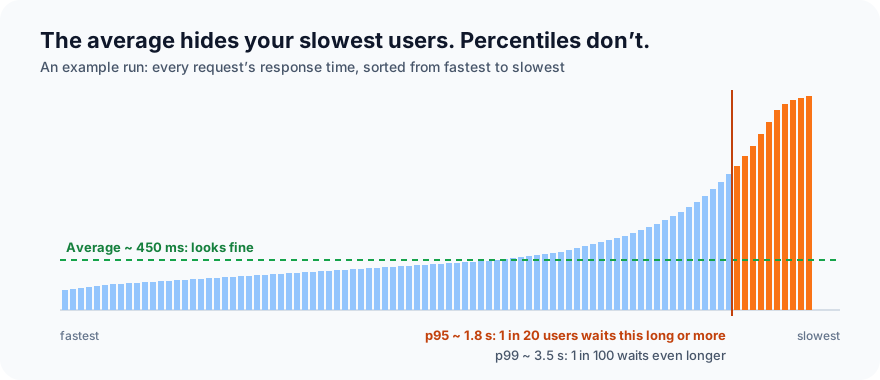
That's why performance targets use percentiles:
- p50 (median): half of requests are faster than this.
- p95: 95% of requests are faster than this; 1 in 20 users waits longer.
- p99: 99% are faster; 1 in 100 waits longer.
When thousands of people use your app, "1 in 20" is a lot of unhappy customers. A good target sounds like: "p95 under 1 second, error rate under 1%, at 2,000 users."
How to run a performance test, step by step
- Set clear goals. Which pages and APIs, how many users, and what response time and error rate count as a pass.
- Model realistic behaviour. Real users don't all hit "Pay" at the same millisecond. Mix the journeys (browse, search, order) in realistic proportions, and add think time: the pause while a user reads a menu.
- Use a production-like environment. Same server sizes, same configuration and a realistic amount of data. Results from a tiny test server don't predict production.
- Prepare test data. Enough test accounts, restaurants and codes that thousands of virtual users don't all fight over the same row in the database.
- Write the test script. Here is a load test written for k6, a popular open-source tool:
import http from 'k6/http';
import { check, sleep } from 'k6';

export const options = {
  stages: [
    { duration: '2m', target: 200 },  // ramp up to 200 users
    { duration: '5m', target: 200 },  // hold
    { duration: '1m', target: 0 },    // ramp down
  ],
  thresholds: {
    http_req_duration: ['p(95)<1000'], // 95% of requests under 1 second
    http_req_failed: ['rate<0.01'],     // less than 1% errors
  },
};

export default function () {
  const res = http.get('https://staging.example.com/api/restaurants?q=pizza');
  check(res, { 'status is 200': (r) => r.status === 200 });
  sleep(1); // think time
}
- Run it, and watch the servers too. Response times tell you that it's slow; CPU, memory and database graphs tell you why.
- Find the bottleneck, fix it, and run it again. Performance work is a loop.
Only ever test systems you own or have permission to test. Sending heavy load to someone else's website or API can look like an attack, and can take their service down.
Common bottlenecks
- Slow database queries, often a missing index.
- The "N+1" problem: loading a list of orders, then making a separate database call for each one.
- Too few database connections in the connection pool.
- No caching of data that rarely changes, like menus.
- Slow or rate-limited outside services, such as a payment provider or a maps API.
- Large pages and images that take long to download on mobile networks.
Common mistakes
- Only looking at averages instead of p95 and p99.
- Testing from an overloaded load generator. If the machine sending the traffic is at 100% CPU, you're measuring it, not your app.
- Unrealistic scenarios: no think time, every user doing the same thing, or a test database with ten rows.
- Testing once, just before launch. Run load tests regularly, so you see when a change makes things slower.
- Ignoring errors because response times looked good. Fast errors are still errors.
Popular tools
| Tool | Good for |
|---|---|
| k6 | Scripted load tests in JavaScript; good for developers and CI |
| Apache JMeter | A long-standing, GUI-based tool with many plugins |
| Gatling | High-load tests written as code (Scala, Java, Kotlin) |
| Locust | Load tests written in Python |
What's next
In Part 17 we look at test runs and test results: what happens each time a set of tests is run, and how to read the results.
ProvaLab's load testing runs k6 tests from the cloud, shows response time percentiles, throughput and errors live, and can find your app's breaking point step by step. Your coding agent can write the test from your code and explain the slow spots afterwards. See it in the two-minute product tour.
Prefer to read offline? The whole Testing Basics series is one free PDF: get the PDF.
See ProvaLab working on a real app
Your coding agent runs the tests, reads the failures and fixes them.