Testing Basics · Part 17
Test runs and test results explained: statuses, pass rates and how to read them
ProvaLab team · · 6 min read
So far in this series you have written test cases, planned the testing and learned about the kinds of testing. But a test case on its own doesn't tell you anything about the software. Only when it is run do you learn something.
This part explains test runs and test results: what they are, what each result status means, how to calculate a pass rate correctly, and how to read a run like an experienced tester.
Test case, test run and test result
These three are easy to confuse, but each has a different job:
- Test case: what to check. Written once and kept in the catalogue. "TC-104: an expired discount code must be refused."
- Test run: one execution of a set of test cases, at a specific time, on a specific build and environment. "Run 42: release 2.4 regression, build 2.4.0, staging, 4 November."
- Test result: what happened to one test case in one run. "TC-104 in Run 42: Failed. The total became 450 instead of showing 'code expired'."
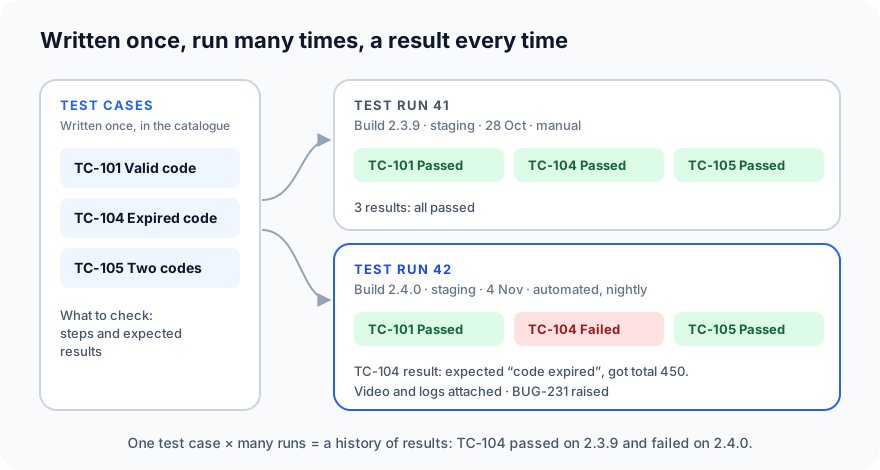
A test case is written once. It is run many times. Every run gives it a new result. Over months, those results become the test case's history: "TC-104 passed on every build until 2.4.0".
You may also hear test execution (the act of running tests) and test cycle (one round of testing, often made up of several runs, such as "the release 2.4 test cycle").
What a test run records
| Field | Example |
|---|---|
| Name | Release 2.4 regression |
| Test plan | Release 2.4: discount codes |
| Build / version | 2.4.0 |
| Environment | Staging, Chrome 131 and Android 14 |
| Test cases included | 120 from the regression suite |
| Run by | A tester, or automated (nightly pipeline) |
| Started / finished | 4 Nov 02:00 – 02:47 |
| Status | Completed |
The build and environment are what make a run meaningful. "TC-104 failed" is not useful on its own; "TC-104 failed on build 2.4.0 on staging, and passed on 2.3.9" tells a developer exactly where to look.
What a test result records
| Field | Example |
|---|---|
| Status | Failed |
| Actual result | Code OLD10 accepted; total became 450 |
| Error message | AssertionError: expected 500, got 450 (for automated tests) |
| Duration | 8.2 seconds |
| Evidence | Screenshot, screen recording, console and network logs |
| Linked bug | BUG-231 |
| Comment | Fails on web and Android; passed on 2.3.9 |
For a passed test, the status is often enough. For a failure, the evidence is what turns a red mark into something a developer can fix.
Every result status explained
| Status | Meaning | What to do |
|---|---|---|
| Passed | The actual result matched the expected result | Nothing; its history grows |
| Failed | The actual result was different | Investigate; raise or link a bug |
| Blocked | The test couldn't run because something else is broken | Fix or report the blocker, then run it |
| Skipped | Deliberately not run this time | Make sure the reason is known and acceptable |
| Not run / Untested | Planned, but not run yet | Run it, or explain why not |
| In progress | Being run right now | Wait for the result |
Blocked is not the same as failed. If sign-in is broken, every test that needs a signed-in user is blocked: we learned nothing about those features, good or bad. Counting them as failed exaggerates the damage; ignoring them hides how much is untested.
Calculating the pass rate correctly
Here is the summary of Run 42:
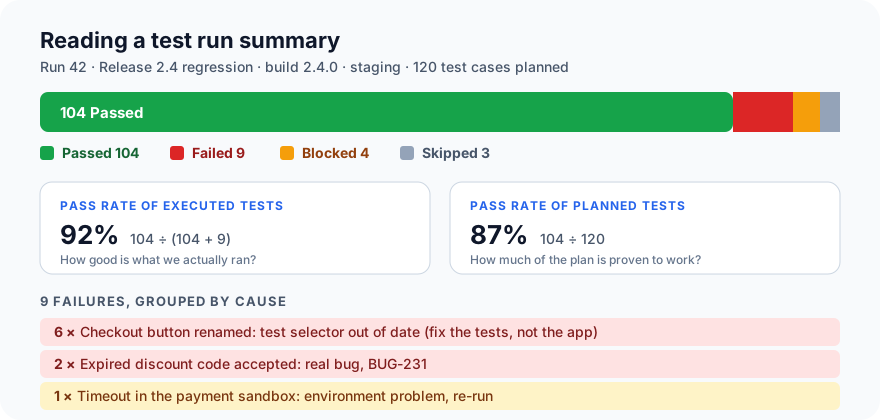
There are two different pass rates, and both are useful:
- Pass rate of executed tests = passed ÷ (passed + failed) = 104 ÷ 113 = 92%. How good is the software in the parts we actually tested?
- Pass rate of planned tests = passed ÷ all planned tests = 104 ÷ 120 = 87%. How much of the plan has been proven to work?
The gap between them is the blocked and skipped tests: 7 tests, nearly 6% of the plan, that told us nothing. A report that only says "92% passed" hides that.
How to read a test run
A run with 9 red results is not 9 problems. Read it like this:
- Check the run is valid. Right build? Right environment? Did it finish, or stop halfway?
- Look at blocked and skipped first. They show what you didn't learn.
- Group failures by cause, not by test. In Run 42, six failures come from one cause: a renamed button that the tests still look for by its old name. That's one fix to the test code, not six bugs.
- Separate real bugs from test or environment problems.
- Product bug: the app is wrong (BUG-231).
- Test problem: the test is outdated or wrong (the renamed button).
- Environment problem: something around the app failed (the payment sandbox timeout).
- Compare with the previous run. A test that passed yesterday and fails today on a new build is a likely regression (see Part 15). A test that fails on some runs and passes on others with no change is probably flaky.
- Read the actual error before describing a failure. Don't guess from a test's name what went wrong; open the result, its message and its recording.
- Link every real failure to a bug (see Part 9), so the run, the test case and the bug can all be traced to each other.
Manual and automated runs
- Manual runs: a tester works through the test cases and records each result by hand, with screenshots for failures.
- Automated runs: a tool runs the tests (often every night, or on every code change) and records the results itself, often with logs and video.
Most teams have both, and the best practice is to keep their results in the same place, so a release report covers everything tested, however it was run.
Common mistakes
- Only reporting "X% passed", without the blocked and skipped tests.
- Re-running failed tests until they pass, then reporting green. That hides flaky tests and real intermittent bugs.
- Counting failures instead of causes, so one broken selector looks like a disaster.
- Not recording the build and environment, so nobody can tell what the result applies to.
- Results scattered across spreadsheets, chat messages and CI logs, so nobody has the full picture.
What's next
In Part 18, the last of this set, we look at test coverage: the different kinds, and how to calculate each one.
In ProvaLab Test Management, every run, manual or automated, records its build, environment and a result for each test case, with the error, screen recording and logs attached to failures. Each test case keeps its full history across runs, and failures can be grouped by cause and linked to bugs. See it in the two-minute product tour.
Prefer to read offline? The whole Testing Basics series is one free PDF: get the PDF.
See ProvaLab working on a real app
Your coding agent runs the tests, reads the failures and fixes them.