Playwright with Python in practice: fixtures, page objects, saved state, mocked APIs and parallel runs
ProvaLab team · · 10 min read
In Hands-On Part 2 we wrote three Playwright tests in one file, ran them against this site and read a failure. That is where most tutorials stop, and where most real suites start to hurt: the fourth file copies the first, every test dismisses the same cookie banner, one test submits a real form and creates a real record in the real database, and the whole thing takes a minute because nothing runs in parallel.
This guide takes the three tests from Part 2 and grows them into a suite with ten tests that is cheap to change. Every command below was run as written, against provalab.io, with these versions:
| Package | Version |
|---|---|
| playwright | 1.64.0 |
| pytest-playwright | 0.10.0 |
| pytest | 9.2.0 |
| pytest-xdist | 3.8.0 |
What we're building
playwright-in-practice/
├── pytest.ini
├── conftest.py          # fixtures: saved state, viewport, mocked API
├── pages/
│   ├── __init__.py
│   ├── blog.py          # BlogPage, PostPage
│   └── guide.py         # GuidePage
├── test_blog.py
├── test_consent.py
└── test_guides.py
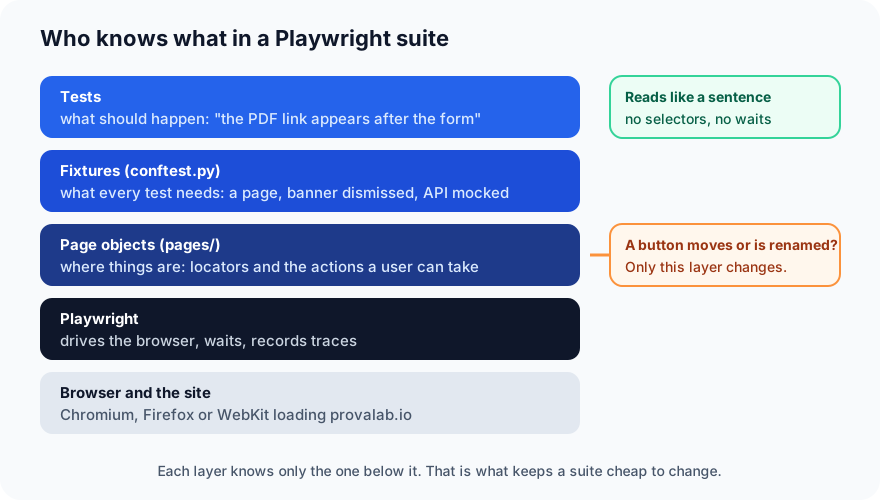
Four ideas, one each for the four problems above:
- Page objects so a locator lives in one place.
- Fixtures so a test asks for what it needs instead of building it.
- Saved browser state so the cookie banner is dismissed once, not ten times.
- A mocked API so the form test never creates a real lead.
Then we run the whole thing on four workers.
Setup (2 minutes)
Same folder and virtual environment routine as Part 2, plus the parallel runner:
mkdir playwright-in-practice && cd playwright-in-practice
python3 -m venv .venv && source .venv/bin/activate
pip install pytest-playwright pytest-xdist
playwright install chromium
pytest.ini points at the site and silences one warning:
[pytest]
addopts = --base-url https://provalab.io
filterwarnings = ignore::pytest.PytestRemovedIn10Warning
The second line is worth a sentence. pytest 9 deprecated a pattern that pytest-playwright 0.10 still uses for its base_url fixture, and prints a warning on every run. It is harmless, and the plugin will catch up; until then this keeps the output clean so that a warning you should read doesn't hide among ones you shouldn't.
Step 1: Page objects (10 minutes)
A page object is a small class that knows where things are on one page and what a user can do there. Tests use it instead of locators. Here is the blog index and a post:
# pages/blog.py
import re

from playwright.sync_api import Page


class PostPage:
    def __init__(self, page: Page):
        self.page = page
        self.title = page.get_by_role("heading", level=1)
        self.all_posts = page.get_by_role("link", name="All posts")

    URL = re.compile(r"/blog/[a-z0-9-]+/$")


class BlogPage:
    def __init__(self, page: Page):
        self.page = page
        self.heading = page.get_by_role("heading", level=1)
        self.cards = page.get_by_test_id("blog-card")
        self.pdf_banner = page.get_by_test_id("blog-pdf-banner")

    def open(self):
        self.page.goto("/blog/")
        return self

    def open_first_post(self) -> PostPage:
        self.cards.first.get_by_role("link").first.click()
        return PostPage(self.page)

    def pdf_link(self, series: str):
        return self.pdf_banner.get_by_role("link", name=f"{series} PDF")
Two things to notice. The attributes are locators, not elements: self.cards is a description of how to find the cards, evaluated fresh every time a test uses it, so it never goes stale after navigation. And an action that leads somewhere returns the page object for where you end up: open_first_post() hands back a PostPage.
The second page object covers the free-PDF pages, which have a form:
# pages/guide.py
from playwright.sync_api import Page


class GuidePage:
    """The free-PDF page for one series, e.g. /testing-basics/."""

    def __init__(self, page: Page, slug: str):
        self.page = page
        self.slug = slug
        self.parts = page.get_by_test_id("pdf-part")
        self.download_link = page.get_by_test_id("download-link")
        self.error = page.get_by_test_id("lead-error")

    def open(self):
        self.page.goto(f"/{self.slug}/")
        return self

    def request_pdf(self, name: str, email: str):
        self.page.get_by_test_id("lead-name").fill(name)
        self.page.get_by_test_id("lead-email").fill(email)
        self.page.get_by_test_id("lead-submit").click()
request_pdf is the kind of method page objects exist for: three low-level steps that every test would otherwise repeat, named after what the user is doing.
Now the three tests from Part 2, rewritten. They read like sentences, and there is not a single selector in them:
# test_blog.py
from playwright.sync_api import expect

from pages.blog import PostPage


def test_blog_lists_posts(blog):
    expect(blog.heading).to_have_text("ProvaLab Blog")
    expect(blog.cards.first).to_be_visible()


def test_a_post_opens_from_the_list(blog):
    post = blog.open_first_post()
    expect(post.page).to_have_url(PostPage.URL)
    expect(post.title).to_be_visible()
    expect(post.all_posts).to_be_visible()


def test_pdf_banner_links_to_both_guides(blog):
    expect(blog.pdf_link("Testing Basics")).to_have_attribute("href", "/testing-basics/")
    expect(blog.pdf_link("Hands-On Testing")).to_have_attribute("href", "/hands-on-testing/")
Where does blog come from? That is the next step.
Step 2: Fixtures (5 minutes)
A pytest fixture is a function that builds something a test needs; a test asks for it by naming it as a parameter. You have been using them since Part 2: page is a fixture that pytest-playwright provides. Yours go in conftest.py, which pytest loads automatically:
# conftest.py (first part)
import pytest

from pages.blog import BlogPage


@pytest.fixture
def blog(page) -> BlogPage:
    return BlogPage(page).open()
A fixture can ask for other fixtures. blog asks for page, wraps it and opens the blog. Every test that names blog gets a fresh page, already on /blog/, with no setup lines of its own.
pytest-playwright also lets you override its own fixtures. The most useful one is browser_context_args, the options every new browser context is created with. A fixed viewport and locale make screenshots and date formats the same on every machine:
@pytest.fixture(scope="session")
def browser_context_args(browser_context_args):
    return {
        **browser_context_args,
        "viewport": {"width": 1280, "height": 800},
        "locale": "en-GB",
    }
scope="session" means it runs once per test session, not once per test. Keep that word in mind for the next step.
Step 3: Dismiss the cookie banner once (10 minutes)
Every page on this site shows a small cookie notice until you close it. In Part 2 we ignored it, because none of the three tests clicked anything under it. In a bigger suite it will eventually sit on top of something you need, and the lazy fix, a click at the top of every test, is slow and gets copied everywhere.
Playwright has a better answer. A browser context can save its state (cookies and local storage) to a file, and a new context can start from that file. So: dismiss the banner once, save, and have every test's context begin with it already gone.
# conftest.py (second part)
import os
from pathlib import Path

# One state file per pytest-xdist worker, so parallel runs never write the same file.
STATE = Path(__file__).parent / ".state" / f"consent-{os.environ.get('PYTEST_XDIST_WORKER', 'main')}.json"


@pytest.fixture(scope="session")
def consent_state(browser, base_url) -> Path:
    """Dismiss the cookie banner once per session and save the browser state."""
    if not STATE.exists():
        context = browser.new_context(base_url=base_url)
        page = context.new_page()
        page.goto("/")
        page.get_by_role("button", name="Dismiss").click()
        STATE.parent.mkdir(exist_ok=True)
        context.storage_state(path=STATE)
        context.close()
    return STATE


@pytest.fixture(scope="session")
def browser_context_args(browser_context_args, consent_state):
    """Every test's browser context starts with the banner already dismissed."""
    return {
        **browser_context_args,
        "storage_state": str(consent_state),
        "viewport": {"width": 1280, "height": 800},
        "locale": "en-GB",
    }
consent_state is session-scoped, so the banner is dismissed once per run. browser_context_args now asks for it and passes the file as storage_state. Nothing else in the suite mentions the banner at all. The saved file is small and readable:
{"cookies": [], "origins": [{"origin": "https://provalab.io", "localStorage": [{"name": "cookie-consent", "value": "dismissed"}]}]}
What went wrong the first time
Our first version clicked the banner's OK button instead of Dismiss. The run was green, the state file was {"cookies": [], "origins": []}, and the banner was still there in every test. The home page has two buttons called "OK", and the click had landed on the other one. The lesson is the one from Part 1 again: a locator should describe one thing. "Dismiss" is the banner's only button with that accessible name, so that is the one the fixture clicks.
Two tests prove the state works, and show the difference between a context built from the fixture and a bare one:
# test_consent.py
from playwright.sync_api import expect

BANNER = "We use cookies for analytics"


def test_banner_is_gone_with_saved_state(page):
    page.goto("/")
    expect(page.get_by_text(BANNER)).to_have_count(0)


def test_banner_shows_for_a_fresh_visitor(browser, base_url):
    context = browser.new_context(base_url=base_url)   # no storage_state
    page = context.new_page()
    page.goto("/")
    expect(page.get_by_text(BANNER)).to_be_visible()
    context.close()
The same trick is how you handle login. Sign in once in a session fixture, save the state, and every test starts signed in. Put the state file in .gitignore: it holds whatever cookies the site set.
Step 4: Mock the API so no real lead is created (10 minutes)
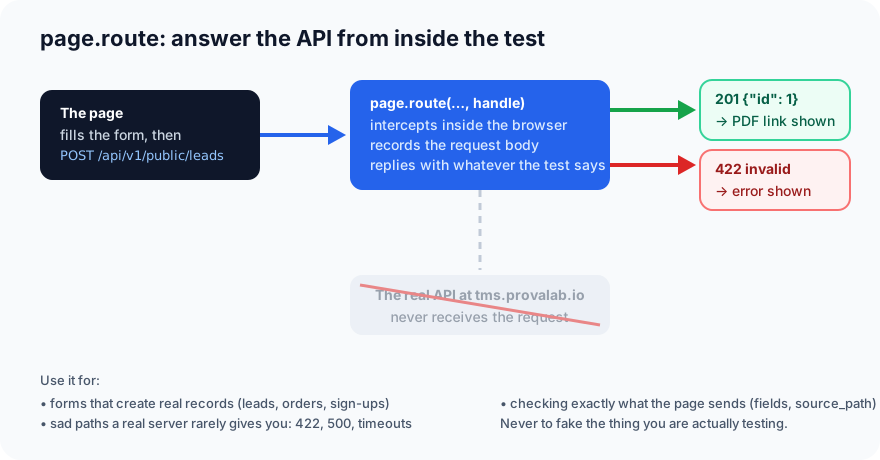
The free-PDF pages have a form: name and email, then a download link appears. Behind it the page POSTs to a lead API. A test that fills the form for real creates a real lead every run, and someone has to delete "Test Reader" from the inbox each morning.
page.route intercepts requests inside the browser, before they leave it. The test decides what the server says.
As a fixture, so any test can ask for it:
# conftest.py (third part)
@pytest.fixture
def mock_leads(page):
    """Answer the lead API inside the browser, so tests never create a real lead.
    Returns the list of request bodies the page sent."""
    sent = []

    def handle(route):
        sent.append(route.request.post_data_json)
        route.fulfill(status=201, json={"id": 1})

    page.route("**/api/v1/public/leads", handle)
    return sent
The fixture returns the list it appends to, so a test can check what the page sent, not just what it showed afterwards. Here are the guide tests, parametrised over both PDF pages:
# test_guides.py
import pytest
from playwright.sync_api import expect

from pages.guide import GuidePage

GUIDES = [("testing-basics", 23), ("hands-on-testing", 7)]


@pytest.mark.parametrize("slug,parts", GUIDES)
def test_guide_lists_every_part(page, slug, parts):
    guide = GuidePage(page, slug).open()
    expect(guide.parts).to_have_count(parts)


@pytest.mark.parametrize("slug,parts", GUIDES)
def test_pdf_appears_after_the_form(page, mock_leads, slug, parts):
    guide = GuidePage(page, slug).open()
    guide.request_pdf("Test Reader", "[email protected]")
    expect(guide.download_link).to_have_attribute("href", f"/downloads/{slug}.pdf")
    assert len(mock_leads) == 1
    assert mock_leads[0]["email"] == "[email protected]"
    assert mock_leads[0]["source_path"] == f"/{slug}/"


def test_rejected_submission_shows_an_error(page):
    page.route("**/api/v1/public/leads", lambda route: route.fulfill(status=422, json={"detail": "invalid"}))
    guide = GuidePage(page, "testing-basics").open()
    guide.request_pdf("Test Reader", "[email protected]")
    expect(guide.error).to_be_visible()
    expect(guide.download_link).to_have_count(0)
@pytest.mark.parametrize runs a test once per row of GUIDES, so two tests become four, each with its own name in the output. The last test skips the fixture and routes inline, because it wants a different answer: a 422. That is the real value of mocking. A real server gives you the happy path all day; the sad paths, a rejection, a 500, a timeout, you get on demand only when you are the server.
One rule: mock the things around what you are testing, never the thing itself. Here the subject is the page's behaviour after an answer, so faking the answer is fair. A test of the lead API would have to call the lead API.
Step 5: Run it, then run it in parallel (3 minutes)
The whole suite, ten tests, one browser:
$ pytest -v
test_blog.py::test_blog_lists_posts[chromium] PASSED                     [ 10%]
test_blog.py::test_a_post_opens_from_the_list[chromium] PASSED           [ 20%]
test_blog.py::test_pdf_banner_links_to_both_guides[chromium] PASSED      [ 30%]
test_consent.py::test_banner_is_gone_with_saved_state[chromium] PASSED   [ 40%]
test_consent.py::test_banner_shows_for_a_fresh_visitor[chromium] PASSED  [ 50%]
test_guides.py::test_guide_lists_every_part[chromium-testing-basics-23] PASSED [ 60%]
test_guides.py::test_guide_lists_every_part[chromium-hands-on-testing-7] PASSED [ 70%]
test_guides.py::test_pdf_appears_after_the_form[chromium-testing-basics-23] PASSED [ 80%]
test_guides.py::test_pdf_appears_after_the_form[chromium-hands-on-testing-7] PASSED [ 90%]
test_guides.py::test_rejected_submission_shows_an_error[chromium] PASSED [100%]
============================= 10 passed in 27.14s ==============================
Now the same suite on four workers. pytest-xdist starts four pytest processes and deals the tests out between them; each process gets its own browser and its own session fixtures, which is why the state file is named after the worker:
$ pytest -q -n 4
..........                                                               [100%]
10 passed in 11.56s
| Run | Time |
|---|---|
pytest (one worker) |
27.1 s |
pytest -n 4 |
11.6 s |
Ten tests don't need four workers. A hundred do, and parallel only works if the tests were written as if they would run in any order, each starting from its own goto() and sharing nothing but read-only state. That is why Part 2's habit, "no test depends on another", matters before the suite is big, not after.
Everything from Part 2 still applies on top: --headed to watch, --tracing retain-on-failure to keep a trace of anything red, --browser firefox to run the same ten tests in a second engine.
Habits worth keeping
- Page objects hold locators and actions, never assertions. The test decides what should be true; the page object only knows where to look.
- A fixture per recurring need. If two tests share three setup lines, that is a fixture.
- Session scope for anything expensive and read-only: saved state, a signed-in session, test data that doesn't change.
- Mock what creates real records, and the sad paths. Everything else, hit for real.
- Write every test to run alone and in any order. Then
-n 4is free when you need it.
What's next
This suite runs on one laptop and one browser. The next step is to run it on the browsers and devices your users actually have, keep every trace somewhere the whole team can see it, and have failures land with the agent that wrote the code. That is what ProvaLab's QA Infrastructure does: the same Playwright tests connect to real browsers and devices in the cloud, every session is recorded, and a failing test's trace goes straight back to your coding agent through the ProvaLab plugin or MCP. See it in the two-minute product tour.
If you came here without doing Part 2 first, start at Your first Playwright test. The whole Hands-On series, seven parts, is also one free PDF.
See ProvaLab working on a real app
Your coding agent runs the tests, reads the failures and fixes them.