Testing Basics · Part 14
Smoke testing vs sanity testing: the difference, with examples
ProvaLab team · · 5 min read
Imagine the team spends a whole morning preparing to test a new build, and the first tester finds that nobody can even sign in. Every other test is now blocked, and the morning is gone.
Two quick checks exist to stop that from happening: smoke testing and sanity testing. They are among the most confused terms in testing, and a favourite interview question. This post clears them up.
What is smoke testing?
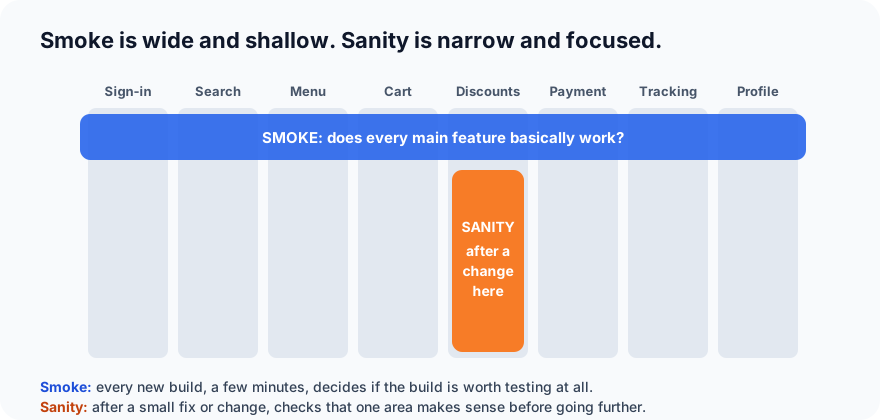
A smoke test is a quick, shallow check of the most important features of a new build, to decide whether it is stable enough to test further.
It answers one question: "Is this build worth testing at all?"
The name comes from hardware: switch a new device on, and if smoke comes out, there's no point testing anything else. Smoke testing is also called build verification testing (BVT) or confidence testing.
Key traits:
- Runs on every new build, before any deeper testing.
- Covers the main features, lightly: wide, not deep.
- Takes minutes, not hours.
- Is usually scripted and automated.
- Fail = reject the build. Testing doesn't start until it's fixed.
Example smoke test checklist
For our food delivery app, a smoke test might be just ten checks:
- The app opens and the home page loads.
- A test customer can sign in.
- Searching for "pizza" returns restaurants.
- A restaurant menu opens.
- An item can be added to the cart.
- Checkout opens and shows the right total.
- A test payment in the sandbox succeeds.
- The order appears in "My orders".
- The restaurant dashboard receives the order.
- The customer can sign out.
Notice that none of these go deep. There's no discount-code edge case, no closed-restaurant scenario. That's the job of the full test cycle that comes after the smoke test passes.
What is sanity testing?
A sanity test is a quick, focused check of one area after a small change or bug fix, to confirm the change makes sense before investing in further testing.
It answers a different question: "Did this specific change work, and does this area still behave sensibly?"
Key traits:
- Runs after a small change: a bug fix, a minor feature, a configuration change.
- Covers one area, a little deeper: narrow, not wide.
- Takes minutes.
- Is often unscripted: a tester who knows the area checks it quickly.
- Fail = back to the developer before wasting time on full re-testing and regression.
Example sanity test
The developer has just fixed BUG-231 from Part 9: expired discount codes were being accepted. A quick sanity check of the discount area:
- An expired code (OLD10) is now refused with the right message.
- A valid code (SAVE10) still works.
- Removing a code restores the full total.
- The checkout page still loads normally.
If that looks sensible, the tester moves on to the formal re-test of the bug and the regression run (both covered in Part 15). If the valid code is now broken too, the build goes straight back. No point running 200 regression tests on it.
Smoke vs sanity: the difference at a glance
| Smoke testing | Sanity testing | |
|---|---|---|
| Question | Is this build stable enough to test? | Did this change work, and is the area sensible? |
| When | Every new build | After a small fix or change |
| Scope | Wide and shallow: all main features | Narrow: one area |
| Depth | Just "does it basically work?" | A bit deeper in that area |
| Scripted? | Usually scripted and automated | Often unscripted |
| Done by | Testers, or automatically in CI | Usually testers |
| If it fails | Reject the whole build | Send the change back |
| Related to | Build acceptance | Part of regression and re-testing |
A simple way to remember it: smoke checks the whole house has power; sanity checks that the one room you just rewired has working lights.
A word of warning: teams and textbooks don't all use these terms the same way. Some glossaries treat "sanity test" as just another name for a smoke test. In day-to-day practice, most teams use the distinction above. If you join a new team, ask what they mean by each.
Where they fit in the testing process
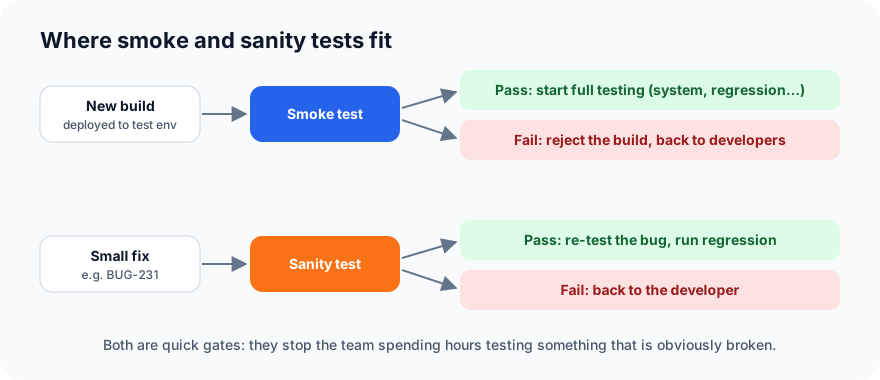
In the testing life cycle, a passing smoke test is usually part of the entry criteria for test execution: "build deployed and smoke test passed".
Automating smoke tests
Smoke tests are ideal for automation: few in number, run on every build, and with a clear pass or fail.
- Run them automatically after every deployment to a test environment, as a step in the CI/CD pipeline.
- Keep them fast: a few minutes at most. If the smoke suite takes an hour, it has turned into a regression suite.
- Keep them stable: a flaky smoke test blocks every build, so these need to be the most reliable tests you have.
- Run them in production too: after each release, a small set of safe, read-only smoke checks (the home page loads, search works) confirms the release went out cleanly.
Sanity tests are usually quicker to do by hand, because each one targets whatever just changed.
Common mistakes
- Skipping the smoke test "because the change was small". Small changes break builds too.
- Letting the smoke suite grow until it takes as long as full testing.
- Testing deeply during a smoke test. Its job is go / no-go, not finding every bug.
- Treating a sanity pass as "done". Sanity only says the change is worth testing properly: re-testing and regression still follow.
What's next
After the sanity check, two more things happen to every fix: the bug is re-tested, and regression tests check that nothing else broke. In Part 15 we explain regression testing vs re-testing, and how to keep regression suites fast.
ProvaLab can run your smoke suite automatically after every deployment, on real browsers and devices, and report the result in seconds, so a broken build is caught before anyone starts testing it. See it in the two-minute product tour.
Prefer to read offline? The whole Testing Basics series is one free PDF: get the PDF.
See ProvaLab working on a real app
Your coding agent runs the tests, reads the failures and fixes them.