Testing Basics · Part 15
Regression testing vs re-testing: what they are and why we do both
ProvaLab team · · 6 min read
A developer fixes a bug and says "done". Two questions follow, and they sound similar but are very different:
- Is the bug really fixed?
- Did the fix break anything else?
The first is answered by re-testing. The second is answered by regression testing. Every fix needs both, and mixing them up is one of the most common ways bugs reach customers.
What is re-testing?
Re-testing (also called confirmation testing) means running the exact test that failed again, after the bug has been fixed, to confirm the fix works.
Why do we re-test?
Because a fix is only a claim until someone checks it. In real teams, "fixed" turns out not to be fixed surprisingly often:
- The fix is partial. It works for the case the developer tried, but not for the one in the bug report.
- It works in one place but not another. Remember BUG-231: the expired-code fix worked on the web, but the Android app had its own copy of the check, so the bug was still there.
- The fix never arrived. It's on the developer's machine or in a branch, but not in the build being tested.
- The developer misunderstood the bug and fixed something else.
- The environment hid the bug, so it passed on the developer's laptop but fails with real test data.
How to re-test
- Use the same steps, the same data and the same kind of environment as the original bug report.
- Test on every platform the bug affected (web, Android, iPhone).
- Try one or two small variations around the bug: another expired code, a code that expired one minute ago.
- Then update the bug: Verified if it passed, Reopened with details if not (see the bug life cycle).
The person who found the bug is usually the best one to re-test it.
What is regression testing?
Regression testing means re-running tests that used to pass, after a change, to make sure nothing that worked before is now broken.
A regression is something that worked yesterday and doesn't work today. Regressions happen because software is connected: code is shared, data flows between features, and a change in one place can ripple into others.
Why do we do regression testing?
Changes break things in places nobody expected:
- Shared code: the fix for BUG-231 moved the discount check to the server. Every app now uses it, including flows nobody touched.
- Side effects: a faster search query returns results in a different order, and the "recommended" section breaks.
- Merges: two developers' correct changes conflict when combined.
- Upgrades: a new version of a library, the database or the browser changes behaviour.
- Configuration: a changed setting in one environment affects features far away.
Developers can't always predict these ripples. Regression tests catch them.
Re-testing vs regression testing for one fix
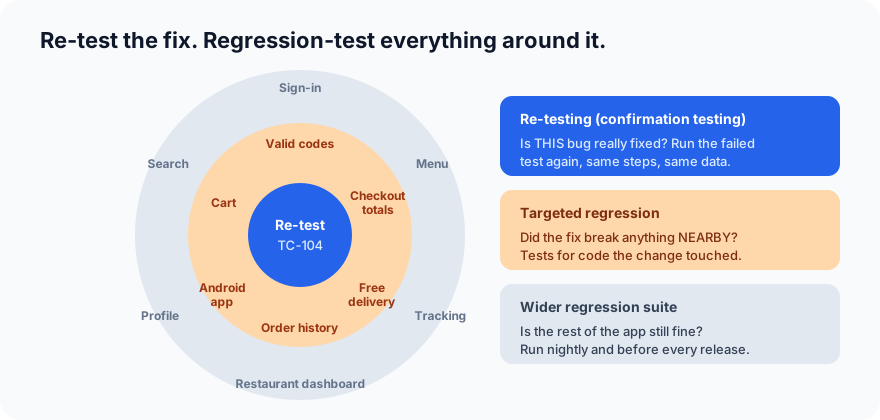
For the BUG-231 fix:
- Re-test: TC-104 (expired code refused), on web and Android.
- Targeted regression: valid codes still work, cart and checkout totals, free-delivery rule, order history totals, the Android checkout. These all touch the discount code that changed.
- Wider regression: the full suite runs that night, and again before the release.
The differences at a glance
| Re-testing | Regression testing | |
|---|---|---|
| Question | Is this bug really fixed? | Did the change break anything else? |
| What is run | The test(s) that failed | Tests that previously passed |
| When | After a specific bug is fixed | After any change: fixes, features, upgrades |
| Scope | Narrow: the bug | Wide: the areas around the change, or everything |
| Planned in advance? | No, it depends on which bugs were found | Yes, a regression suite is built and maintained |
| Good for automation? | Sometimes; often quicker by hand | Yes, it's the classic case for automation |
| Expected result | The test that failed now passes | Tests that passed still pass |
Re-testing usually comes first: there's no point running a big regression suite on a fix that doesn't work. (A quick sanity check often comes before both.)
How to choose which regression tests to run
Running every test after every change is the safest choice, but rarely practical. There are three common strategies:
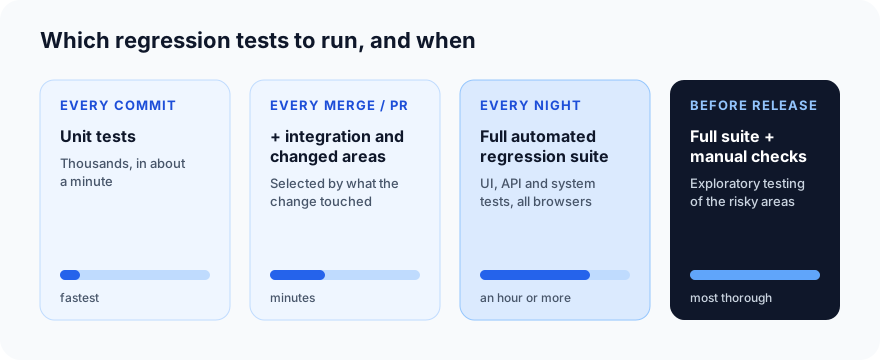
- Retest all: run the whole regression suite. Most thorough, slowest. Good before a release.
- Regression test selection: run only the tests related to what changed. A traceability matrix and good test tagging (by feature, by area of code) make this possible.
- Prioritisation: run tests in order of risk, with critical journeys first (risk-based testing), so the most important results come back first.
Most teams combine them with a schedule like this:
Building and maintaining a regression suite
A regression suite is a living thing. Some habits that keep it useful:
- Add a test for every bug you fix. If a bug happened once, it can come back. The test from the BUG-231 fix joins the suite permanently.
- Automate it. Regression tests are run again and again, which is exactly when automation pays off (see Part 3).
- Tag tests by feature, priority and speed, so you can run "all checkout tests" or "critical tests only".
- Remove or update obsolete tests. A test for a feature that no longer exists only slows everyone down.
- Fix flaky tests quickly. If people learn to ignore red results, real regressions slip through.
- Watch the run time. If the suite gets too slow to run often, split it into faster and slower layers.
Common mistakes
- Re-testing only on one platform when the bug affected several.
- Skipping regression for "small" fixes. Small changes to shared code cause big regressions.
- Running the full suite on a fix that hasn't been re-tested, then wasting the run when the fix turns out not to work.
- Never adding tests for fixed bugs, so the same bug returns months later.
- Treating regression testing as manual work forever. It grows with every release; without automation it becomes impossible to keep up.
What's next
In Part 16 we look at performance testing and its types: load, stress, spike, soak, volume and scalability testing.
ProvaLab runs your regression suite on every change and every night, on real browsers and devices, and shows each test's history: when it last passed, and the build where it started failing. When a regression appears, your coding agent gets the failure with its logs and recording, and can fix it. See it in the two-minute product tour.
Prefer to read offline? The whole Testing Basics series is one free PDF: get the PDF.
See ProvaLab working on a real app
Your coding agent runs the tests, reads the failures and fixes them.