Testing Basics · Part 1
What is software testing, and why does every team need it?
ProvaLab team · · 5 min read
Every app you use today, your bank, your food delivery, the page you are reading, was tested before it reached you. Usually you only notice testing when it was skipped: a payment that fails, a page that never loads, a "something went wrong" at the worst moment.
This is Part 1 of our Testing Basics series. No prior knowledge needed. By the end you will know what software testing is, what it checks, when it happens and who does it.
What is software testing?
Software testing is checking that software does what it should, and doesn't do what it shouldn't.
That sentence has two halves, and both matter:
- Does what it should: a user can sign up, add items to a cart and pay.
- Doesn't do what it shouldn't: a user can't see someone else's orders, the app doesn't crash on an empty search, and a wrong password doesn't let anyone in.
A test is one small check of that kind. It has three parts:
- A starting point: "A signed-in user with one item in their cart."
- An action: "They click Pay."
- An expected result: "They see the order confirmation, and the cart is empty."
If what actually happens matches the expected result, the test passes. If not, it fails, and you have found a bug: a difference between what the software does and what it should do.
What does testing check?
Testing answers four big questions about your software:
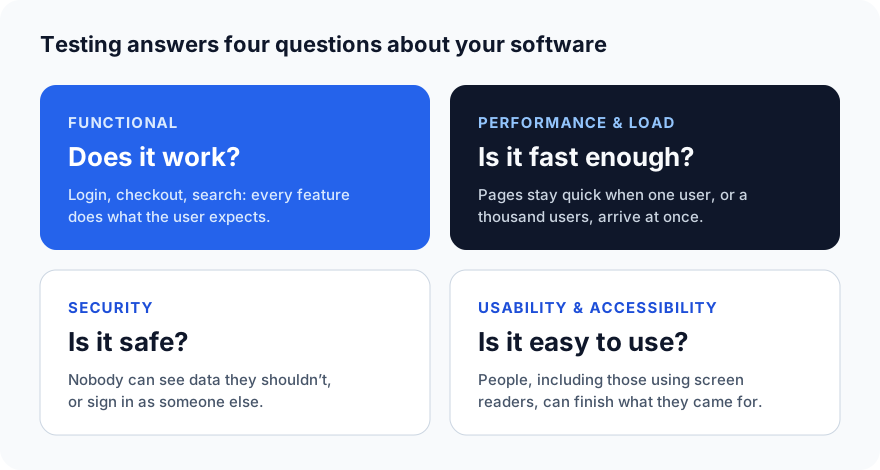
The first question, "does it work?", is called functional testing. The other three are non-functional testing: they check how well the software works, not just whether it does. Each one gets its own posts later in this series.
Why does every team need testing?
- Users leave quickly. If the checkout breaks, most people don't report it. They just go to a competitor.
- Bugs get more expensive the later you find them. A mistake caught while writing the code takes minutes to fix. The same mistake found by a customer means support tickets, an urgent fix, a new release and lost trust.
- Security problems are business problems. One leaked customer record can cost far more than years of testing.
- Changes break old things. Every new feature can break an old one. Tests that run on every change catch that, so the team can move fast without fear.
- Code is written faster than ever. With AI coding assistants, teams produce far more code. Checking it has to keep up.
When does testing happen?
A common mistake is to test only at the end, just before release. Good teams test at every stage:
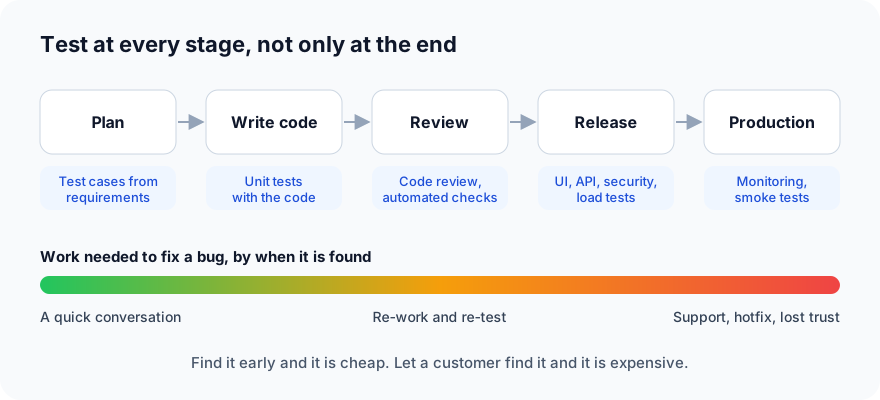
This idea is often called "shift left": move testing earlier (to the left) on the timeline, where bugs are cheapest to fix.
Who does the testing?
- Developers write unit tests that check small pieces of their own code.
- QA engineers (quality assurance) plan what to test, test like a real user would, and look for the cases nobody thought of.
- Automation engineers turn repeated checks into code that runs by itself, on every change.
- Security and performance specialists test the harder questions: can it be attacked, and does it hold up under heavy traffic?
- AI agents are the newest member of the team: they can now write and run tests, and read the results.
In a small team, one person may do all of these. What matters is that each job gets done, not who has which title.
Manual and automated testing
Testing can be done in two ways:
- Manual testing: a person uses the app and checks the result by eye. Best for new features, design and "does this feel right?"
- Automated testing: code performs the checks. Best for anything you need to check again and again, like "can users still sign in?" on every release.
Most teams use both. We cover automation in detail in Part 3.
Four myths about testing
- "Testing proves there are no bugs." It can't. Testing shows bugs are there; it never proves they are all gone. Its job is to find the important ones before users do.
- "Testing is the QA team's job." Quality is everyone's job. Developers, reviewers and testers each catch different problems.
- "We'll test at the end." By the end, bugs are tangled together and expensive. Test as you go.
- "100% test coverage means we're safe." Coverage tells you which lines of code ran during tests, not whether the tests checked the right things.
Key terms
| Term | Meaning |
|---|---|
| Test case | One check: a starting point, an action and an expected result |
| Bug (defect) | A difference between what the software does and what it should do |
| Test suite | A group of related test cases, such as "all checkout tests" |
| Test run | One time a set of tests is run, with a pass or fail result for each |
| Regression | Something that used to work and is now broken by a change |
What's next
In Part 2 we look at the types of testing (unit, integration, system and acceptance tests) and when to use each.
Want to see testing done by an AI agent on a real app? Watch the two-minute product tour. ProvaLab keeps your test cases, runs them on real browsers and devices, and records every result in one place.
Prefer to read offline? The whole Testing Basics series is one free PDF: get the PDF.
See ProvaLab working on a real app
Your coding agent runs the tests, reads the failures and fixes them.