Testing in Practice · Part 18
Cross-browser testing (hands-on): Chromium, Firefox and WebKit, and two bugs only Safari users would see
ProvaLab team · · 10 min read
Most teams test in Chrome. Most of their users use Chrome-based browsers too, so most bugs are found. The ones that aren't tend to land on the iPhone, because browsers on an iPhone, including Chrome, use Apple's WebKit engine. (Since iOS 17.4, browsers in the EU may use their own engines, but WebKit is still what almost every iPhone user gets.) A bug that only happens in WebKit is a bug for your iPhone users.
Cross-browser testing runs the same tests on the different browser engines: Chromium (Chrome, Edge, Opera, Samsung Internet), Gecko (Firefox) and WebKit (Safari). Playwright can drive all three from one test.
This post does that for a FoodNow page with two planted bugs. Before planting them, we asked the three engines a set of questions to find out what really differs between them in late 2026, rather than repeating old advice. Every result below is from a real run, in Microsoft's official Playwright Docker image, version 1.64.0, with Chromium 156, Firefox 157 and WebKit 27.2.
Why the Docker image
On a normal Linux laptop, Chromium and Firefox run once Playwright has downloaded them. WebKit didn't: it needs system libraries that have to be installed with sudo. Playwright's error said exactly which:
║ Host system is missing dependencies to run browsers. ║
║     sudo playwright install-deps                     ║
║     sudo apt-get install libevent-2.1-7t64\          ║
║         libgstreamer-plugins-bad1.0-0\               ║
║         libflite1\                                   ║
...
The official image has all three browsers and everything they need, which is also how most teams run them in CI:
docker pull mcr.microsoft.com/playwright/python:v1.64.0-noble
docker run --rm --ipc=host -v "$PWD":/work -w /work mcr.microsoft.com/playwright/python:v1.64.0-noble \
  bash -c "pip install -q playwright==1.64.0 pytest==9.2.0 && python -m pytest -v"
Two details: the image contains the browsers but not the Python package, so install the same Playwright version inside it. And --ipc=host gives Chromium enough shared memory, which avoids crashes on bigger pages.
WebKit in Playwright is the WebKit engine on Linux, not Safari on a Mac. It catches engine differences, which are most of them, but not everything that's specific to macOS or iOS. For that, you need real Apple devices, as in Part 6.
Step 1: Ask the engines what differs
This script asks each engine the same questions, all in the same browser locale (en-IN) and time zone (India):
"""Ask each browser engine the same questions and print the answers side by side."""
from playwright.sync_api import sync_playwright

CHECKS = {
    "Date('2026-11-12 19:30')": "String(new Date('2026-11-12 19:30'))",
    "Date('2026-11-12T19:30')": "String(new Date('2026-11-12T19:30').getHours())",
    "Date('12 Nov 2026 19:30')": "String(new Date('12 Nov 2026 19:30').getHours())",
    "en-IN time": "new Date(2026,10,12,19,30).toLocaleTimeString('en-IN',{timeStyle:'short'})",
    "en-IN money": "new Intl.NumberFormat('en-IN',{style:'currency',currency:'INR'}).format(125000.5)",
    "button height": "(()=>{const b=document.createElement('button');b.textContent='Pay';document.body.append(b);return b.getBoundingClientRect().height})()",
    "input height": "(()=>{const b=document.createElement('input');document.body.append(b);return b.getBoundingClientRect().height})()",
    "date input type": "(()=>{const i=document.createElement('input');i.type='date';return i.type})()",
    "scrollbar width": "(()=>{const d=document.createElement('div');d.style.cssText='width:100px;height:100px;overflow:scroll';document.body.append(d);return 100-d.clientWidth})()",
    "user agent": "navigator.userAgent.slice(0,90)",
}
with sync_playwright() as p:
    for bt in (p.chromium, p.firefox, p.webkit):
        b = bt.launch()
        page = b.new_page(locale="en-IN", timezone_id="Asia/Kolkata")
        page.set_content("<!doctype html><body></body>")
        print(f"== {bt.name} {b.version}")
        for name, js in CHECKS.items():
            try:
                print(f"  {name:<28} {page.evaluate(js)!r}")
            except Exception as e:
                print(f"  {name:<28} ERROR {str(e).splitlines()[0][:80]}")
        b.close()
The results, side by side:
| Question | Chromium 156 | Firefox 157 | WebKit 27.2 |
|---|---|---|---|
new Date("2026-11-12 19:30") |
19:30 India time | same | same |
"2026-11-12T19:30", "12 Nov 2026 19:30" |
hour 19 | 19 | 19 |
| Indian time format | 7:30 pm |
7:30 pm |
7:30 pm |
| Indian money format | ₹1,25,000.50 |
same | same |
| Default button height | 21px | 23px | 30px |
| Default text input height | 21px | 23px | 27px |
| Scrollbar width in a scrolling box | 0 | 0 | 0 |
| User agent says | Linux, HeadlessChrome | Linux, Firefox | Macintosh, Safari-like |
The date row matters because of old advice. For years, new Date("2026-11-12 19:30"), with a space instead of a T, returned "Invalid Date" in Safari, and countless bugs came from it. In WebKit 27.2 it parses like the others. The JavaScript standard still leaves non-standard date strings up to each engine, so prefer 2026-11-12T19:30 or separate numbers. But the specific trap many testers still check for didn't appear here.
What did differ: the size of form controls. A button is 21 pixels tall in Chromium, 23 in Firefox and 30 in WebKit, with the same CSS. And Firefox measured 25 pixels on our laptop but 23 in the Docker image, because the fonts differ. Same browser, different machine, different layout.
We also checked newer features:
CHECKS = {
    "Temporal": "typeof Temporal",
    "Intl.DurationFormat": "typeof Intl.DurationFormat",
    "CSS field-sizing": "CSS.supports('field-sizing','content')",
    "CSS anchor-name": "CSS.supports('anchor-name','--a')",
    "View transitions": "typeof document.startViewTransition",
    "Uint8Array.fromBase64": "typeof Uint8Array.fromBase64",
    "RegExp.escape": "typeof RegExp.escape",
    "Error.isError": "typeof Error.isError",
    "showPicker": "typeof HTMLInputElement.prototype.showPicker",
    "Element.moveBefore": "typeof Element.prototype.moveBefore",
    "CSS text-wrap: pretty": "CSS.supports('text-wrap','pretty')",
    "Navigation API": "typeof navigation",
}
Ten of the twelve were supported in all three engines. Two weren't:
| Feature | Chromium 156 | Firefox 157 | WebKit 27.2 |
|---|---|---|---|
CSS text-wrap: pretty |
yes | no | yes |
Element.moveBefore() |
yes | yes | no |
text-wrap: pretty only changes how lines break, so a browser without it just ignores it. moveBefore() is a JavaScript method: calling it where it doesn't exist throws an error, and whatever it was doing doesn't happen.
Step 2: The page
A FoodNow "order for later" page with three parts: the delivery time, a list of dishes with a "Put my usual first" button, and a promo code row:
<style>
  /* The promo row was sized to fit the button exactly as it looked in Chrome. */
  .promo { display: flex; gap: 8px; height: 21px; overflow: hidden; }
  .promo input { flex: 1; }
</style>
...
<p>Your lunch arrives at <span id="slot"></span>.</p>
...
<ul id="dishes"><li>Masala chai</li><li>Veg biryani</li><li id="usual">Paneer wrap</li></ul>
<button id="usual-first">Put my usual first</button>
...
<div class="promo"><input id="code" placeholder="Promo code"><button id="apply">Apply</button></div>
<script>
  // The server sends the slot as "YYYY-MM-DD HH:MM", in the kitchen's time.
  const slotFromServer = "2026-11-12 19:30";
  const when = new Date(slotFromServer);
  document.getElementById("slot").textContent =
    when.toLocaleTimeString("en-IN", { hour: "numeric", minute: "2-digit" });

  // Move the customer's usual dish to the top, keeping its state (moveBefore doesn't reset it).
  document.getElementById("usual-first").onclick = () => {
    const list = document.getElementById("dishes");
    list.moveBefore(document.getElementById("usual"), list.firstElementChild);
  };
</script>
Two planted bugs, both built on assumptions that are true in Chrome: a row exactly as tall as Chrome's button, and a DOM method that Chrome has. The date string with a space is there on purpose too, to check the old Safari trap in a real page.
Step 3: One test, three browsers
A parametrized fixture runs every test once per engine. tests/conftest.py:
import functools
import http.server
import threading
from pathlib import Path

import pytest
from playwright.sync_api import sync_playwright

SITE = Path(__file__).parents[1] / "site"


@pytest.fixture(scope="session")
def base_url():
    handler = functools.partial(http.server.SimpleHTTPRequestHandler, directory=SITE)
    server = http.server.ThreadingHTTPServer(("127.0.0.1", 0), handler)
    threading.Thread(target=server.serve_forever, daemon=True).start()
    yield f"http://127.0.0.1:{server.server_port}"
    server.shutdown()


@pytest.fixture(scope="session")
def playwright():
    with sync_playwright() as p:
        yield p


@pytest.fixture(params=["chromium", "firefox", "webkit"])
def page(request, playwright, base_url):
    browser = getattr(playwright, request.param).launch()
    page = browser.new_page(locale="en-IN", timezone_id="Asia/Kolkata", viewport={"width": 412, "height": 500})
    page.goto(base_url + "/index.html")
    yield page
    page.screenshot(path=f"shots/{request.node.name}.png")
    browser.close()
(If you use the pytest-playwright plugin, pytest --browser chromium --browser firefox --browser webkit does the same.)
The tests, in tests/test_xbrowser.py:
def test_slot_time_is_shown(page):
    assert page.text_content("#slot") == "7:30 pm"


def test_apply_button_is_not_cut_off(page):
    # The button's box can be squeezed to fit the row, so check that its *content* fits in the box.
    content, inside = page.evaluate(
        "() => { const b = document.getElementById('apply'); return [b.scrollHeight, b.clientHeight]; }")
    assert content <= inside + 1, f"the button's text needs {content}px but has {inside}px"


def test_usual_dish_moves_to_the_top(page):
    errors = []
    page.on("pageerror", lambda e: errors.append(str(e)))
    page.click("#usual-first")
    assert errors == []
    assert page.locator("#dishes li").all_inner_texts()[0] == "Paneer wrap"
page.on("pageerror", ...) collects JavaScript errors that the page throws. Without it, a broken click often just "does nothing", and the test fails later with a confusing message, or not at all.
Step 4: Run it
tests/test_xbrowser.py::test_slot_time_is_shown[chromium] PASSED         [ 11%]
tests/test_xbrowser.py::test_slot_time_is_shown[firefox] PASSED          [ 22%]
tests/test_xbrowser.py::test_slot_time_is_shown[webkit] PASSED           [ 33%]
tests/test_xbrowser.py::test_apply_button_is_not_cut_off[chromium] PASSED [ 44%]
tests/test_xbrowser.py::test_apply_button_is_not_cut_off[firefox] PASSED [ 55%]
tests/test_xbrowser.py::test_apply_button_is_not_cut_off[webkit] FAILED  [ 66%]
tests/test_xbrowser.py::test_usual_dish_moves_to_the_top[chromium] PASSED [ 77%]
tests/test_xbrowser.py::test_usual_dish_moves_to_the_top[firefox] PASSED [ 88%]
tests/test_xbrowser.py::test_usual_dish_moves_to_the_top[webkit] FAILED  [100%]
E   AssertionError: the button's text needs 23px but has 17px
E   assert ['list.moveBe...s undefined)'] == []
========================= 2 failed, 7 passed in 11.27s =========================
Both bugs, only in WebKit, and the date string is fine in all three.
The reorder button does nothing in WebKit. The full error:
list.moveBefore is not a function. (In 'list.moveBefore(document.getElementById("usual"), list.firstElementChild)', 'list.moveBefore' is undefined)
An iPhone user taps "Put my usual first", and nothing happens. No message, nothing in the server logs.
The Apply button is cut off in WebKit. WebKit's button needs 23 pixels for its content. The row gives it 21, of which 17 are inside the border.
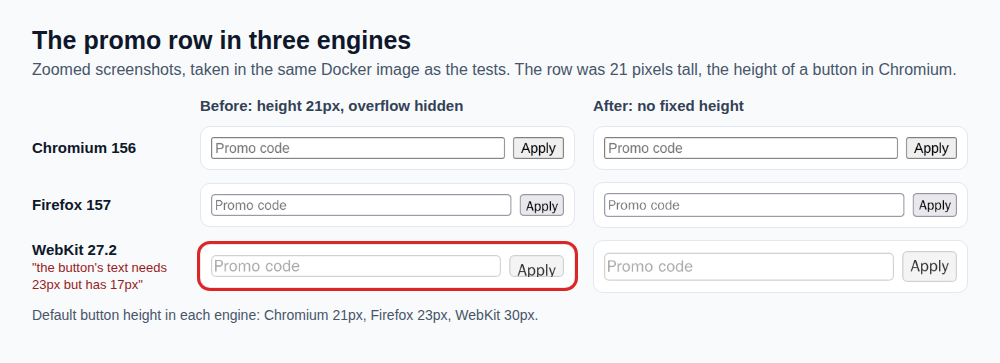
Our first version of this test passed in all three browsers. It compared the button's box with the row's box, and both were 21 pixels: in a flex row, the browser squeezes the button's box to fit the row, and the content spills out of the box and is cut off. Only the screenshots showed the problem. Firefox's content is 1 pixel taller than its box (18 against 17), which is rounding you can't see, so the check allows 1 pixel. Compare what users see, and look at the screenshots of every engine at least once.
Step 5: Fix it
-  .promo { display: flex; gap: 8px; height: 21px; overflow: hidden; }
+  .promo { display: flex; gap: 8px; align-items: center; }
...
-    list.moveBefore(document.getElementById("usual"), list.firstElementChild);
+    const usual = document.getElementById("usual");
+    if (list.moveBefore) list.moveBefore(usual, list.firstElementChild);
+    else list.insertBefore(usual, list.firstElementChild);  // Safari: no moveBefore yet
- No fixed heights for rows with form controls. Let the content decide, and use
align-items: centerto line things up. - Check before you use a newer API. If the method exists, use it. If not, fall back to an older one that does the same job.
insertBeforehas been everywhere for decades. It doesn't keep some element state thatmoveBeforekeeps, which doesn't matter for a plain list.
Three runs on the fixed page:
9 passed in 11.05s
9 passed in 11.28s
9 passed in 11.05s
What to run on which browsers
Running every test on every engine triples the time. Most teams don't need to:
- Run everything on one engine, usually Chromium, on every commit.
- Run a cross-browser set on all three engines, on every pull request or every night: layout-heavy pages, forms, anything using newer APIs, and the main customer journeys.
- Check your own analytics. If 40% of your customers use iPhones, WebKit isn't optional.
- Visual baselines per engine. Fonts and controls differ, so a screenshot from Firefox won't match one from Chromium. Keep one baseline per engine, as in Part 3.
- Real devices for the last mile. Playwright's WebKit catches engine differences. Real iPhones catch the rest.
Common mistakes
- Testing only in Chrome. iPhone browsers almost all run on WebKit. A Chrome-only test suite says nothing about them.
- Repeating old browser lore without checking. The famous Safari date-parsing trap didn't happen in WebKit 27.2. Ask the engines, as in Step 1.
- Sizing layouts to one engine's controls. Default buttons were 21, 23 and 30 pixels tall in our run.
- Checking boxes instead of content. Our first check passed while WebKit cut the button off.
- Using new APIs without a check.
moveBeforeexists in two engines out of three. - Ignoring page errors. Listen for
pageerror, so a broken click fails with the real reason. - Different machines, same baseline. Fonts differ between a laptop and a container, so layouts do too. Run visual tests in the same image every time.
The end of Testing in Practice, for now
This is the last part of the series. Eighteen hands-on posts, each built on FoodNow, each run for real:
- Accessibility with axe and Playwright
- API testing with Postman and Newman
- Visual regression testing
- Testing database changes
- Test doubles: mocks, stubs and fakes
- Mobile app testing with Appium
- Contract testing with Pact
- BDD with pytest-bdd
- User acceptance testing
- Usability testing
- Your first Selenium test
- Your first Cypress test
- Test estimation
- The test summary report
- Localization testing
- Flaky tests
- Property-based testing with Hypothesis
- Cross-browser testing (this post)
One topic is still to come: running these suites automatically in CI with GitHub Actions, so a red test blocks a merge. We'll add it when it's ready.
ProvaLab's QA Infrastructure runs Playwright and Selenium tests on browsers in the cloud, with a live view of the browser while each test runs, and ProvaLab's plugins send each result to the ProvaLab test management system with its screenshots, so a parametrized run like this one shows which test failed on which browser. See it in the two-minute product tour.
See ProvaLab working on a real app
Your coding agent runs the tests, reads the failures and fixes them.