Hands-On Testing · Part 6
Your first security scan with OWASP ZAP (hands-on)
ProvaLab team · · 9 min read
Part 5 explained the OWASP Top 10 and the six kinds of security testing. This post does one of them for real: a DAST scan, where a tool attacks a running application from the outside, the way an attacker would.
We'll use OWASP ZAP, the most widely used free security scanner, against the discount API we built in Part 4. Then we'll plant a real vulnerability and watch the scanner find it.
Every command and every line of output below was run while writing this post.
Before you start: a DAST scan sends thousands of hostile requests. Only ever point it at something you own, and never at a production system: it will create records, trip rate limits and fill logs. Our target runs on our own laptop.
How a DAST scan works
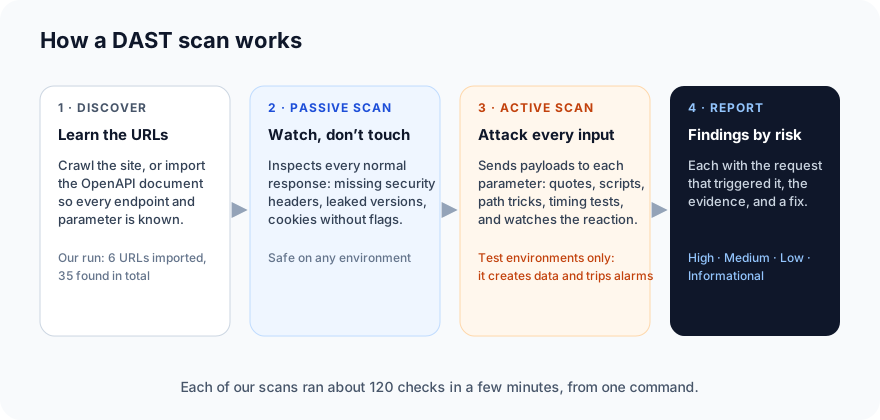
The scanner has to discover the URLs first. For a website it crawls the pages; for an API it reads the OpenAPI document, which lists every endpoint and parameter. FastAPI generates one for us automatically at /openapi.json, which is why the Part 4 API is a convenient target.
Step 1: Get ZAP (2 minutes, plus a download)
ZAP ships as a container image, so there's nothing to install beyond Docker:
docker pull ghcr.io/zaproxy/zaproxy:stable
It's large (about 3.7 GB), because it carries a full Java runtime and a browser.
Step 2: Start the target (1 minute)
In the first-api-test folder from Part 4, start the API and leave it running:
uvicorn app:app
Step 3: Run the scan (5 minutes)
ZAP includes a ready-made API scan script. One command runs discovery, the passive scan and the active scan, and writes a report:
mkdir -p zap && chmod 777 zap
docker run --rm --network host -v "$PWD/zap:/zap/wrk:rw" ghcr.io/zaproxy/zaproxy:stable \
  zap-api-scan.py -t http://127.0.0.1:8000/openapi.json -f openapi \
  -J report.json -w report.md -I \
  -z "-config replacer.full_list(0).description=auth \
      -config replacer.full_list(0).enabled=true \
      -config replacer.full_list(0).matchtype=REQ_HEADER \
      -config replacer.full_list(0).matchstr=Authorization \
      -config replacer.full_list(0).regex=false \
      -config replacer.full_list(0).replacement=Bearer\ token-alice"
What the pieces mean:
--network hostlets the container reach the API on your machine. (On macOS and Windows, usehttp://host.docker.internal:8000instead of127.0.0.1and drop--network host.)-t …/openapi.json -f openapitells ZAP to import the endpoints from the OpenAPI document.-Jand-wwrite JSON and Markdown reports into thezapfolder.-Istops the script from returning a failure code on warnings, so it finishes cleanly.- The long
-zpart configures ZAP's replacer to addAuthorization: Bearer token-aliceto every request. Without it, every endpoint would answer401and the scanner would test nothing but the sign-in wall. - If the output ends with "Failed to start the main proxy: Address already in use", something on your machine is using port 8080, which ZAP wants for itself. Add
-P 8099(any free port) afterzap-api-scan.py. This happened to us on the third run.
Three minutes later, the end of the output:
Number of Imported URLs: 6
Total of 35 URLs
PASS: Directory Browsing [0]
PASS: Vulnerable JS Library (Powered by Retire.js) [10003]
...
PASS: Remote OS Command Injection (Time Based) [90037]
WARN-NEW: X-Content-Type-Options Header Missing [10021] x 1
	http://127.0.0.1:8000/openapi.json (200 OK)
WARN-NEW: Cross-Origin-Resource-Policy Header Missing or Invalid [90004] x 1
	http://127.0.0.1:8000/openapi.json (200 OK)
FAIL-NEW: 0	FAIL-INPROG: 0	WARN-NEW: 2	WARN-INPROG: 0	INFO: 0	IGNORE: 0	PASS: 118
118 checks passed, 2 warnings, no failures. Both warnings are the same kind of thing: a recommended security header the server doesn't send, flagged on the OpenAPI document itself. ZAP rates them Low. For a tiny API with no browser pages they barely matter, but they're real and the fix is one line of middleware, so they go on the backlog.
(A note on the words: the API-scan script reports every finding as WARN unless you give it a rules file saying which ones should FAIL the build. The actual risk level, High to Informational, is in the report.)
What the scanner cannot see
Remember the most valuable test from Part 4: Alice asking for Bob's order and getting 403. ZAP can't find that bug. It has one token, Alice's, and no way of knowing that order 43 isn't hers. If the API wrongly returned Bob's order, the scanner would see a perfectly healthy 200.
This is the single most important thing to understand about security scanners: they find the generic mistakes, not the ones specific to your business rules. The number-one risk in the OWASP Top 10, broken access control, is mostly found by tests you write. The scanner and your test suite are partners, not alternatives.
Step 4: Plant a vulnerability (3 minutes)
To see what a real finding looks like, let's add two things a team might ship by accident. Append this to app.py:
# ---- two things a real team might ship by accident ----
import sqlite3
import traceback

from fastapi import Request
from fastapi.responses import PlainTextResponse

db = sqlite3.connect(":memory:", check_same_thread=False)
db.execute("create table restaurants(name text, cuisine text)")
db.executemany("insert into restaurants values (?, ?)",
               [("Pizza Palace", "pizza"), ("Curry House", "indian"), ("Sushi Go", "japanese")])


@app.get("/restaurants")
def search_restaurants(q: str = "", customer: str = Depends(current_customer)):
    # the query is built by gluing the user's text into the SQL
    rows = db.execute(f"select name, cuisine from restaurants where name like '%{q}%'").fetchall()
    return [{"name": n, "cuisine": c} for n, c in rows]


@app.exception_handler(Exception)
async def show_errors(request: Request, exc: Exception):
    # "debug mode": send the full stack trace back to whoever asked
    return PlainTextResponse("".join(traceback.format_exception(exc)), status_code=500)
The first is A05 Injection: the search text is glued straight into an SQL statement. The second is A10 Mishandling of Exceptional Conditions (and a bit of A02): any crash sends the full stack trace to the caller.
Restart uvicorn, and try the search with a single quote, the classic probe:
curl "http://127.0.0.1:8000/restaurants?q=%27" -H "Authorization: Bearer token-alice"
Traceback (most recent call last):
  ...
sqlite3.OperationalError: unrecognized token: "'"
One character broke the query, and the server told us exactly which database it uses and what went wrong. That's what an attacker's first probe looks like, and what their first clue looks like.
Step 5: Scan again
Run the same docker run command. This time:
WARN-NEW: A Server Error response code was returned by the server [100000] x 1
WARN-NEW: X-Content-Type-Options Header Missing [10021] x 2
WARN-NEW: SQL Injection [40018] x 1
WARN-NEW: Cross-Origin-Resource-Policy Header Missing or Invalid [90004] x 2
FAIL-NEW: 0	FAIL-INPROG: 0	WARN-NEW: 4	WARN-INPROG: 0	INFO: 0	IGNORE: 0	PASS: 117
ZAP found the injection. The detail is in the report:
[High (Low)] SQL Injection (plugin 40018) x1  CWE 89
   uri:      http://127.0.0.1:8000/restaurants?q=%27 | method: GET | param: q
   attack:   '
   evidence: HTTP/1.1 500 Internal Server Error
   solution: Do not trust client side input, even if there is client side validation
             in place. In general, type check all data on the server side. ...
             use PreparedStatement ... with parameters passed by '?'

[Low (High)] A Server Error response code was returned by the server (plugin 100000) x1
   uri:      http://127.0.0.1:8000/restaurants?q=5%3BURL%3D... | method: GET
   evidence: 500
How to read a finding:
High (Low)means High risk, Low confidence. ZAP saw a500when it sent a quote, which is a strong hint but not proof. Confirm every finding by hand before you act on it. We already did: the curl above reproduced it.param: q,attack: 'tell you exactly where and how. That's your bug report's steps to reproduce.- CWE 89 is the standard identifier for SQL injection, useful for looking up fixes and for compliance reports.
- The server-error finding is the symptom of the same bug plus the debug handler: rated Low on its own, but the stack trace it leaks is a gift to an attacker.
Step 6: Triage
A scan report is not a to-do list. Sort it:
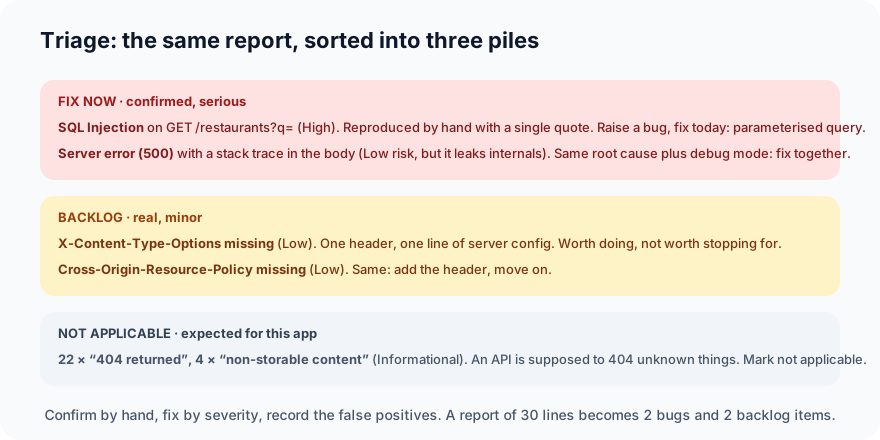
- Fix now: the injection and the stack-trace leak. Confirmed, serious, same root cause.
- Backlog: the two headers. Real, minor, one line each.
- Not applicable: the 22 informational notes that the API returned
404for things that don't exist, and the 4 about responses not being cacheable. An API is supposed to do both. Mark them as not applicable in your tracker so the next scan doesn't repeat them.
Thirty lines of report become two bugs and two backlog items. The bug report for the injection writes itself: the URL, the parameter, the payload ', the expected result (a normal empty list or a 400), the actual result (a 500 with a stack trace), and the CWE.
Step 7: Fix and re-scan
Two changes. The query takes a parameter instead of glued text, and the debug handler goes:
rows = db.execute("select name, cuisine from restaurants where name like ?", (f"%{q}%",)).fetchall()
Restart, and the single quote now returns an empty list with a 200, as it should:
curl "http://127.0.0.1:8000/restaurants?q=%27" -H "Authorization: Bearer token-alice"
[]
Scan a third time:
Number of Imported URLs: 7
Total of 36 URLs
WARN-NEW: X-Content-Type-Options Header Missing [10021] x 2
WARN-NEW: Cross-Origin-Resource-Policy Header Missing or Invalid [90004] x 2
FAIL-NEW: 0	FAIL-INPROG: 0	WARN-NEW: 2	WARN-INPROG: 0	INFO: 0	IGNORE: 0	PASS: 118
The injection and the server error are gone; 118 checks pass again.
The two header warnings are still there, as expected; they're on the backlog, and a scanner will keep mentioning them until the header is added. That's the right behaviour: a scan is a regression test for security.
Putting it in the pipeline
The same command runs in CI. Start the API, run the scan against it, and keep the report as an artifact:
      - run: pip install -r requirements.txt
      - run: uvicorn app:app &
      - run: mkdir -p zap && chmod 777 zap
      - run: >
          docker run --rm --network host -v "$PWD/zap:/zap/wrk:rw"
          ghcr.io/zaproxy/zaproxy:stable zap-api-scan.py
          -t http://127.0.0.1:8000/openapi.json -f openapi -J report.json -w report.md
          -z "-config replacer.full_list(0).description=auth -config replacer.full_list(0).enabled=true -config replacer.full_list(0).matchtype=REQ_HEADER -config replacer.full_list(0).matchstr=Authorization -config replacer.full_list(0).regex=false -config replacer.full_list(0).replacement=Bearer\ ${{ secrets.TEST_API_TOKEN }}"
      - uses: actions/upload-artifact@v4
        if: always()
        with:
          name: zap-report
          path: zap/
Without -I, the job fails when ZAP finds anything new, which is what you want once the backlog items are either fixed or listed in a rules file as ignored. Run it nightly rather than on every commit: a full active scan takes minutes, not seconds.
Habits worth keeping
- Scan with a signed-in session. An unauthenticated scan tests your sign-in page and nothing else.
- Confirm by hand before raising a bug. "High (Low)" is a lead, not a verdict.
- Triage into fix-now, backlog, not-applicable, and record the last pile so it stops reappearing.
- Keep writing access-control tests yourself. The scanner can't.
- Never scan what you don't own.
What's next
In Part 7, the last of this series, we go hands-on with load testing: a k6 script against the same API, finding where it slows down and where it breaks.
ProvaLab AppSec runs this kind of scan, and API fuzzing, dependency, secrets, container and code scans, against targets you've verified you own, from the cloud, and presents the findings as a plain-language fix list ordered by severity, with your confirmed false positives remembered between runs. See it in the two-minute product tour.
Prefer to read offline? The whole Hands-On Testing series is one free PDF: get the PDF.
See ProvaLab working on a real app
Your coding agent runs the tests, reads the failures and fixes them.