Hands-On Testing · Part 5
Security testing basics: the OWASP Top 10 (2025) in plain language
ProvaLab team · · 8 min read
Every test so far in this series asked "does it work?" Security testing asks a different question: "what happens when someone tries to make it do something it shouldn't?"
Users mistype. Attackers don't. They send exactly the input that breaks a check, ask for exactly the record they're not allowed to see, and try the default password first. Security testing means doing that before they do.
What is security testing?
Security testing checks that the software protects its data and its users against misuse: that people can only see and do what they're allowed to, that data is protected in storage and in transit, and that the system fails safely when something unexpected happens.
It's a non-functional kind of testing, and the one with the highest cost of failure. A functional bug annoys a customer. A security bug can expose every customer at once.
The OWASP Top 10
OWASP (the Open Worldwide Application Security Project) is a non-profit that publishes free security guidance. Its best-known document is the OWASP Top 10: the ten most serious risks to web applications, updated every few years from real-world data. The current edition is 2025. If you learn one thing about security testing, learn these ten.
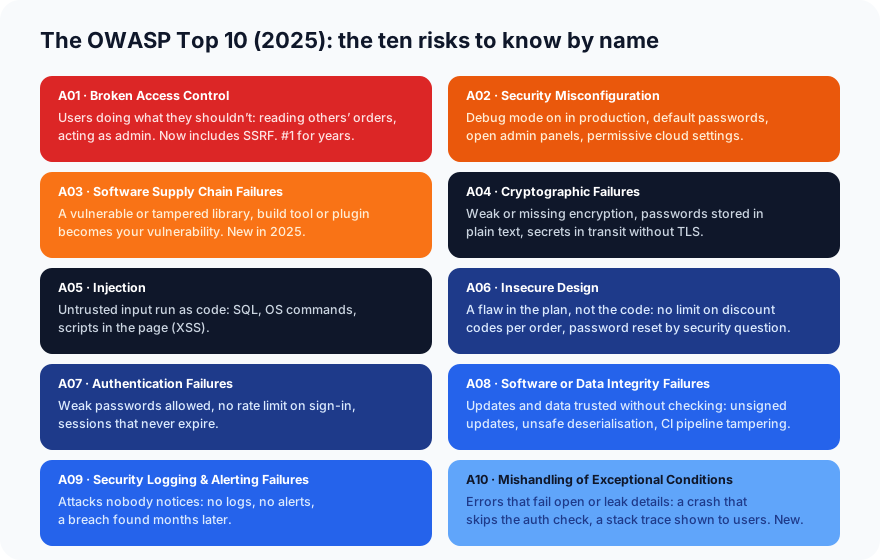
Here is each one, with an example from our food delivery app.
A01 · Broken Access Control
Users doing things they're not allowed to. Alice reads Bob's order by changing 42 to 43 in the URL. A customer reaches the restaurant dashboard. A regular user calls an admin-only endpoint.
This has been number one for years, because it's common, easy to get wrong and devastating. The 2025 edition also folds in server-side request forgery (SSRF), where an attacker tricks your server into fetching internal resources on their behalf.
You've already tested for it: test_customer_cannot_read_someone_elses_order in Part 4 is an access-control test.
A02 · Security Misconfiguration
The software is fine; the settings aren't. Debug mode left on in production, so errors show internal details. Default admin passwords never changed. Directory listings enabled. Cloud storage buckets open to the world. Missing security headers.
It climbed from fifth to second in 2025, because modern systems have so many settings to get wrong.
A03 · Software Supply Chain Failures
A vulnerability in something you installed becomes your vulnerability. Your app may be perfect, but it runs on hundreds of libraries, a build tool, a container image and some CI plugins. Any of them can carry a known flaw, or be tampered with. New in 2025, replacing and widening the old "vulnerable and outdated components".
A04 · Cryptographic Failures
Data that should be protected isn't. Passwords stored in plain text (or with weak hashing). Card numbers kept when they didn't need to be. Traffic sent without TLS. Home-made encryption. The fix is mostly "use the standard, well-tested thing and don't invent your own".
A05 · Injection
Untrusted input gets run as code. The classic is SQL injection: a search box that turns ' OR 1=1 -- into a database query that returns everything. Also OS command injection, and cross-site scripting (XSS), where a comment containing <script> runs in every other user's browser.
Injection is almost always prevented the same way: never build queries or commands by gluing strings together; use parameterised queries and output encoding.
A06 · Insecure Design
A flaw in the plan, not the code. The discount feature works exactly as specified, but the specification never limited how many codes one order can use, so a customer stacks ten. Password reset by "mother's maiden name". No limit on how many OTPs can be requested. No amount of bug-free code fixes a design that's wrong. This is what threat modelling during design is for.
A07 · Authentication Failures
Proving who you are, done badly. Weak passwords accepted. No rate limit on sign-in, so an attacker tries a million passwords. Session tokens that never expire, or that stay valid after sign-out. "Remember me" implemented with the password in a cookie.
Already tested: test_no_token_means_401 in Part 4 is the simplest authentication test.
A08 · Software or Data Integrity Failures
Trusting code or data without checking it. Auto-updates with no signature check. Deserialising objects from an untrusted source. A CI pipeline anyone can push to. Closely related to supply chain, but about verification: did this come from where it claims, unchanged?
A09 · Security Logging & Alerting Failures
Attacks nobody notices. Failed sign-ins aren't logged. Logs exist but nobody looks, and nothing alerts. A breach is discovered months later, from the outside. Renamed in 2025 to stress that logging without alerting isn't enough.
A10 · Mishandling of Exceptional Conditions
Errors that fail the wrong way. An exception in the permission check gets caught and the request continues as if allowed ("fail open"). A crash shows users a stack trace with file paths and library versions. An out-of-memory condition leaves half an order saved. New in 2025.
Already tested: every "never a 500" assertion in Part 4 is a small check of this. An API that answers 422 to bad input, instead of crashing, is handling the exceptional condition.
The six kinds of security testing
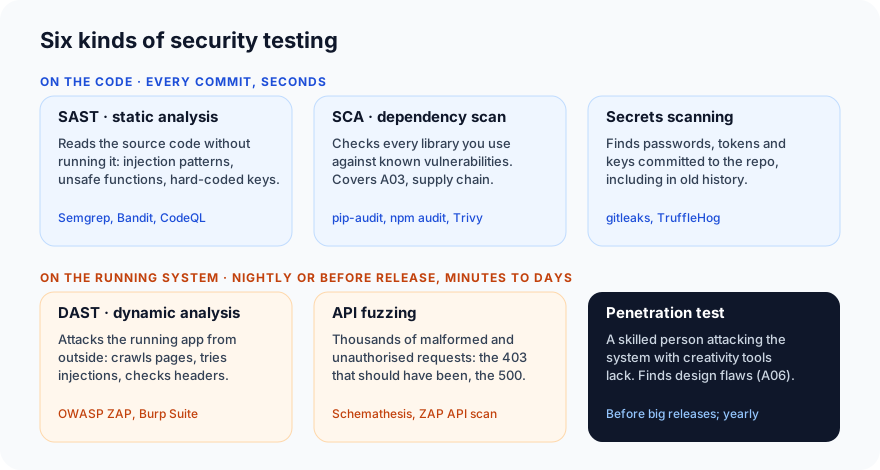
Different risks need different kinds of testing. Three run on the code and three on the running system:
| Kind | Looks at | Finds | Typical tools | When |
|---|---|---|---|---|
| SAST (static application security testing) | Source code, without running it | Injection patterns, unsafe functions, hard-coded secrets | Semgrep, Bandit, CodeQL | Every commit |
| SCA (software composition analysis) | Your dependencies | Libraries with known vulnerabilities (A03) | pip-audit, npm audit, Trivy, Dependabot | Every commit, and daily as new flaws are published |
| Secrets scanning | The repository, including history | Committed passwords, API keys, tokens | gitleaks, TruffleHog | Every commit |
| DAST (dynamic application security testing) | The running application, from outside | Injection, misconfiguration, missing headers, auth problems | OWASP ZAP, Burp Suite | Nightly, before release |
| API fuzzing | The API, with generated requests | Crashes (500s), missing auth checks, validation gaps | Schemathesis, ZAP API scan | Nightly, before release |
| Penetration testing | Everything, by a skilled person | Design flaws and chained attacks tools miss | A person | Before major releases, yearly |
The first three are static testing applied to security: cheap, fast, on every change. DAST and fuzzing are dynamic and mostly black-box or grey-box. A penetration test adds the one thing none of the tools have: creativity.
Which kind finds which risk
| Risk | Best found by |
|---|---|
| A01 Access control | API tests you write (as in Part 4), fuzzing, pentest |
| A02 Misconfiguration | DAST, configuration scanners, cloud posture tools |
| A03 Supply chain | SCA, image scanning, pinned and verified dependencies |
| A04 Cryptography | SAST, code review, TLS checkers |
| A05 Injection | SAST, DAST, fuzzing |
| A06 Insecure design | Threat modelling, design review, pentest |
| A07 Authentication | API tests, DAST, pentest |
| A08 Integrity | Code review, pipeline hardening, signature checks |
| A09 Logging | Review and a drill: do an attack, see if anyone is alerted |
| A10 Exceptional conditions | Negative tests, fuzzing, code review of error handling |
Notice how many rows say "API tests you write". Ordinary functional and negative tests, written with security in mind, are the first and cheapest layer of security testing. The 403 test, the 401 test, the "never a 500" assertion: you don't need a security tool to write those.
Three checks you can do this week
- Add one access-control test per resource. For every kind of record (orders, profiles, addresses), sign in as one user and request another user's record. Expect
403or404, never200. This single habit covers the number-one risk. - Run a dependency scan.
pip-auditfor Python,npm auditfor JavaScript, or Trivy for containers. It takes a minute and often finds something. - Do a 30-minute threat model. Draw the app's data flows on a whiteboard (what goes where, who can reach it) and ask, for each arrow: what's the worst thing someone could do here? This is the design-stage activity that catches A06, and no tool replaces it.
Rules of the road
- Only test what you own or have written permission to test. Running a scanner or a fuzzer against someone else's site is illegal in most countries, and it looks exactly like an attack because it is one.
- Test against a test environment, with test data. A scanner will try to submit forms, create records and trip rate limits.
- Fix in order of severity, not in order found. A scanner's 200 findings usually contain 3 that matter.
- Verify, then report. Scanners produce false positives. Confirm a finding by hand before raising it, and write it up as a bug report with steps, not as "the scanner said so".
What's next
In Part 6 we run a real DAST scan with OWASP ZAP against the little API from Part 4, read the findings, and sort the real ones from the noise.
ProvaLab AppSec runs web app (DAST), API fuzzing, dependency, secrets, container and code scans against targets you've verified you own, and turns the findings into a plain-language fix list ordered by severity, with the false positives you've checked marked as such. See it in the two-minute product tour.
Sources: the OWASP Top 10:2025 introduction.
Prefer to read offline? The whole Hands-On Testing series is one free PDF: get the PDF.
See ProvaLab working on a real app
Your coding agent runs the tests, reads the failures and fixes them.