Testing Basics · Part 20
QA vs QC vs testing, and verification vs validation, explained
ProvaLab team · · 6 min read
Two pairs of terms cause more confusion in software quality than any others: QA vs QC (and where testing fits), and verification vs validation. They're also near the top of every list of QA interview questions.
The short version:
- QA improves the process to prevent defects. QC checks the product to find them. Testing is the main way QC finds them.
- Verification asks "are we building the product right?" Validation asks "are we building the right product?"
Now the longer version, with examples.
QA vs QC vs testing
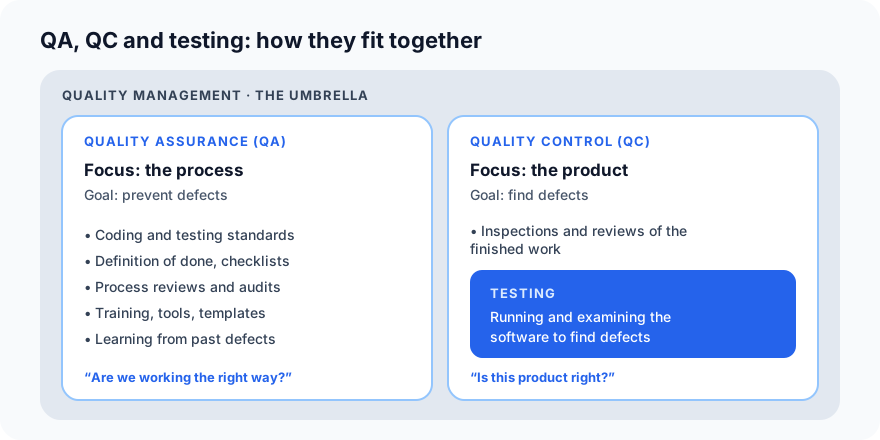
Quality assurance (QA)
Quality assurance is about the process. Its goal is to prevent defects by making sure the team works in a way that produces good software in the first place.
QA activities in our food delivery app team might include:
- Agreeing coding standards and a definition of done ("a story is done when it has tests, a code review and updated docs").
- Using templates for test plans and bug reports.
- Making code review mandatory for every change.
- Learning from defects: "we had five payment bugs this quarter; let's add a payment checklist to code reviews."
- Training the team, and choosing good tools.
QA is proactive, runs through the whole project, and is everyone's responsibility.
Quality control (QC)
Quality control is about the product. Its goal is to find defects in what has been built, before it reaches users.
QC activities include:
- Reviewing finished work: requirements, designs and code.
- Testing the software: everything from unit tests to system tests.
- Checking releases against exit criteria before they ship.
QC is reactive: it looks at a product that already exists and asks "is this right?"
Testing
Testing is one part of quality control: running and examining the software to find defects and to provide information about its quality. Everything in this series so far, from test cases to regression runs, is testing.
The differences at a glance
| Quality assurance | Quality control | Testing | |
|---|---|---|---|
| Focus | The process | The product | The product |
| Goal | Prevent defects | Find defects | Find defects, give information about quality |
| Approach | Proactive | Reactive | Reactive |
| When | Throughout the project | After something is built | After something is built |
| Examples | Standards, reviews of how work is done, training, process improvement | Inspections, reviews of finished work, testing | Running test cases, exploratory testing, automated test runs |
| Question | Are we working the right way? | Is this product right? | Does this behave as it should? |
A simple analogy from a restaurant kitchen: QA is the recipe, the hygiene rules and the chef's training. QC is tasting each dish before it leaves the kitchen.
"But my job title is QA engineer..."
In everyday industry use, "QA" often just means "testing": a QA engineer or QA team usually spends most of their time testing. That's fine in practice. But in interviews and in quality-management standards (such as ISO 9001), QA and QC have the distinct meanings above, so it's worth knowing the difference.
Verification vs validation
The classic definitions, from software engineer Barry Boehm:
- Verification: "Are we building the product right?" Does the product meet its specification: the requirements, designs and standards written for it?
- Validation: "Are we building the right product?" Does the product meet the real needs of its users and the business?
Verification
Verification checks each piece of work against what it was supposed to be. Much of it happens without running the software:
- Reviewing requirements for gaps and contradictions.
- Reviewing designs against requirements.
- Code review and static analysis tools, which check code without running it.
- Testing against the specification: does the discount function return exactly what the requirement says?
Example: the requirement says "expired codes must be refused with a clear message". A tester checks that the app does exactly that. That's verification.
Validation
Validation checks the product against what users actually need. It usually happens by running the software with real or realistic use:
- Acceptance testing with the product owner or customers.
- Usability testing with real users.
- Beta releases to a small group of real customers.
- Demos to stakeholders at the end of each sprint.
Example: the new restaurant dashboard matches its specification perfectly, which is verified. But restaurant owners find it too slow to use during the dinner rush. It fails validation. (This is principle 7: bug-free can still be wrong.)
The differences at a glance
| Verification | Validation | |
|---|---|---|
| Question | Are we building the product right? | Are we building the right product? |
| Checks against | Requirements, designs, standards | Real user and business needs |
| Typical activities | Reviews, inspections, static analysis, testing against the spec | Acceptance testing, usability testing, beta releases, demos |
| Software running? | Often not (reviews), sometimes yes | Usually yes |
| When | Throughout development | Mostly towards the end, and with every release to users |
| Done by | Developers, testers, reviewers | Customers, users, product owners, testers |
| Finds | Mistakes in building to the spec | A spec that doesn't match what users need |
You need both. Verification without validation can build a perfect version of the wrong product. Validation without verification finds the right product, full of bugs.
The V-model: where they meet
The V-model shows how each step of building software has a matching level of testing:
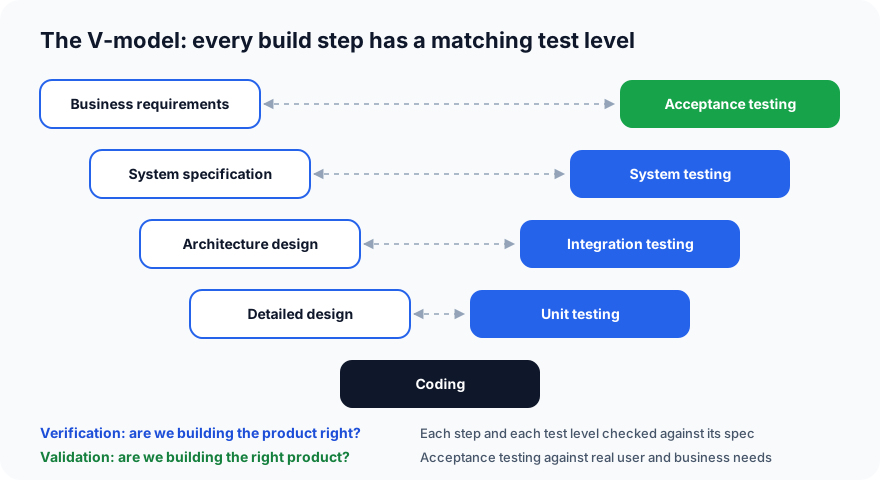
- Each step down the left is verified against the one before it, through reviews.
- Each test level up the right checks the matching step on the left: unit tests check the detailed design, integration tests the architecture, system tests the specification.
- Acceptance testing, at the top, validates the product against the business's real needs.
The V-model also explains why testing should start early: the acceptance tests can be designed as soon as the business requirements are written, long before any code exists.
Quick interview answers
- QA vs QC? QA prevents defects by improving the process; QC finds defects by checking the product. Testing is the main part of QC.
- Verification vs validation? Verification: are we building the product right (against the spec)? Validation: are we building the right product (for the users)?
- Is a code review QA or QC? Reviewing a specific piece of code is QC (and verification). Requiring code reviews for every change, and improving how they're done, is QA.
- Can something pass verification but fail validation? Yes: a product that exactly matches a specification that missed what users need.
What's next
In Part 21 we look at static testing: reviews, walkthroughs, inspections and static analysis, the cheapest way to find bugs, because it happens before the software even runs.
ProvaLab supports both sides: Test Management links requirements to test cases and results for verification, the PR Bot reviews every code change before it's merged, and acceptance and exploratory results live alongside automated ones, so you can see the whole picture of quality in one place. See it in the two-minute product tour.
Prefer to read offline? The whole Testing Basics series is one free PDF: get the PDF.
See ProvaLab working on a real app
Your coding agent runs the tests, reads the failures and fixes them.