Testing Basics · Part 22
Exploratory testing explained: charters, sessions and heuristics
ProvaLab team · · 6 min read
Every scripted test in this series checks something somebody already thought of. But the bug that doubles a discount when you change the delivery address and press back? Nobody wrote a test case for that, because nobody imagined it.
Exploratory testing is how skilled testers find those bugs. It's the most misunderstood kind of testing: often dismissed as "just clicking around", when done well it is one of the most effective techniques there is.
What is exploratory testing?
In exploratory testing, the tester designs, runs and learns from tests at the same time, using what they just discovered to decide what to try next.
In scripted testing, the thinking happens first (writing the test case) and the running happens later, often by someone else. In exploratory testing the two happen together: you try something, see what the software does, form a new idea, and try that.
Three things make it different from "just clicking around":
- It has a goal. A written charter says what to explore and why.
- It is time-boxed. A session lasts a fixed time, typically 60 to 120 minutes.
- It is recorded. The tester keeps notes of what they tried, what they found and what questions came up, and reports them afterwards.
This structured form is called session-based test management, developed by James and Jonathan Bach.
Scripted vs exploratory testing
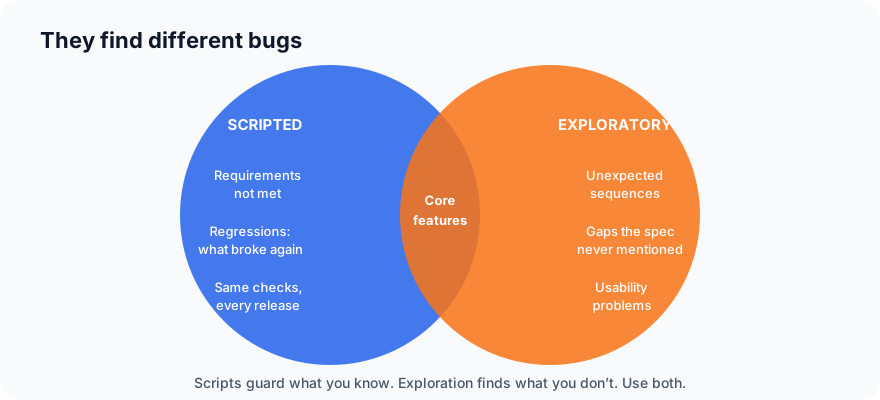
| Scripted testing | Exploratory testing | |
|---|---|---|
| Tests designed | In advance, from requirements | During the session, from what you learn |
| Best at finding | Requirements not met, regressions | Unexpected behaviour, gaps in the requirements, usability problems |
| Repeatable? | Yes, by anyone | Partly: notes record what was tried |
| Depends on | Good requirements | Tester skill and curiosity |
| Good for automation? | Yes | No, by definition |
| Coverage | Known, measurable | Harder to measure; charters track it |
They are not rivals. Scripted tests, especially automated regression tests, guard against what you already know can go wrong. Exploratory testing finds what you don't know yet. Principle 5, tests wear out, is exactly why you need both.
A session, start to finish
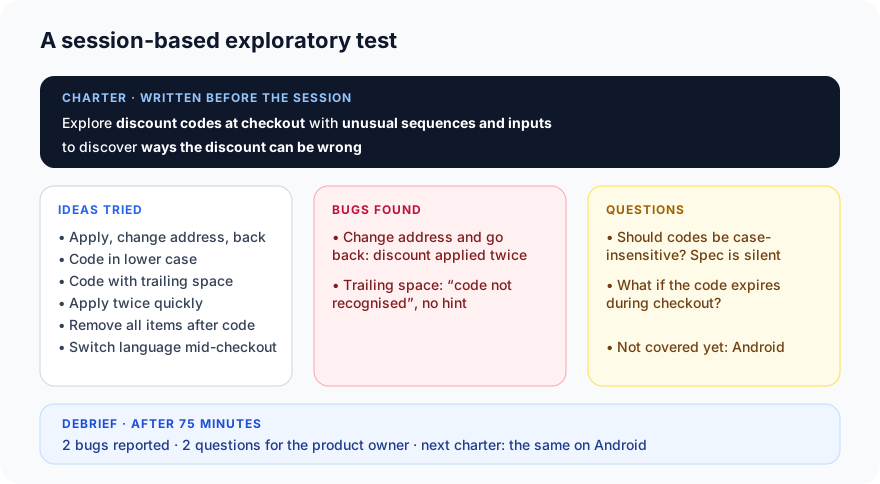
1. Write the charter
A charter is one or two sentences describing the mission. A useful template, from Elisabeth Hendrickson's Explore It!:
Explore (the target) with (resources or approaches) to discover (the information you want).
For our food delivery app:
Explore discount codes at checkout with unusual sequences and inputs to discover ways the discount can be wrong.
A charter is narrow enough to finish in a session and open enough to leave room for discovery. "Test checkout" is too broad; "apply code SAVE10" is a test case, not a charter.
2. Run the session
Set a timer. Start from the charter, and let each result suggest the next idea. Keep notes as you go, in three groups:
- Ideas tried: so you and others know what was covered.
- Bugs found: with enough detail to write a proper bug report afterwards.
- Questions: things the requirements don't answer, and areas you didn't reach.
When something looks wrong, stop and reproduce it before moving on. A bug you can't reproduce is a bug you'll struggle to report.
3. Debrief
At the end, report briefly: what was covered, what was found, what's left. Then decide the next charter. In the example, the discount bugs on the web suggest an obvious follow-up: the same charter on Android.
Heuristics: where ideas come from
Experienced testers don't rely on inspiration. They use heuristics: rules of thumb that generate test ideas on demand. A few of the most useful:
Vary the input
- Boundaries: zero, one, the maximum, one more than the maximum (see Part 6).
- Nothing: empty fields, missing files, no network.
- Too much: very long text, huge files, thousands of items.
- Strange characters: spaces at the ends, emoji, quotes,
<script>, text in another alphabet. - Wrong type: letters in a number field, a date in the past.
Vary the sequence
- Do things in the wrong order. Pay, then add an item.
- Interrupt: go back, refresh, lose the network, close the app mid-way.
- Repeat: click twice, submit twice, apply the same code twice.
- Undo: add then remove, apply then cancel.
Vary the state and environment
- A new user vs a user with 500 orders.
- Two browser tabs doing the same thing at once.
- Switch language, time zone or currency mid-flow.
- Different devices, screen sizes, slow connections.
Follow the data
- Where does this value go after I enter it? Check the order history, the email, the restaurant's screen. Is it the same everywhere?
Think like different people
- A first-time user who misreads the screen. An impatient user. A restaurant owner. Someone trying to get a discount they shouldn't.
Keeping a personal list of heuristics, and adding to it every time a new kind of bug turns up, is one of the fastest ways to become a better tester.
When to use exploratory testing
- New features, before test cases exist or while they're being written.
- Right after a sprint's work lands, to find problems the stories didn't anticipate.
- Around a bug fix, alongside the re-test and regression run.
- Before a release, on the riskiest areas, after the scripted suite has passed.
- When requirements are thin and scripted tests would mostly be guesses.
- For usability: scripts can't tell you a flow is confusing.
Common mistakes
- No charter. Aimless clicking covers the easy paths and misses the rest.
- No notes. If nobody knows what was explored, the session can't be reported, repeated or built on.
- Only happy paths. The value is in the odd sequences and inputs.
- Treating it as a replacement for regression testing. Exploration doesn't guard against old bugs returning; automated scripts do.
- Only junior testers do it. It benefits most from experience; put your most knowledgeable people on the riskiest charters.
- Not reporting bugs properly. A finding in your notes isn't fixed until it's a bug report in the tracker.
What's next
In Part 23, the last part of Testing Basics, we look at testing in agile teams and CI/CD pipelines: how everything in this series fits together when the team ships every week, or every day.
ProvaLab keeps exploratory findings next to scripted results: a bug found in a session is filed with its steps and evidence, linked to the feature, and visible alongside the automated runs for the same release. See it in the two-minute product tour.
Prefer to read offline? The whole Testing Basics series is one free PDF: get the PDF.
See ProvaLab working on a real app
Your coding agent runs the tests, reads the failures and fixes them.