Testing Basics · Part 23
Testing in agile and CI/CD: how it all fits together
ProvaLab team · · 8 min read
Most of the ideas in this series are decades old. What has changed is speed. Teams that used to release twice a year now release every week, every day, or many times a day. There is no longer a "testing phase" at the end, because there is no end: the next change is always on its way.
This final part of Testing Basics shows how everything we've covered fits together when a team works like that.
Testing in agile teams
Agile methods such as Scrum and Kanban build software in short cycles (sprints of one to four weeks, or a continuous flow of work). Four things change for testing:
1. Quality is the whole team's job
There's no separate testing phase, so there can't be a separate testing team that gets the software at the end. Developers write unit tests and review each other's code. Testers join the planning conversations, ask the awkward questions early, and spend their time on the things only people can do: exploratory testing, test design and risk. This is often called the whole-team approach.
2. Testing happens inside the sprint
Each user story is tested in the same sprint it's built. A story isn't "done" when the code is written; it's done when it meets the team's definition of done, which usually includes: tests written and passing, code reviewed, acceptance criteria checked, and no open bugs of high severity.
3. Acceptance criteria are the test cases
Each user story carries acceptance criteria agreed before development starts. They play the role that requirements and test cases played in the STLC: they say what "working" means, and each one becomes at least one test. A common format is Given / When / Then:
Given a signed-in customer with 500 in the cart When they apply the expired code OLD10 Then they see "This code has expired" and the total stays 500
4. Automation is not optional
If the regression suite takes a week to run by hand, you can't release every week. Agile teams automate their regression tests and run them continuously, so the humans are free to explore.
The agile testing quadrants
Brian Marick's agile testing quadrants, made popular by Lisa Crispin and Janet Gregory, are a map of all the testing an agile team does. They answer the question "are we doing all the kinds of testing we need, or only the easy ones?"
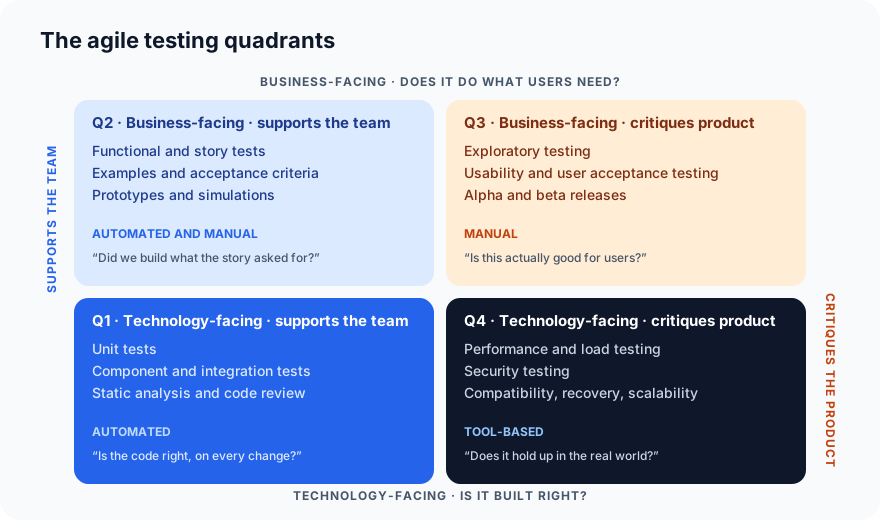
- Q1 and Q2 support the team while building: they tell developers quickly whether the code does what the story asked.
- Q3 and Q4 critique the finished product: they find what the stories didn't anticipate.
Most teams are strong in Q1 and Q2 and weak in Q3 and Q4. If your team has thousands of unit tests but nobody has done a load test or an exploratory session this quarter, the quadrants show the gap.
Shift left, shift right
Shift left means moving testing earlier in the process: reviewing requirements, writing tests before code, running tests on every commit. Everything from principle 3 (early testing) and static testing is shifting left.
Shift right means continuing to test after release, in production: monitoring, alerts, feature flags that release a change to 1% of users first, and small smoke checks that run against the live site. Shift right accepts that some problems only show up with real users and real data, and makes sure you learn about them in minutes rather than weeks.
Modern teams do both: catch what you can early, and watch closely for what you couldn't.
TDD and BDD
Two practices shape how tests are written in agile teams:
Test-driven development (TDD) is a developer practice: write a failing unit test first, write just enough code to make it pass, then clean up, and repeat. The tests become a design tool, and every line of code exists because a test asked for it. (You saw the value of a test you've watched fail in Part 5.)
Behaviour-driven development (BDD) applies the same idea at the story level, using the Given/When/Then format above. The acceptance criteria are written so that tools such as Cucumber, Behave or SpecFlow can run them directly as automated tests. The main benefit is shared language: product owners, developers and testers all read the same examples.
Neither is mandatory for agile, but both make "acceptance criteria are the test cases" literally true.
Continuous integration and continuous delivery
Continuous integration (CI) means every change is merged into the shared codebase frequently (at least daily) and automatically built and tested each time. Continuous delivery (CD) extends the pipeline so that every change that passes the tests is ready to release, and continuous deployment releases it automatically.
The pipeline is where all the test types in this series take their places:
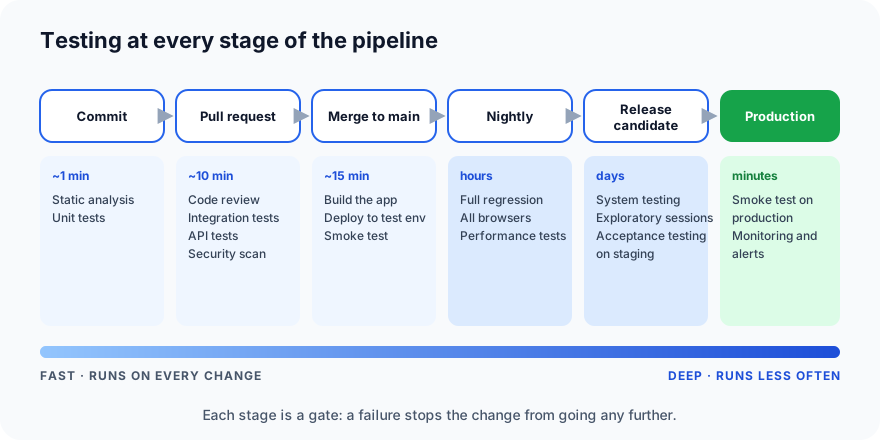
| Stage | What runs | How long | What it catches |
|---|---|---|---|
| Every commit | Static analysis, unit tests | About a minute | Typos, logic errors, broken units |
| Every pull request | Code review, integration and API tests, security scan | About 10 minutes | Broken joins, insecure code |
| Merge to main | Build, deploy to test environment, smoke test | About 15 minutes | A build that doesn't even start |
| Nightly | Full regression on every browser, performance tests | Hours | Regressions, slowdowns |
| Release candidate | System, exploratory and acceptance testing on staging | Days | What the scripts didn't think of |
| Production | Smoke test on the live site, monitoring and alerts | Minutes, then continuous | Problems only real traffic reveals |
Three rules make a pipeline work:
- Each stage is a gate. A failure stops the change from going further, and the team fixes it before doing anything else. A red pipeline that everyone ignores protects nobody.
- Fast first, deep later. The tests that run on every commit must be fast, or developers stop committing often. The slow, thorough tests run less frequently.
- Every result is recorded. Which build, which environment, which tests, which result (see test runs), so a failure can be traced and a release can be reported on.
What a pipeline looks like
Here is a minimal GitHub Actions workflow that runs the static analysis and unit tests from Parts 5 and 21 on every push:
name: tests
on: [push, pull_request]

jobs:
  check:
    runs-on: ubuntu-latest
    steps:
      - uses: actions/checkout@v4
      - uses: actions/setup-python@v5
        with:
          python-version: "3.12"
      - run: pip install pytest ruff
      - run: ruff check .        # static analysis
      - run: pytest              # unit tests
If either command fails, the workflow fails, the pull request shows a red cross, and the change can't be merged until it's fixed. Real pipelines add more stages, but they all start like this.
Where AI coding agents fit
The newest change to this picture is that much of the code is now written by AI coding agents such as Claude Code and Cursor. That makes two things in this series more important, not less:
- Shift left matters more, because code is produced faster than people can review it. Static analysis, unit tests and automated review on every pull request are what keep up.
- The pipeline becomes the agent's feedback loop. When a test fails, the agent that wrote the code can read the failure, the logs and the recording, fix the code and run the tests again, with a person approving the result rather than doing the checking by hand.
That is the idea ProvaLab is built around, and the subject of our first post, how to test code your AI coding agent wrote.
Common mistakes
- Keeping a separate "testing sprint" at the end. That's a waterfall with shorter phases.
- Ignoring red pipelines. Once one failure is tolerated, every failure is.
- A slow pipeline. If the commit stage takes 30 minutes, people batch up changes, and the fast feedback is lost.
- Only Q1 and Q2 testing. Unit tests and story tests don't tell you the product is slow, insecure or confusing.
- No shift right. Releasing without monitoring means customers are your alerting system.
Testing Basics: the complete series
That's the end of Testing Basics. Over 23 parts you've learned:
Foundations: what testing is · types and levels · manual vs automated · the STLC · the 7 principles · QA vs QC, verification vs validation
The craft: your first automated test · writing test cases · test design techniques · test plans · bug reports · the bug life cycle · the traceability matrix · test runs and results · test coverage
The test types: integration · system · smoke and sanity · regression and re-testing · performance · static testing · exploratory testing · agile and CI/CD (this post)
Next on the blog, the Hands-On Testing series: deeper guides to UI testing, API testing, security testing and load testing, each with examples you can run. It starts with Part 1: UI testing explained.
ProvaLab is built for the pipeline described here: the PR Bot checks every pull request, QA Infrastructure runs the tests on real browsers and devices, Test Management records every run, and AppSec and load testing cover Q4, with your coding agent able to drive all of it. See it in the two-minute product tour.
Prefer to read offline? The whole Testing Basics series is one free PDF: get the PDF.
See ProvaLab working on a real app
Your coding agent runs the tests, reads the failures and fixes them.