Testing Basics · Part 18
Test coverage explained: the types, and how to calculate each one
ProvaLab team · · 7 min read
"What's our test coverage?" is one of the most common questions in software teams, and one of the most misunderstood. The answer depends on what you are measuring the coverage of. A team can honestly say "we have 90% coverage" while a whole feature has never been tested.
In this part we look at the main kinds of test coverage, how to calculate each one, and how to use them without being fooled.
What is test coverage?
Test coverage measures how much of something your tests have checked, as a percentage. That "something" can be:
- the requirements (what the software should do),
- the test cases you planned to run,
- the code itself,
- the platforms your users have: browsers, devices and operating systems.
Each kind answers a different question:
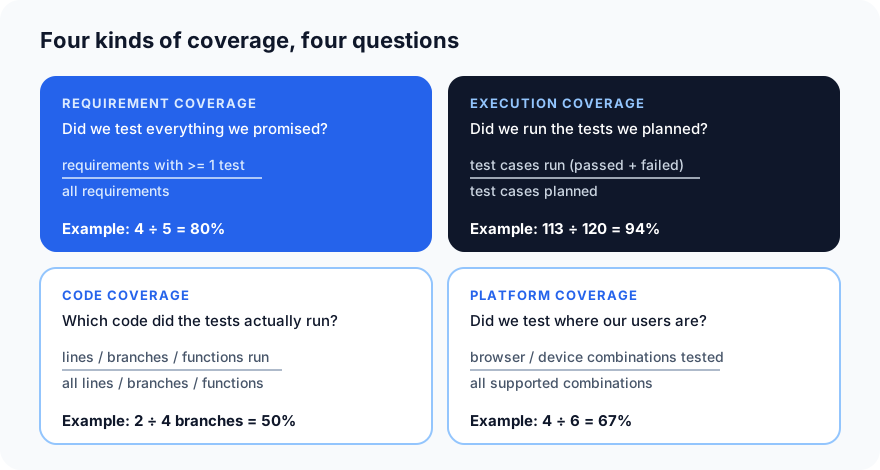
1. Requirement coverage
Question: did we test everything the software is supposed to do?
Requirement coverage = (requirements with at least one test ÷ all requirements) × 100
Example: from the traceability matrix in Part 11, the discount-code feature has 5 requirements, and 4 of them have test cases (REQ-14, Android, has none).
4 ÷ 5 × 100 = 80%
A stricter version only counts requirements whose tests pass:
Passing requirement coverage = (requirements whose tests all pass ÷ all requirements) × 100
In the same example, REQ-12 is tested but failing, so: 3 ÷ 5 × 100 = 60%.
Requirement coverage is the one business people care about most: it speaks the language of features, not code.
2. Execution coverage
Question: did we actually run the tests we planned?
Execution coverage = (test cases run ÷ test cases planned) × 100
"Run" means the test produced a real verdict: passed or failed. Blocked, skipped and not-run tests don't count, because we learned nothing from them.
Example: in Run 42 from Part 17, 120 test cases were planned: 104 passed, 9 failed, 4 were blocked and 3 skipped.
(104 + 9) ÷ 120 × 100 = 94%
Don't confuse this with the pass rate, which asks how many of the tests that ran passed: 104 ÷ 113 = 92%. Execution coverage tells you how much you tested; pass rate tells you how well it did.
3. Code coverage
Question: which parts of the code did the tests actually run?
Code coverage is measured by a tool while the tests run: coverage.py for Python, JaCoCo for Java, Istanbul/nyc or Jest's built-in coverage for JavaScript, and so on. There are several kinds:
Line (statement) coverage = (lines executed ÷ all executable lines) × 100
Branch coverage = (branch outcomes taken ÷ all branch outcomes) × 100
Function coverage = (functions called ÷ all functions) × 100
The difference between line and branch coverage matters a lot. Here is the delivery-fee function from Part 7, with a single test:
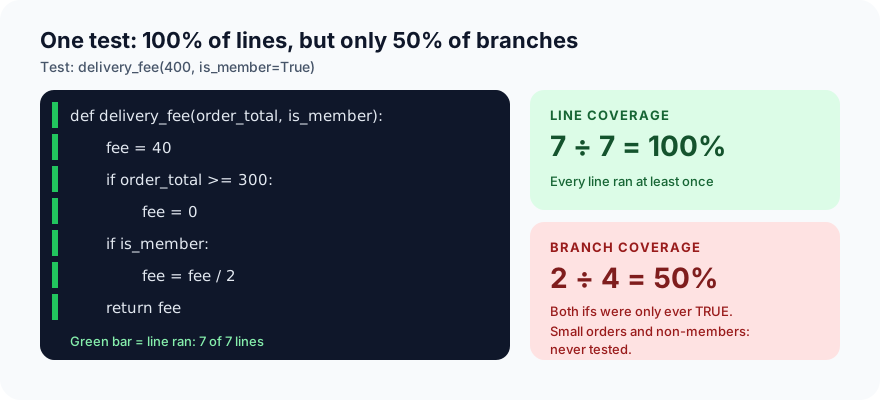
- Line coverage: all 7 lines ran → 7 ÷ 7 = 100%.
- Branch coverage: each
ifhas two outcomes (true and false), so there are 4 outcomes. The test only took the 2 "true" ones → 2 ÷ 4 = 50%.
100% line coverage, yet half the decisions in the code were never tested. That's why branch coverage is the more honest number.
A note on tools: some tools combine lines and branches into one figure. In Part 7, coverage.py reported 82% for this same test: it counts the 7 lines plus the 4 branch outcomes, and the test covered 7 + 2 = 9 of those 11. (9 ÷ 11 = 82%.) When you compare coverage numbers, check exactly what each tool is counting.
Path coverage goes further still: every route through the code. With two if statements there are four paths (big order + member, big + non-member, small + member, small + non-member). Path coverage is very thorough, but grows so fast in real code that it is usually only used for critical logic.
4. Platform coverage
Question: did we test on the browsers and devices our users actually have?
Platform coverage = (supported platform combinations tested ÷ all supported combinations) × 100
Example: the food app officially supports Chrome, Safari and Firefox on desktop, plus the Android app, the iPhone app, and Chrome on Android phones: 6 combinations. This release was tested on 4 of them.
4 ÷ 6 × 100 = 67%
Use your analytics to weight this: missing a browser that 2% of users have matters far less than missing the one that 50% use.
Other coverage measures you may hear
- Risk coverage: how many of the identified high-risk areas have tests.
- Feature coverage: like requirement coverage, but counted per feature or user story.
- Mutation score: a test of your tests. A tool makes small deliberate changes to the code (for example,
>=becomes>) and checks whether any test fails. Mutation score = changes caught ÷ changes made × 100. Tests with no real assertions score badly here, even with high code coverage.
What coverage target should you aim for?
There is no universal right number. Some sensible rules of thumb:
- Requirement coverage: aim for 100% of high-priority requirements before release. Any gap should be a deliberate, documented decision, not a surprise.
- Execution coverage: aim for 100% of planned tests run, and explain every blocked or skipped one in the test report.
- Code coverage: many teams aim for around 70–80% line or branch coverage, with higher targets for critical code like payments. Chasing 100% everywhere often produces low-value tests written just to touch lines.
- Platform coverage: cover the combinations used by most of your real users, plus anything business-critical.
More useful than any single target: watch the trend, and make sure coverage doesn't drop when new code is added.
Why 100% coverage doesn't mean bug-free
Coverage tells you what your tests touched. It does not tell you whether they checked the right things:
- A test with no
assertstill gives coverage. - 100% requirement coverage only means each requirement has a test, not a good one.
- Code coverage can't find a feature that was never built. You can't cover code that doesn't exist (see Part 7).
- You can't test every possible input, so coverage will always be of a chosen sample.
So use coverage as a map of what you haven't tested, not as proof of quality. Low coverage is a clear warning; high coverage is a good sign, not a guarantee.
Quick reference
| Coverage | Formula | Answers |
|---|---|---|
| Requirement | requirements with tests ÷ all requirements | Did we test everything we promised? |
| Execution | tests run ÷ tests planned | Did we run what we planned? |
| Line / statement | lines run ÷ all lines | Which code was touched? |
| Branch | branch outcomes taken ÷ all outcomes | Did every decision go both ways? |
| Function | functions called ÷ all functions | Which functions were used? |
| Platform | combinations tested ÷ combinations supported | Did we test where our users are? |
What's next
That completes this batch of the Testing Basics series, from what testing is to coverage. Coming up next: the 7 principles of testing, QA vs QC, static testing, exploratory testing and testing in agile and CI/CD.
ProvaLab Test Management keeps requirement and execution coverage up to date automatically: requirements link to test cases, every manual or automated run records its results, and coverage reports show the gaps by feature, test plan and run. See it in the two-minute product tour.
Prefer to read offline? The whole Testing Basics series is one free PDF: get the PDF.
See ProvaLab working on a real app
Your coding agent runs the tests, reads the failures and fixes them.