Hands-On Testing · Part 3
API testing explained: what it is, why test the API before the UI, and what to check
ProvaLab team · · 7 min read
In Part 2 our three browser tests took about 11 seconds to run. Most of that time was spent loading pages, rendering them and waiting for a browser, not checking anything. There is a faster place to test most of what matters, one layer down from the screens: the API.
What is an API?
An API (application programming interface) is the set of requests a program can make to another program. In a modern app, every screen talks to the server through an API: when you tap "Place order", the mobile app sends a request like POST /orders with the order details, and the server replies with the result.
Most web and mobile APIs are HTTP APIs, usually following the REST style:
- A request names a resource with a URL path, such as
/orders/42. - A method says what to do with it:
GET(read),POST(create),PUTorPATCH(update),DELETE. - Data travels as JSON, a plain-text format of fields and values.
- The reply carries a status code:
200means OK,201created,400bad request,401not signed in,403not allowed,404not found,500the server broke.
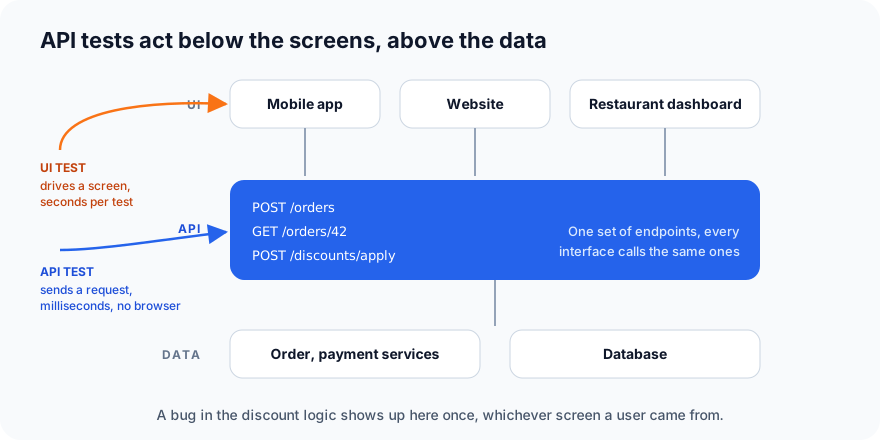
The API is where the real logic lives. Whether a customer orders from the mobile app, the website or the restaurant dashboard, the same POST /discounts/apply decides what the discount is. A bug there shows up once, for everyone.
What is API testing?
API testing sends requests directly to the API and checks the responses, without any user interface.
A test is still locate, act, assert, with "locate" replaced by "build the request":
- Build a request: method, URL, headers, body.
- Send it.
- Assert on the response: status, headers, body and timing.
In Python with the requests library it looks like this (we'll run tests like it for real in Part 4):
response = requests.post(
    "https://api.example.com/discounts/apply",
    json={"order_total": 500, "code": "SAVE10"},
    headers={"Authorization": f"Bearer {token}"},
)
assert response.status_code == 200
assert response.json()["total"] == 450
No browser, no page load, no waiting for elements. That test runs in a few milliseconds.
Why test the API before the UI
| API tests | UI tests | |
|---|---|---|
| Speed | Milliseconds each; thousands in a minute | Seconds each |
| Stability | Very stable: no timing, no layout, no cookie banners | The flakiest kind of test |
| When you can start | As soon as the endpoint exists, often before the screen does | Only once the screen is built |
| Finds | Logic, data, validation, security and error-handling bugs | What the user actually sees |
| Pinpoints the cause | Yes: one endpoint, one response | Rarely: the failure could be anywhere in the stack |
| Covers | Every client at once (app, website, partners) | One screen on one client |
The pattern most teams settle on is the testing pyramid applied to the back end: test the business rules thoroughly at the API level, and keep a few UI tests for the journeys users see. The discount logic gets fifty API tests and one UI test, not the other way round.
A second reason that's easy to miss: APIs are products too. If partners or a mobile team build on your API, a change that breaks it breaks them, whether or not your own website still works.
What to check in every response
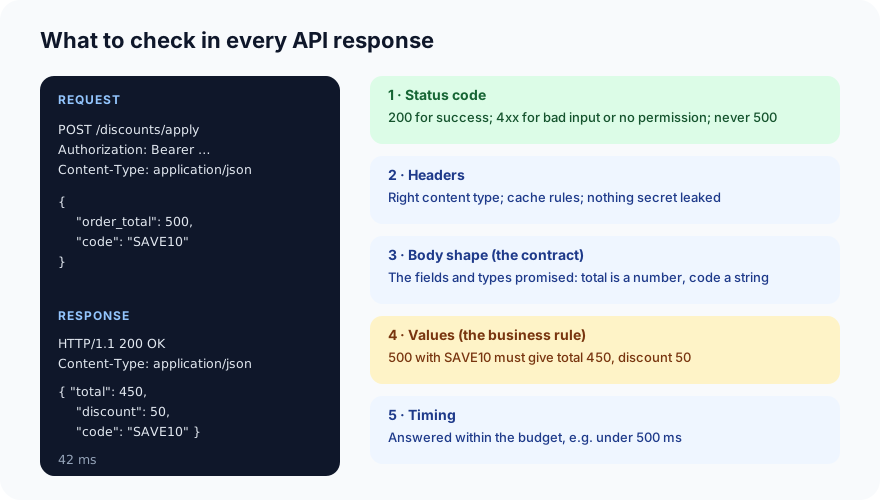
- Status code.
200for success, the right4xxfor bad input or missing permission, and never a500. A500means the server crashed instead of handling the situation. - Headers. The content type is what the client expects (
application/json); caching is right for the data; and nothing sensitive leaks in a header. - Body shape, the contract. The fields the API promises are present, with the right types:
totalis a number, not the string"450". Clients break on shape changes even when the values are right. - Values, the business rule. 500 with
SAVE10must givetotal: 450. This is the check that finds the bug that charges every customer the wrong amount. - Timing. The response arrived within the budget, say under 500 ms. One slow endpoint makes every screen that uses it slow.
Kinds of API tests
Functional tests check that each endpoint does its job: create an order, read it back, apply a discount. The bulk of your API suite.
Negative tests send wrong input on purpose, and check that the API refuses it cleanly: a missing field returns 400 with a helpful message, an unknown order returns 404, a discount of 150% is rejected. Many real bugs hide here, as we saw in test design.
Authentication and authorisation tests check that requests without a valid token get 401, and that a signed-in customer gets 403 when asking for someone else's order. The second kind, called broken object-level authorisation, is the most common serious API security bug, and it's easy to test: sign in as customer A, request customer B's order, expect 403.
Contract tests check the shape of requests and responses against an agreed definition, usually an OpenAPI (formerly Swagger) document. When several teams or partners depend on the API, contract tests catch a renamed field before it breaks anyone. Tools such as Pact go a step further, letting each client declare exactly what it needs.
Integration tests through the API check that a sequence works end to end: create an order, apply a code, pay, then read the order back and confirm the total. This is integration testing with the API as the entry point.
Performance tests send many requests at once to find the breaking point, as described in performance testing. Load tests are nearly always API tests.
Test data and authentication
Two practical problems every API tester meets:
- Tokens. Most APIs need a key or a bearer token. Tests get one in a setup step (sign in with a test account, or read a test key from an environment variable), then reuse it. Never put real credentials in the test code or the repository.
- Test data.
POST /orderscreates real rows. Tests should create what they need, use it, and clean up, or run against a test environment that's reset regularly. A test that depends on "order 42 already existing" will fail the day someone deletes order 42.
Tools
| Tool | Style | Good for |
|---|---|---|
| Postman / Bruno | Point-and-click, with collections you can run from the command line | Exploring an API, sharing requests with a team |
| pytest + requests or httpx | Python code | Suites that live with the code and run in CI; what we use in Part 4 |
| REST Assured | Java | Java teams |
| Karate | Its own readable script language | Teams that want tests non-developers can read |
| Playwright's request API | JavaScript, Python | Mixing API calls into UI tests, such as creating data before a browser test |
| Schemathesis / Dredd | Generate tests from an OpenAPI document | Contract checking and fuzzing |
If you're starting from nothing, pytest with requests needs the least setup and produces tests that live next to your code.
API testing and the UI tests you already have
The two work together. The fastest reliable UI suites use the API to set the stage: create the test customer and the order through API calls in a few milliseconds, then open the browser only for the part that needs a browser. The sign-up form gets one UI test; the thousand ways an order can be wrong get API tests.
What's next
In Part 4 we build a small API of our own, so there's nothing to sign up for and nothing we don't own, and write a pytest suite against it: functional, negative, authorisation and contract checks, with the real output.
ProvaLab's QA AI Agent runs API test cases on its own and records each request and response against its test case, and AppSec fuzzes your API for the authorisation and input-handling bugs described above. See it in the two-minute product tour.
Prefer to read offline? The whole Hands-On Testing series is one free PDF: get the PDF.
See ProvaLab working on a real app
Your coding agent runs the tests, reads the failures and fixes them.